Loading the page…
Add a live black hole to your hero section with Infall
Install Infall, put the whole hero on a Next.js page or just the black hole, and choose its theme and the scroll dive.
Written with AI: Claude Opus 5.5, through Claude
Loading the page…
Install Infall, put the whole hero on a Next.js page or just the black hole, and choose its theme and the scroll dive.
Written with AI: Claude Opus 5.5, through Claude
The product
Free · Component
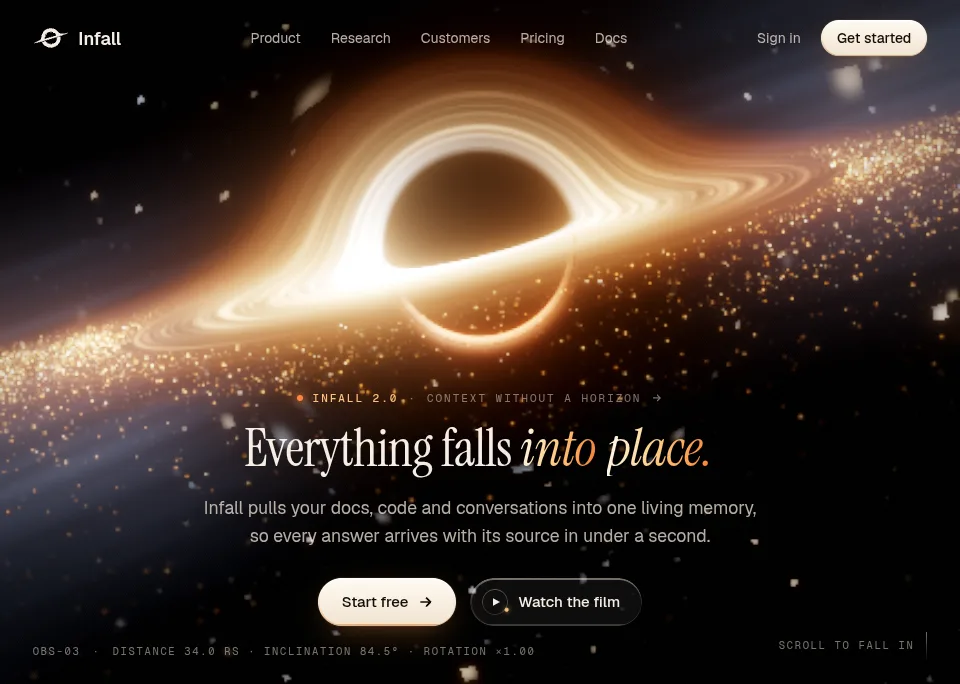
A React hero section with a black hole ray-traced live in WebGL: real light bending, a scroll dive into the event horizon, and light and dark themes.
npx shadcn@latest add https://upfork.dev/r/black-hole-hero.jsonInfall is a hero section with a live black hole in it. It isn't a video or a loop: every frame is ray-traced in your visitor's browser. Light bends around the hole, the disk turns with its inner gas faster than its outer gas, gold dust orbits it, and the stars behind it are lensed. When the page opens, the stars come first, then the disk lights up from the inside out. A mouse or pen swings the camera a little, and scrolling on falls you into the hole.
It's made for the first screen of an AI or SaaS product, and it stays out of your page's way: the black hole renders in a web worker, off the main thread, so the page stays responsive while it runs.
One command adds Infall's files to your components folder, with three.js:
npx shadcn@latest add https://upfork.dev/r/black-hole-hero.jsonFree: no account or token needed.
The hero comes with its navigation bar, headline, two buttons and the corner readouts. Give it your product's name, a headline and a button, and it does the rest:
Every prop is optional except brand, title and primaryCta. These are all of them:
highlight picks the words of the headline set in the gradient italic; by default, its last two. If your page already has an h1, set headingAs="h2".
If you have a hero of your own, use the black hole alone. Its box is sized by className, and the canvas fills it:
settings changes any of the black hole's defaults, and later changes apply live. intro={false} starts it fully lit, parallax={false} keeps the camera still, and startAfter holds the first frame until your words have come in.
theme="dark" is the default. theme="light" draws the page in ink on paper, with the black hole seen through a dark window around it, like an eclipse. theme="auto" follows your site: it's dark when <html> or <body> has the dark class or data-theme="dark", and it switches when they change.
As the visitor scrolls, the hero stays pinned while the camera falls into the hole: faster and faster, the light reddens and dies, and the page carries on out of the dark. The pinned stretch is 150svh; set --ifh-dive-length on the hero to make it longer or shorter, or dive={false} to turn it off.
It also looks after itself: rendering pauses while the hero is off screen or the tab is hidden, and a browser without WebGL 2 gets a drawing of the black hole in the same framing.
Everything that shapes the black hole is one flat object of settings, measured in Schwarzschild radii: the horizon is 1. A few to start with:
spinDirection: -1 puts the brighter side of the disk on the left, doppler: 0 makes both sides alike, and hot, warm and ember set the colours of the gas, from the hottest to the coolest.
Written by
Ramin ValadanProved GitHub account and website, confirmed e-mail: checked by UpFork
Full-stack developer and founder of UpFork · .NET, React/Next.js and WebGL
Their page and productsSomething wrong in it, or against the rules? Tell UpFork.
import { InfallHero } from "@/components/infall-hero";

export default function Home() {
  return (
    <InfallHero
      brand={{ name: "Acme", href: "/" }}
      title="Everything falls into place."
      description="One line on what your product does."
      primaryCta={{ label: "Start free", href: "/signup" }}
      theme="auto"
    />
  );
}import { BlackHole } from "@/components/infall-black-hole";
<section className="relative h-svh">
<BlackHole className="absolute inset-0" settings={{ roll: -10, doppler: 0.3 }} />
</section>export type InfallHeroProps = {
/** The product's name and where the logo links. */
brand: { name: string; href: string };
/** Links in the middle of the navigation bar (a menu on phones). */
nav?: HeroLink[];
signIn?: HeroLink;
/** The small button at the right of the navigation bar. */
getStarted?: HeroLink;
/** The line above the headline: a short tag (e.g. a version) and a phrase, optionally a link. */
eyebrow?: { tag?: string; text: string; href?: string };
/** The headline. */
title: string;
/** The words of the title set in the gradient italic (default: its last two words). */
highlight?: string;
/** The line under the headline. */
description?: string;
/** The ivory button that turns into a little black hole when hovered. */
primaryCta: HeroLink;
/** The glass button with the orbiting dot. */
secondaryCta?: HeroLink;
/** The readouts in the bottom corners: a label for the live camera readout, and the scroll cue. */
hud?: { label?: string; scrollCue?: string } | false;
/** Optional: a word painted far behind the hole and bent round it by gravity (default: none). */
backdropWord?: string;
theme?: HeroTheme;
/**
* Scrolling on, the hero stays pinned while the camera falls into the hole, and the page carries on out of the dark
* (default true). The pinned stretch is 150svh; set --ifh-dive-length on the hero to change it. Off with
* prefers-reduced-motion.
*/
dive?: boolean;
/** Overrides for the black hole (see components/black-hole/engine/settings.ts). */
blackHole?: Partial<BlackHoleSettings>;
/** The headline's element: h1 on a landing page, h2 if the page already has one. */
headingAs?: "h1" | "h2";
className?: string;
};type BlackHoleProps = {
/** Overrides for the defaults in engine/settings.ts; later changes are applied live. */
settings?: Partial<BlackHoleSettings>;
/** Trade resolution for a steady frame rate on slower GPUs (default true). */
adaptive?: boolean;
/** Open with the intro: stars, then the disk lighting up from the inside out (default true). */
intro?: boolean;
/** Swing the camera a little toward a mouse or pen pointer (default true; never on touch). */
parallax?: boolean;
/** Earliest first frame in ms after the page started loading, e.g. once the words have come in. */
startAfter?: number;
className?: string;
/** The running engine, for panels that tune it. */
onReady?: (api: BlackHoleApi) => void;
onStats?: (stats: BlackHoleStats) => void;
}; /** Angular speed at r = 1 in rad/s; Kepler slows it as r^-1.5. */
spin: number;
/** Pulses of light that run along the threads, a little faster than their gas (0 = none, 1 = the default). */
shimmer: number;
/** 1 = the gas comes toward the camera on the right (that side is brighter), -1 = on the left. */
spinDirection: 1 | -1;
/** 0 = both sides alike, 1 = the full physical Doppler beaming and colour shift. */
doppler: number;
Comments
0 comments
No comments yet. Questions, what you built with it, what could be better: its developer reads them.
Sign in to comment.
Sign in to comment