New

Backgrounds
Loading the page…
Loading the page…
Before you buy
How this component gets from the preview into your project, and what buyers ask most.
How to use it
From the preview to your project
Try it in the preview
Switch between light and dark, and resize it to phone and tablet widths, before you decide.
Get it
Free products are yours with a free account. Paid ones settle in USDT on TRON, sent straight to the wallet on your order.
Install it
Components go into your project with one shadcn command, dependencies included. Everything else downloads with a checksum.
Make it yours
It's your code now: rename it, restyle it and wire in your real data.
Or hand it to your AI
Copy the prompt and let your coding assistant place it in your project, following your conventions.
Yes, a free one: it keeps your order, every payment you make for it and the files together. Free products need it too: without an account you can look and try the live preview, but not download, install or copy anything.
Send the price as a USDT transfer on TRON (TRC-20) to the wallet on your order, shown with its QR code, then paste the transaction ID on the order. It's checked on-chain, and the files unlock once it's confirmed. Paid less? You're asked for the rest.
Yes. The Standard License covers unlimited personal and commercial projects, client work included; just don't resell it on its own. Open-source licenses say so on the product.
Create a CLI token on your account page, put it in your project's .env.local, add UpFork to components.json once, and install with npx shadcn add: free and paid components alike.
Onto your order, in your account. Download links last ten minutes and can be made again.
Releases are scanned for malware and reviewed before anyone can download them, and every file shows its SHA-256 so you can check what you got.
Building with an AI assistant?
Copy a ready-made prompt with the code, its dependencies and a demo, and your assistant can put it in place for you.
Selling your own work?
Get approved once, then publish components, templates and mobile components, paid in USDT straight to your own wallet.
Components
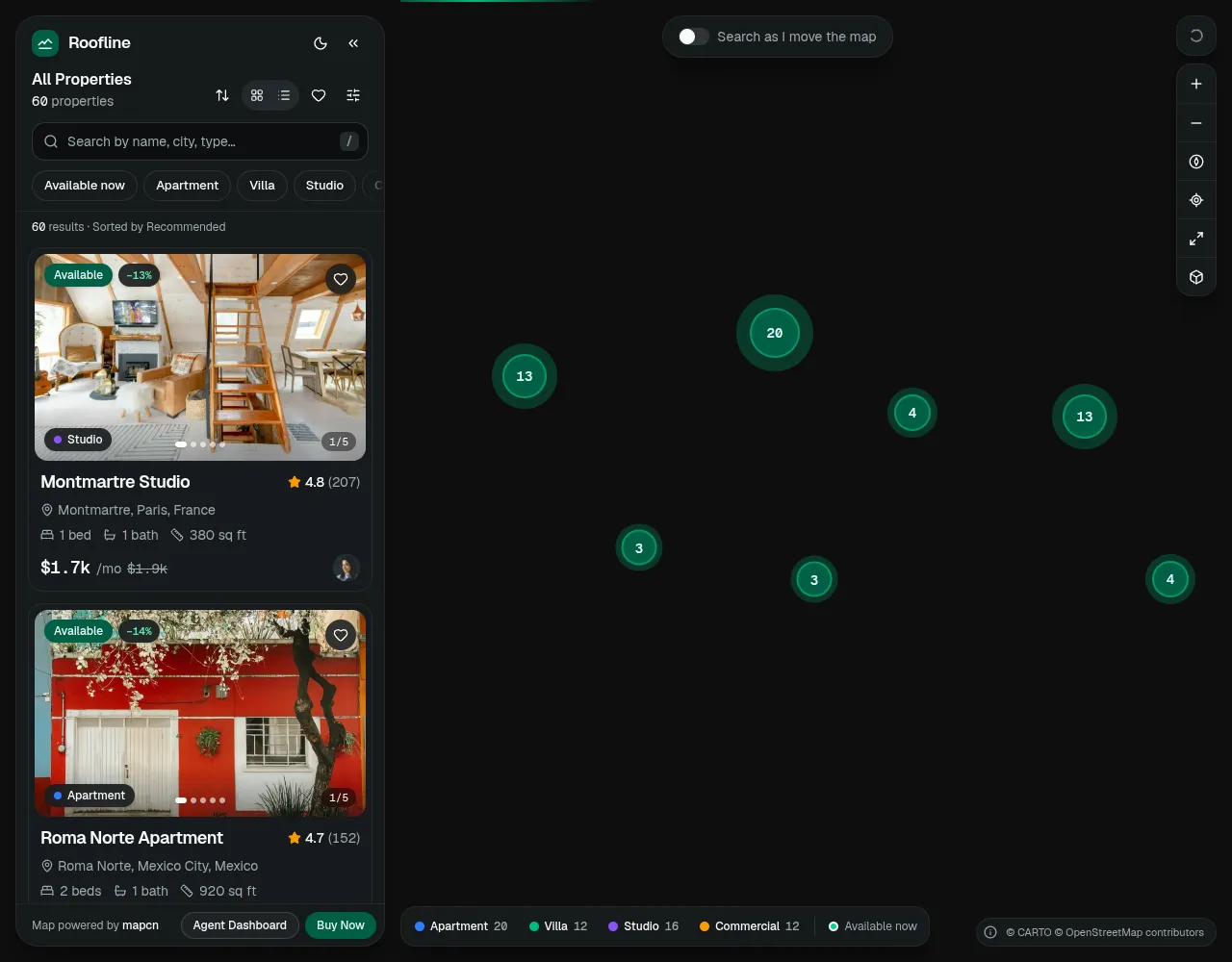
A complete real estate property search for React and shadcn/ui: a clustered MapLibre map with price pills, synced to a fast listings panel, smart search, filters with a price histogram, a property page with gallery, reviews and a visit request form, favourites and compare.
by UpFork, built by Ramin ValadanComponentUpdated 15 Oct 2026
shadcn/ui components
31 files · 16 packages · 298 assets
The code comes with the Pro plan
The files above install into your project with one command, or download as a ZIP.
See the plansA full-screen map of listings with a floating listings panel, filters and a property detail panel, built on
shadcn/ui (Radix), Tailwind CSS 4, MapLibre GL in the mapcn way,
supercluster, TanStack Virtual, Embla, vaul, react-hook-form + zod, motion and sonner. Light and dark,
phone to wide desktop.
pnpm install
pnpm dev                     # http://localhost:5301
pnpm build && pnpm start     # review build on http://localhost:5300
import { PropertyExplorer } from "@/components/explorer/explorer"

export default function Page() {
  return (
    <main className="h-dvh">
      <PropertyExplorer brand="Roofline" onRequestVisit={async (request) => api.post("/visits", request)} />
    </main>
  )
}
| Prop | Default | |
|---|---|---|
listings | the 60 demo listings | your data, ListingSeed[] (see types.ts); reviews, nearby places and price history are derived |
brand | "Roofline" | the wordmark and the agency name on agent cards |
storagePrefix | "roofline" | localStorage keys: ${prefix}-favourites, ${prefix}-public-filters (versioned, migrated) |
assetBase | "" | prefix for the photos under /images (a CDN) |
stadiaApiKey | — | the Outdoors style outside localhost (Stadia Maps); without it Outdoors falls back to Default |
syncUrl | true | mirror filters, the open property and the camera in the address bar |
dashboardHref, buyHref | /agent/dashboard, /pricing | the footer buttons |
onRequestVisit | — | receives a validated visit request; the success card shows when it resolves |
toaster | true | mounts a sonner <Toaster />; pass false if your app has one |
| initialFilters | — | filters to open with ({ city: "Dubai" } for a /rent/dubai page), over saved ones; the address bar wins |
| initialPropertyId | — | a property to open on load |
The explorer fills its parent: give the parent a height. Its layout follows its own width (under 768 px it is the phone layout with a bottom sheet), so it also works inside a page section.
/), quick chips,
removable active filters, a virtualized list with photo carousels (only the first photo loads up front), hover sync
with the map, keyboard navigation, skeletons, an empty state with ways out, collapse to a rail, drag to resize..ics); previous / next, share, save, full-listing view; a sticky action bar.?), toasts with Undo, URL state,
reduced motion everywhere, a phone layout with a snapping bottom sheet and a card row that follows the markers.| Path | |
|---|---|
components/explorer/explorer.tsx | PropertyExplorer: providers, persistence, URL state, layout, shortcuts |
components/explorer/store.ts | the zustand store (filters, favourites, UI) and localStorage migration |
components/explorer/lib/ | filtering and sorting, formatting, URL state, photo paths, labels and colours |
components/explorer/map/ | the MapLibre map (adapted from mapcn), clusters and markers, controls and overlays |
components/explorer/panel/, filters/, detail/ | the listings panel, the filters panel, the property detail |
components/explorer/data/listings.ts | the demo listings, agents and reviewers |
components/explorer/data/enrich.ts | derived fields, seeded per listing (stable between visits) |
components/explorer/data/media.ts | gallery assignment and blur previews, generated by pnpm media |
public/images/ | photos (pnpm media, credits in public/images/CREDITS.md) and style previews |
The components/ui/* files are standard shadcn/ui (new-york, Radix). Installed, the explorer follows your own shadcn/ui
theme; for Roofline's emerald look, copy the :root and .dark variables from app/globals.css (also in
registry/demos/roofline-theme.css).
MapLibre's worker. MapLibre GL 6 draws on a Web Worker kept in a file of its own
(node_modules/maplibre-gl/dist/maplibre-gl-worker.mjs) that app bundlers don't ship. Unless you set one, the
explorer fetches the same version's file from unpkg (jsDelivr as a fallback) once and starts it from a blob. To serve
it yourself, copy that file to public/ and call setWorkerUrl("/maplibre-gl-worker.mjs") from maplibre-gl before
the explorer renders. Under a Content-Security-Policy, allow worker-src blob:, data: in connect-src and the map
servers (basemaps.cartocdn.com, tiles.openfreemap.org, tiles.stadiamaps.com).
pnpm media downloads and processes every photo (scripts/media-picks.json), node scripts/style-thumbs.mjs renders
the style previews from a running server, pnpm shots takes review screenshots (light and dark, 1440 → 390 px) into
.review/, and node scripts/e2e.mjs clicks through the main interactions, node scripts/a11y.mjs runs axe on the main screens,
pnpm registry writes registry/ (what UpFork lists) and pnpm zip packs roofline.zip (see LISTING.md).
Map data © OpenStreetMap contributors, © CARTO, OpenFreeMap / OpenMapTiles, © Stadia Maps. The map component is
adapted from mapcn (MIT). Photos from Unsplash (see public/images/CREDITS.md). Listings, agents and reviews are
fictional.
0 reviews · 0 bugs
Ship it0With fixes0Skip0· 0 reviews
0 bugs0 open0 fixed
Members who have it review it and report its bugs. Sign in
No reviews or bugs yet.


