
Loading the page…
Loading the page…
How Maple turns a 720p AI video into a keyed, recolourable cow that follows the cursor at 60 fps: the frame pipeline, gaze mapping, one-spring motion, WebGL drawing, and what surprised us.
Written with AI: Claude Opus 5.5, through Claude
19 lessons learned building it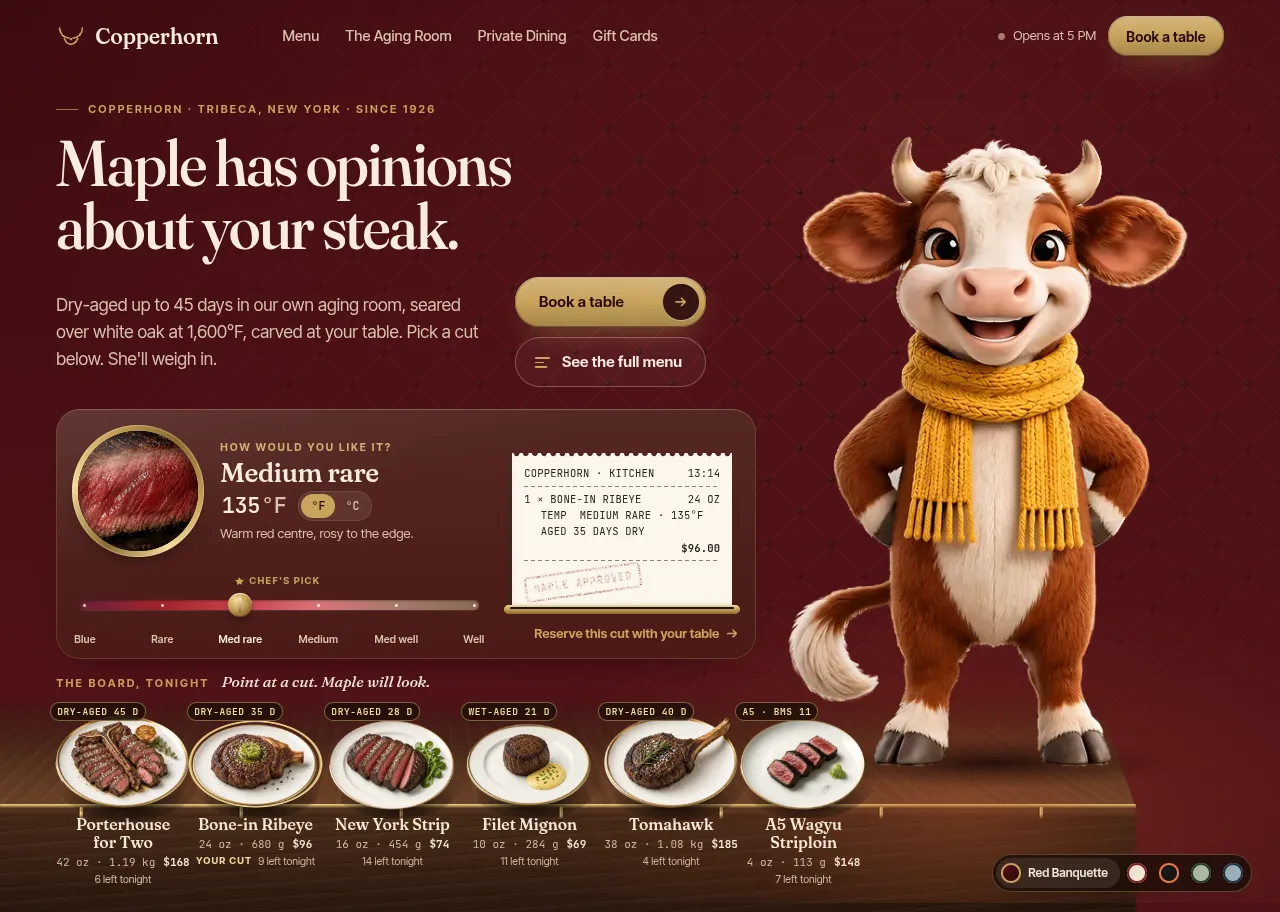
The product
Maple — Steakhouse & Restaurant Hero Section for React with an Interactive MascotPro plan · Component
The product
Pro plan · Component
Steakhouse & restaurant hero section for React and Next.js. Maple, a filmed cartoon cow in a knitted scarf, follows your guest's cursor across six photographed steaks, smiles at their pick and has her say. Brass doneness probe, kitchen ticket, five palettes in light and dark.
npx shadcn@latest add @upfork/restaurant-hero-section-reactMaple is a hero section for a steakhouse with a filmed character in it. A cartoon Hereford cow in a knitted scarf stands at the end of the counter and watches the board of steaks: she looks down at the plate the guest points at, follows the pointer along the board, lifts her head into a smile when a cut is picked, and says her line beside her head. She is not a 3D model and she is not drawn in code: she is an AI-generated video, cut into frames and steered by the pointer.
This article is for anyone, person or AI, who wants to build a hero like it. It covers how to turn a short character video into frames you can steer, how to map the pointer to a pose, how to move a filmed character so it feels alive, how to draw and recolour it in WebGL, and how to keep the page around it at 60 fps. Every number was measured in Chrome on a laptop with an Intel Iris Plus (an integrated GPU). Each lesson sits beside the step where it was learned: what we got wrong or didn't know, and what fixed it.
A 3D model of a furry character needs a modeller, a rig and a renderer in the browser; a Lottie looks flat. A video looks real, but it only plays forward. The middle way is to film the character doing the few motions you need, then treat each motion as an axis you can move along, frame by frame, in either direction, at any speed.
Maple needs three motions, cut from one 1280×720, 24 fps, 361-frame video:
| Clip | Source frames | What it does |
|---|---|---|
lower | 31 → 91 | from looking ahead to looking down at the board; plays once, as the intro |
axis | 150 → 229 | the gaze axis: her head turns from far left to slightly right while she looks down |
rise | 229 → 301 | lifts her head into the smile; played backwards, it closes the smile |
Two stills are the posters: frame 18 (neutral) is the page's LCP image, frame 320 (smiling) stands in for reduced motion.
What makes it work is that axis ends on the very frame where rise begins. Laid end to end they are one track, and every pose Maple shows after the intro is a position on it: looking at a plate is a point on the axis part, smiling is the far end.
So the build has two halves: a pipeline, run once on the developer's machine, that turns the video into small keyed frames, and a runtime in the browser that picks a position on the track every frame and draws it.
The pipeline is a Node script. Only its output ships: WebP atlases, two posters and a generated manifest. Its stages:
Decoding with the same matrix the browser uses matters for step 3: colours measured on the frames are then the colours the guest sees.
The video was made on a plain, light grey background (#c9c3b9). A chroma key doesn't suit a cow that is white, cream and grey herself, so the keyer works on d, each pixel's colour distance from the background, and decides from where a pixel is, not only its colour:
Two things come from the frames themselves, and both were first written from guesses in the brief:
Maple looked soft, most of all with her head down or turning. Every stage was measured on its own before anything was changed.
A video's frames are evenly spaced in time, not in motion: her head moves quickly in some stretches and barely at all in others. The pipeline sums the difference between consecutive frames along each clip and keeps frames at equal steps of that sum, so moving the pointer by the same distance moves her by the same amount anywhere on the axis.
The frames are packed into WebP atlases with alpha, ordered coarse to fine: a clip's first atlas already holds frames spread over the whole clip, and later atlases fill in between. Desktop frames are 468×716, 4.2 MB in 12 atlases; the mobile tier is 1.6 MB in 7; the posters are 39 KB and 26 KB.
An atlas's file size says little about its cost: once decoded it takes width × height × 4 bytes of memory, whatever it weighed as WebP. So the frame store picks a tier, then keeps a budget of decoded atlases by device class:
Atlases are fetched after load and in idle time, four at a time: the first atlas of axis, rise and lower, then the rest coarse to fine. The clips on her current and next route stay decoded; the rest are released least recently used and decoded again from their kept blobs (with createImageBitmap, off the main thread) when needed. Until a frame's atlas is in, the nearest decoded frame of the same clip stands in, so the pointer works from the first coarse pass. The intro's lower clip is let go for good once it has played: after the intro, Maple holds 142 MB decoded on the GPU.
Her gaze is an angle. Measured at her muzzle, θ is the direction to the target: 0 is straight down, negative is toward the screen's left.
The calibration maps θ from −76° (the axis's first frame) to +14° (its last) onto u from 0 to 1. Then u goes through the yaw table measured in Step 1, inverted, to a source frame. Where the table is flat (a few frames with the same yaw), the inversion returns the middle of the run, so she never snaps to one end of it.
The target depends on what the guest is doing, in this order: a script (the intro, or the smile after a pick); a plate pointed at or focused with the keyboard (she looks at that plate's centre); the pointer over the board; and the pointer resting above the board for 450 ms, which makes her look back up and smile. A mouse click doesn't hold her gaze after the pointer leaves: only keyboard focus does. On touch screens she looks at the plate the touch settled on.
How she moves between two poses matters as much as the poses. A filmed character that snaps to the pointer looks like a scrubbed video; one that eases linearly looks mechanical. Maple moves along her track on a critically damped spring (damping 2√k, so it never rings) with two limits: a top speed and a top acceleration. The top acceleration makes every move start and end gently, and the spring brakes in time to stop on its target: going toward it, her speed never exceeds √(2 · a · distance).
The values are in source frames: stiffness 120, top speed 70 frames per second along the axis, top acceleration 420 frames per second². The spring advances in sub-steps of 1/240 s, so a long frame doesn't make it unstable, and it lands on its target instead of passing it.
The top speed changes along the track: the lift into the smile has its own speed (2.6× the source's), and the change from the axis's speed is eased over the 14 axis frames before the junction, so she brakes into the lift instead of hitting it. On her way to a smile she turns at twice her looking speed.
A pick needs an answer at once. After a click, the full smile from the far-left plate used to take about 3 s, and her line waited for it. Now her line starts typing 0.35 s after the click, as her head begins to lift: from the far-left plate the line types from about 0.7 s and the smile lands at 2.3 s.
A position on the track is rarely a whole frame: it falls between two. Blending the two is the obvious answer, but how much to blend decides whether the turn reads as motion or as a double exposure:
Each frame is drawn alone for the first and last quarter of the way to its neighbour, with a smooth crossfade only in the middle half. And blending happens only between the two exact neighbours, both decoded:
The WebGL2 fragment shader does the rest in one pass. The frames carry premultiplied alpha, so colour is divided by alpha first. The scarf mask is a feathered hue band in HSV with stricter floors for saturation and value at the low end (Step 1), plus the neighbour rule for its blended edge. The new colour keeps the knit's shading: the target is the palette's scarf colour scaled by the pixel's luminance relative to the scarf's mean, raised to a gamma. Sharpening follows AMD's contrast-adaptive sharpening (CAS): detail is lifted against the four neighbours, less where local contrast is already high, and not at all on the silhouette, where it would draw a halo on the page. Last, a rim light catches the edge where the silhouette falls away toward the light.
Without WebGL2, a Canvas 2D renderer draws the same blend, without the recolour and the rim light: every palette keeps the native mustard scarf there.
The runtime is framework-free TypeScript with one requestAnimationFrame loop, paused when the hero is off-screen or the tab is hidden. React holds no state that changes per frame or per pointer move: the plates, the card and the speech talk to Maple through a small bus object that the loop reads every frame. The loop draws only when the frame, the blend, the palette or the size has changed, and once she has been settled for 45 frames with nothing pending, it parks until an input wakes it:
At rest, script time fell from 52 ms to 17 ms per 6 s once the loop could sleep.
Her lines go to a polite live region only when the guest caused them, so a screen reader isn't interrupted by the intro.
The six plates are photographs, shot at 45° and set on a walnut counter seen in perspective, the same deck Maple stands on. They were made with an image model as edits of one template photo, so every plate shares the camera, the porcelain and the light, with no side dishes, and the bone of the tomahawk stays inside the frame. The doneness lens shows six cross-section slices, 22–24 KB each at 360 px, loaded with the card.
Maple's frames are cheap to draw; the danger is the rest of the hero making Chrome repaint the page. Sweeping the pointer over the board for 10 s gives frame times of p50 16.7 ms, p95 17.0 ms and max 17.3 ms, with no React commits. Each of these was found by tracing a frame that wasn't.
The plates lift on hover. Their shadows only fade:
The brass rail under the plates has a glint that sweeps along it every 11 seconds:
The "Open now" pill breathes:
Embers rise from a plate when it is picked. They play when a counter prop changes:
The hero lays itself out by its own size, not the window's, since it may sit in a preview frame, a card or a page. The desktop layout starts at 1,180 px of hero width; tablet from 600 px; under that, phones. Height never switches the layout: a short desktop hero (most laptops, and 1519×629 at 125% scaling) keeps the desktop layout and tightens its rhythm in tiers under 880, 800 and 722 px of height. Maple is sized as 74% of the hero's height, never wider than 34% of its width. Two containers carry this: the hero queries its width, and the frame inside it is a size container for the height tiers.
Without JavaScript the hero still works: the neutral poster, the copy, and the plates as links to the menu. With reduced motion there is no intro, no scrubbing and no embers: the smiling poster stands, and her lines still show beside its head. The plates make an entrance only when scripts run and motion is allowed, and the CSS has to know that from the first paint, before any script has run:
On the Intel Iris Plus laptop, in Chrome:
Everything Maple says and shows is in hero-settings.ts: the copy, the menu and its prices, the doneness table, her lines, the five palettes, the gaze calibration and every timing. Every brand fact of the invented restaurant, Copperhorn, is marked // PLACEHOLDER — replace with real data. The component takes four props: palette (one of the five, or "auto" to follow light and dark), settings, units ("F" or "C") and onReserve, called with the picked cut and doneness by "Book a table" and "Reserve this cut".
To build a hero like this around your own character, the order that worked: film one video in which the motions you need meet end to end on the same frame; key it and measure it on its real frames; restore the source if it's soft; thin by motion; move it with one spring with a top acceleration; blend only exact neighbours; and trace every frame of the page around it, not just the character.
npx shadcn@latest add @upfork/restaurant-hero-section-reactInstalls with your UpFork access token once you have it: see how on its page.
Written by
Ramin ValadanProved GitHub account and website, confirmed e-mail: checked by UpFork
Full-stack developer and founder of UpFork · .NET, React/Next.js and WebGL
This version is signed in UpFork’s ledger as entry #38, so anyone can check it hasn’t changed since it was published. Check it.
Something wrong in it, or against the rules? Report it.
Behind the build · Infall — Black Hole Hero Section (React + WebGL)
The physics behind Infall's live black hole: light paths from the Binet equation, worked out once, a Kepler disk in Doppler light, and 16 lessons from making it run at 60 fps in a hero.
Ramin ValadanProved GitHub account and website, confirmed e-mail: checked by UpFork14 min readAI1
16 lessons1
Behind the build · Dynamic 3D Carousel for React & Next.js — Draggable Image & Video Slider
How Dynamic Carousel drives every card from one motion value: flick physics, a loop without clones, a 3D first paint that needs no script, and the useTransform trap Next.js hid from us.
Ramin ValadanProved GitHub account and website, confirmed e-mail: checked by UpFork11 min readAI
6 lessons
Behind the build · Sponsor Bot — Telegram Uploader Bot with Forced Channel Join, Ad Shop and Admin Panel
How Sponsor Bot runs many Telegram bots on one PostgreSQL database, no Redis: inbox, outbox and leases, a forced-join gate, TRON payment checks, and a load test to 200 updates a second.
Ramin ValadanProved GitHub account and website, confirmed e-mail: checked by UpFork17 min readAI
19 lessons
the fill wandered into her shaded white fur, which is close to the background's grey, and cut holes in her.
the fill runs only through clear background (distance under 10) and then at most 3 px further, through the soft edge; enclosed gaps (between the legs) are found separately, as background-coloured regions over 250 px that don't touch the border.
commit 45b98db, the frame pipeline ("shaded white fur no longer floods").
the grow stops at a hard edge, a step of more than 5% of the background's luminance between neighbouring pixels. A shadow fades; a hoof has an outline. Both hooves are now whole in every pose, on light and dark palettes.
commit 65c5d32 (the step = 0.05 limit in the keyer's floorShadow).
edge colours lean on the fur just inside the outline, and a solid outline pixel may be at most 36 levels brighter than that interior fur (rimAllowance).
commit 45b98db ("decontaminated colour that leans on the fur inside and drops the render's baked rim").
the nose is found in HSV: hue 4–23.5°, saturation 0.22–0.5, value at least 0.72. The yaw table is an isotonic fit of that track.
commit 34d2116; "Nose track" under the decisions in the project's README.
the mask runs 26–48° with feathered ends, asks for scarf-level saturation and value below 30–35° (where the irises, horns and belly are), and a pixel next to scarf that is roughly yellow counts as scarf, so no mustard outline is left after recolouring.
commit 45b98db ("Scarf mask retuned to the measured knit"); ?debug=mask shows the mask over every palette.
the frames the clips use (220) were restored with Real-ESRGAN: realesr-general-x4v3 blended half and half with its light-clean-up sibling, run 4× on the region around her, then Lanczos back to the source size. Same size and weight, crisp fur and knit; about 45 minutes on a laptop CPU. The shader adds a light contrast-adaptive sharpening (0.65) for screens at 125–150% that draw her larger than her frames.
commit 13a0a0a.
the axis's first frame maps to −76°. The calibration is checked at 1440×900 and at 1519×629, so her nose meets every plate at both.
commit f41f0b8; gaze.angleFarLeft in hero-settings.ts.
the axis and the lift are one track, end to end, and one spring with a top acceleration moves her along all of it. A look, a smile and the way back down all start and end gently and pass from the turn into the lift without stopping.
commit 65c5d32 ("Before, there were two springs, a dead stop at frame 229, and a constant-speed lift").
all 80 axis frames are back (desktop frames 3.2 → 4.2 MB). Each frame is drawn alone for the first and last quarter of the way to the next, with a smoothstep crossfade only in the middle half; and a frame is never blended with a stand-in several frames away: until its neighbour is decoded, the nearest frame is drawn alone.
commit 13a0a0a; HOLD and blendWeight in renderer.ts.
her lines are set beside her head like a pull quote (a brass quote mark, an italic line, her name) with a brass leader drawn from a dot at her cheek. The pipeline records her head's edges (cheeks, ears, top) in every frame, and the runtime places the quote each frame from them: left of her head, else right, else above it on phones, always clear of the copy column. The tasting notes moved into the board's caption line.
commit 65c5d32.
the cut-out is the plate's gold rim. An axis-aligned ellipse is fitted to the gold pixels with RANSAC over 4-pixel samples, the rim's outer edge is found along 360 rays, and the ellipse is refitted by least squares. The white lip under the front edge is kept, and a bone past the rim is added from seared pixels browner than the background, convex-hulled. Every plate's porcelain is balanced to one white, and each cut-out records its rim box so every rim is drawn the same width.
commits a4cc0ab and f41f0b8 (findRim and ellipseFrom in the pipeline's keyer).
each square was placed by hand, centred on the cut face and sized so the crust, the cut face and the slate sit at the same height in all six. The lens crossfades without a jump.
commit a4cc0ab ("Each square is centred on the cut face … so the lens crossfades without a jump").
the first hover took a 50 ms frame on an Intel Iris Plus: the scaled layer was painted again at its new size.
the contact shadow only fades (opacity 1 → 0.4); the wide, soft shadow that does scale is a single gradient, cheap to paint; and the photo itself only moves up, never scales.
commit f41f0b8: frame times back to p95 17.0 ms, max 17.3 ms.
hidden layers rest at opacity 0.001, invisible but painted ahead of time (HIDDEN in Plate.tsx).
commit f41f0b8.
the keyframes move in px and vw only (translateX(-240px) to translateX(calc(100vw + 20px))), with the rail's overflow: hidden doing the clipping.
commit 65c5d32 ("the rail glint no longer uses container units in its keyframes"); the comment above .mh-rail-glint.
the pulse is a ring of its own (::after) that grows with transform: scale() and fades with opacity, which the compositor runs without painting. The atmosphere behind everything is its own layer (will-change: transform; contain: strict), painted once.
the comment on .mh-status[data-open] .mh-status-dot::after in maple-hero.css.
in development with StrictMode, the newly mounted child was mounted again after the parent's effect had sent the event, so the listener that heard it was gone and no embers rose.
the pick is a prop: a counter the parent increments. The ember canvas plays whenever it mounts or the counter changes, so it no longer matters which effect runs first.
pick in Embers.tsx and Plate.tsx ("a new value makes embers rise from the selected plate").
the rules set their variables on .mh-frame > *, the container's children, which inherit them down the tree.
commit 438744a ("container rules now set their variables on the frame's children: a container cannot query itself").
@media (scripting: enabled) and (prefers-reduced-motion: no-preference) holds the plates off-stage before their entrance, with an animation that reveals them after 3 s whatever happens; @media (scripting: none) keeps the doneness card out. Both apply from the first paint, with no script at all.
commit 269adf5, checked in Chrome with JavaScript on, off, and with reduced motion.
1. extract   every frame with ffmpeg, decoded with the HD (BT.709) matrix, as browsers decode video
2. key       the flat background away: colour + alpha per frame
3. measure   the union crop, the background colour, the nose track, the junction frame
4. thin      each clip by equal motion, so scrubbing feels even
5. pack      frames into WebP atlases (lossy, with alpha) for a desktop and a mobile tier,
bake the posters, write the manifest// The clip graph. Maple is always somewhere on one of three clips (in source frame numbers) and moves only along
// them: she plays `lower` once, crossfades into the gaze axis, and from then on lives on one track: the gaze axis
// and `rise` (the lift into the smile) end to end, where the axis's last frame is rise's first. One spring with a
// top acceleration moves her along it, so a look, a smile and the way back down all start and end gently and pass
// the junction between the clips without stopping. Nothing ever jumps. Time-stepped and free of the DOM, so the
// tests can drive it frame by frame./** The mobile tier for narrow or low-density screens, Save-Data and slow connections. */
export function chooseTier(h: TierHints): TierName {
if (h.saveData) return "mobile";
if (h.effectiveType && SLOW.has(h.effectiveType)) return "mobile";
return h.viewportWidth * Math.min(h.devicePixelRatio || 1, 2) < 1100 ? "mobile" : "desktop";
}
export type DeviceClass = "high" | "mid" | "low";
/** Budget for decoded frames, MB. */
export const DECODE_BUDGET_MB: Record<DeviceClass, number> = { high: 160, mid: 96, low: 48 };
/** By navigator.deviceMemory (GB, capped at 8 by browsers) and hardwareConcurrency, when the browser tells. */
export function deviceClass(o: { deviceMemory?: number; hardwareConcurrency?: number }): DeviceClass {
const mem = o.deviceMemory ?? 4;
const cores = o.hardwareConcurrency ?? 4;
if (mem >= 8 && cores >= 8) return "high";
if (mem >= 4 && cores >= 4) return "mid";
return "low";
}export function gazeAngle(t: Point, h: Point): number {
return (Math.atan2(t.x - h.x, t.y - h.y) * 180) / Math.PI;
}
/** θ → u ∈ [0, 1] along the axis, linear between the two calibrated angles, clamped. */
export function angleToU(theta: number, cal: GazeCalibration): number {
const u = (theta - cal.angleFarLeft) / (cal.angleAxisEnd - cal.angleFarLeft);
return Math.min(1, Math.max(0, u));
}/**
* Advances the spring by `dt` seconds towards `target`, in small sub-steps so a long frame stays stable. It never
* passes the target (it lands on it instead) and never leaves [min, max]: no overshoot at either end. With
* `maxAccel` it speeds up and slows down at most that fast, and brakes in time to stop on the target (its speed
* never exceeds √(2·maxAccel·distance)); a lower top speed ahead is reached by braking, not by a sudden drop.
*/
export function stepSpring(state: SpringState, target: number, dt: number, o: SpringOptions): SpringState {
const goal = Math.min(o.max, Math.max(o.min, target));
let { x, v } = state;
const c = 2 * Math.sqrt(o.k);
const accel = o.maxAccel ?? Infinity;
let left = Math.max(0, Math.min(dt, 0.1));
while (left > 1e-9) {
const h = Math.min(MAX_STEP, left);
left -= h;
const before = x - goal;
let a = -o.k * before - c * v;
if (a > accel) a = accel;
else if (a < -accel) a = -accel;
const was = Math.abs(v);
v += a * h;
const dir = Math.sign(v);
const top = typeof o.maxSpeed === "number" ? o.maxSpeed : o.maxSpeed(x, dir);
// Braking distance: going towards the target, no faster than can still stop on it.
const brake = Number.isFinite(accel) && dir === Math.sign(-before) ? Math.sqrt(2 * accel * Math.abs(before)) + accel * h : Infinity;
const cap = Math.min(top, brake);
// Over the cap: brake from the speed it had, at most `accel` (the spring's own push does not count).
if (Math.abs(v) > cap) v = dir * Math.max(cap, was - (Number.isFinite(accel) ? accel * h : Infinity));/**
* Between two neighbouring frames, each is drawn alone for the first and last quarter of the way and they crossfade
* (smoothly) only in the middle half: a 50/50 mix of two poses reads as a soft double image, so it is kept short.
*/
const HOLD = 0.25;
const blendWeight = (f: number) => {
const t = Math.min(1, Math.max(0, (f - HOLD) / (1 - 2 * HOLD)));
return t * t * (3 - 2 * t);
}; if (w > 0 && w < 1 && i1 !== i0 && store.has(ref.clip, i0) && store.has(ref.clip, i1)) {
const a = layer(store, tier, ref, i0);
const b = layer(store, tier, ref, i1);
if (a && b) return { layers: [a, b], mix: w };
}
// Never blend with a stand-in several frames away: that reads as blur. The nearest resident frame alone.
const one = layer(store, tier, ref, f >= 0.5 ? i1 : i0);
return { layers: one ? [one] : [], mix: 0 };void main() {
vec4 c = frameAt(vUv);
float a = c.a;
if (a < 0.002) { outColor = vec4(0.0); return; }
vec3 rgb = c.rgb / a;
// The mask reads the frame as it is; the colour is sharpened first, so the recolour keeps the sharpened knit.
float m = scarfMask(rgb);
if (uSharp > 0.0 && a > 0.99) rgb = sharpen(rgb);
if (uScarfAmount > 0.0 || uMaskView > 0.5) {
// A roughly yellow pixel next to scarf is scarf: its blended edge would otherwise stay mustard.
float n = max(max(maskAt(vUv + vec2(uTexel.x, 0.0)), maskAt(vUv - vec2(uTexel.x, 0.0))),
max(maskAt(vUv + vec2(0.0, uTexel.y)), maskAt(vUv - vec2(0.0, uTexel.y))));
if (n > m) m = max(m, n * edgeGate(rgb));
}
if (uMaskView > 0.5) { outColor = vec4(vec3(m) * a, a); return; }
if (uScarfAmount > 0.0 && m > 0.0) {
float l = max(1e-4, dot(rgb, vec3(0.2126, 0.7152, 0.0722)));
vec3 target = clamp(uScarf * pow(l / uMeanLuma, ${f(SCARF_GAMMA)}), 0.0, 1.0);
rgb = mix(rgb, target, m * uScarfAmount);
} // Draw only when the frame, the blend, the palette or the size changed.
const { layers, mix } = resolveDraw(store, tier, spec);
const key = `${layers.map((l) => l.id).join("+")}|${mix.toFixed(3)}|${store.version}`;
if (layers.length && (dirty || key !== lastKey)) {
const d = fitFrame(o.canvas.width, o.canvas.height, tier.frame.width, tier.frame.height);
renderer.draw(layers as never, mix, d);
lastKey = key;
dirty = false;
if (!firstFrame) {
firstFrame = true;
o.onFirstFrame?.(renderer.kind);
}
}
const saying = Boolean(sayEl && sayCard && sayEl.dataset.show !== undefined);
if (saying) placeSay(spec, dt);
// Resting: nothing drawn for a while, no script, no tween, no line on screen, and no input whose meaning changes
// with time (the dwell above the board, the idle time after a touch). The loop sleeps until an input wakes it.
const timed =
(pointer?.zone === "above" && now - zoneSince < settings.gaze.dwellMs + 100) ||
(touchMode && touch && now - touch.at < settings.gaze.touchIdleMs + 100);
if (introState === "done" && !script && palT >= 1 && !saying && !timed && key === quietKey) {
if (++quiet > 45) {
parked = true;
update();
}
} else quiet = 0;// Lifted, the plate rises off the counter; its shadow stays there, wider and softer. No scale on the photo: a
// layer scaled on the main thread is painted again at its new size, a 30–60 ms frame on an Iris Plus.
const dish: Variants = {
rest: { y: 0, transition: spring },
lift: { y: -10, transition: spring },
};
// The contact shadow only fades: scaling its two gradients painted it again (a 50 ms frame at the first hover). The
// wide, soft one under it is a single gradient, cheap to scale. It rests at opacity 0.001, not 0: Chrome paints a
// layer at 0 only when it first shows, a long frame at the first hover.
const HIDDEN = 0.001;
const shadow: Variants = {
rest: { opacity: 1, transition: spring },
lift: { opacity: 0.4, transition: spring },
};
const spread: Variants = {
rest: { opacity: HIDDEN, scale: 0.92, transition: spring },
lift: { opacity: 1, scale: 1.08, transition: spring },
};/* The glint's keyframes move it in px and vw only, so the compositor runs them: container units, or a percentage of
its own box, made Chrome restyle the page every frame. */
.mh-rail-glint {
position: absolute;
top: 0;
bottom: 0;
left: 0;
width: 220px;
background: radial-gradient(50% 140% at 50% 50%, rgb(255 252 236 / 0.95), rgb(255 246 214 / 0.25) 45%, transparent 75%);
transform: translateX(-240px);
animation: mh-glint 11s cubic-bezier(0.45, 0, 0.55, 1) infinite;
}/* "Open now" breathes with a ring that grows and fades: transform and opacity only, so it never repaints the page. */
.mh-status[data-open] .mh-status-dot::after {
content: "";
position: absolute;
inset: -1px;
border-radius: 50%;
background: rgb(127 210 139 / 0.55);
animation: mh-breathe 2.8s ease-in-out infinite;
}/** Plays once each time `pick` changes to a new non-zero value (the guest picked this plate). */
export function Embers({ pick, min, max, ms }: { pick: number; min: number; max: number; ms: number }) {/* Desktop width, a hero under 880 px tall (most laptops, UpFork's card at 1280×800): the stacked copy column no longer
fits above the board, so the doneness card moves beside the headline, at the foot of the column so her speech has
the room above it. Never the stacked phone layout because of height. */
@container mh (max-height: 879px) {
/* On the frame's children: the frame is the container and cannot query its own height. */
.mh-frame > * {
--mh-counter: 83cqh;
}/* Before the entrance plays (with JavaScript on and motion allowed), the plates wait off-stage; a fallback reveals
them anyway. The scripting media feature tells from the first paint, without a script of our own. */
@media (scripting: enabled) and (prefers-reduced-motion: no-preference) {
.mh:not([data-reduced]) .mh-plate[data-enter] {
opacity: 0;
animation: mh-reveal 0s linear 3s forwards;
}
}
@keyframes mh-reveal {
to {
opacity: 1;
}
}
/* Without JavaScript the doneness card has nothing to drive it: it stays out. */
@media (scripting: none) {
.mh .mh-card-slot {
display: none !important;
}
}
Comments
0 comments
No comments yet. Questions, what you built with it, what could be better: its developer reads them.
Sign in to comment.
Sign in to comment