New
Loading the page…
Loading the page…
Loading the page…
Before you buy
How this mobile component gets from the preview into your project, and what buyers ask most.
How to use it
From the preview to your project
Try it in the preview
Switch between light and dark, and resize it to phone and tablet widths, before you decide.
Get it
Free products are yours with a free account. Paid ones settle in USDT on TRON, sent straight to the wallet on your order.
Install it
Components go into your project with one shadcn command, dependencies included. Everything else downloads with a checksum.
Make it yours
It's your code now: rename it, restyle it and wire in your real data.
Or hand it to your AI
Copy the prompt and let your coding assistant place it in your project, following your conventions.
Yes, a free one: it keeps your order, every payment you make for it and the files together. Free products need it too: without an account you can look and try the live preview, but not download, install or copy anything.
Send the price as a USDT transfer on TRON (TRC-20) to the wallet on your order, shown with its QR code, then paste the transaction ID on the order. It's checked on-chain, and the files unlock once it's confirmed. Paid less? You're asked for the rest.
Yes. The Standard License covers unlimited personal and commercial projects, client work included; just don't resell it on its own. Open-source licenses say so on the product.
Create a CLI token on your account page, put it in your project's .env.local, add UpFork to components.json once, and install with npx shadcn add: free and paid components alike.
Onto your order, in your account. Download links last ten minutes and can be made again.
Releases are scanned for malware and reviewed before anyone can download them, and every file shows its SHA-256 so you can check what you got.
Building with an AI assistant?
Copy a ready-made prompt with the code, its dependencies and a demo, and your assistant can put it in place for you.
Selling your own work?
Get approved once, then publish components, templates and mobile components, paid in USDT straight to your own wallet.
Mobile
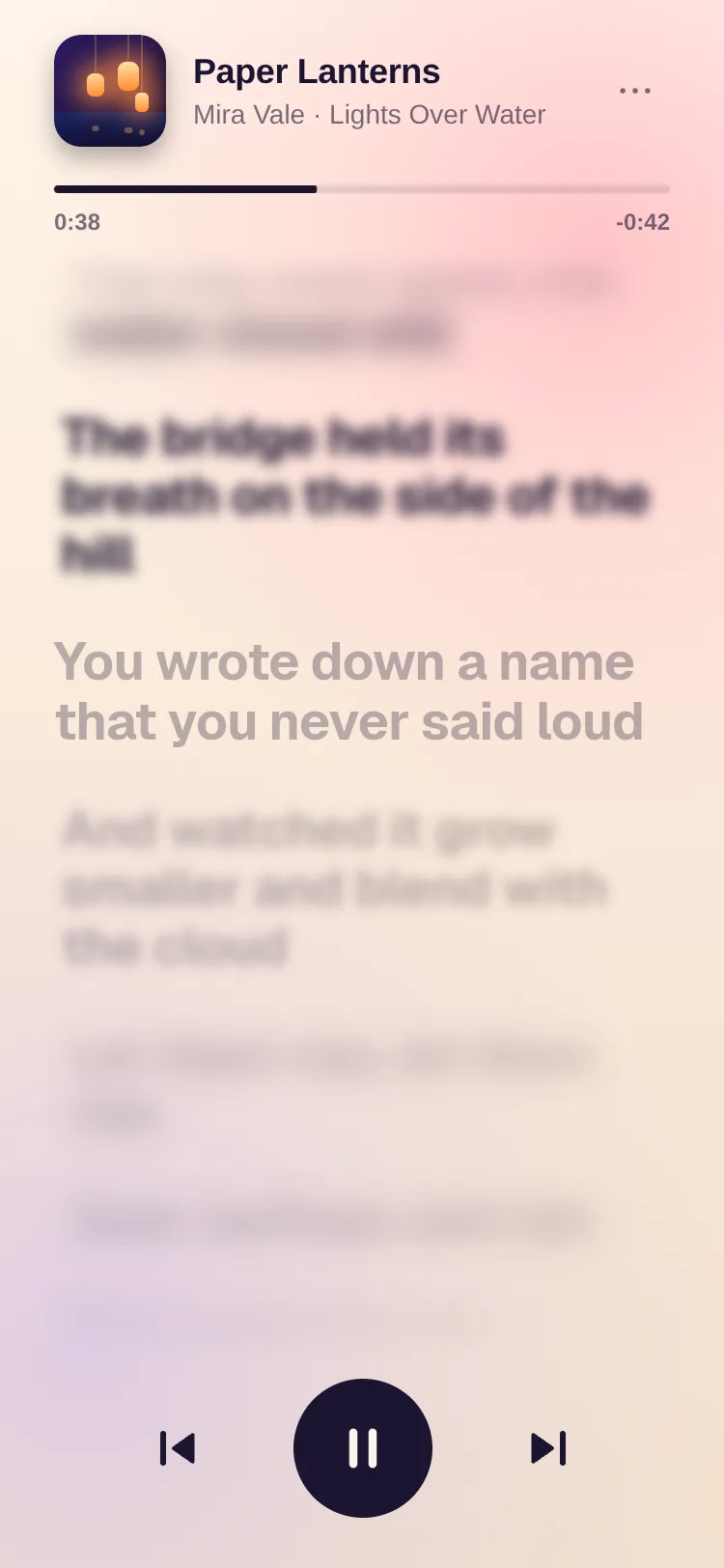
A scrolling list where only the item on the focal line is sharp: the rest blur, shrink, dim and lean away like a camera's depth of field. Karaoke lyrics with a sweeping fill, stories, timelines. One Skia canvas, real blur on iOS, Android and the web, 60 fps.
by UpFork, built by Ramin ValadanMobile componentUpdated 14 Oct 2026
6 files · 5 packages · 4 assets
import { Blur, Canvas, Group, LinearGradient, Paint, Rect, vec } from '@shopify/react-native-skia';
import * as Haptics from 'expo-haptics';
import { memo, useCallback, useEffect, useImperativeHandle, useMemo, useRef, useState, type ReactNode, type Ref } from 'react';
import {
  PixelRatio,
  Platform,
  StyleSheet,
  View,
  type AccessibilityActionEvent,
  type LayoutChangeEvent,
  type StyleProp,
  type ViewStyle,
} from 'react-native';
import { Gesture, GestureDetector } from 'react-native-gesture-handler';
import Animated, {
  Easing,
  cancelAnimation,
  useAnimatedReaction,
  useAnimatedStyle,
  useDerivedValue,
  useReducedMotion,
  useSharedValue,
  withDecay,
  withSpring,
  withTiming,
  type SharedValue,
} from 'react-native-reanimated';
import { scheduleOnRN } from 'react-native-worklets';

import { useScheme, type Scheme } from '../../lib/use-scheme';
import { clamp, fractionalIndex, indexAtY, nearestIndex, rubberBand, smoothstep } from './math';

export type FocusScrollHandle = {
  /** Brings an item onto the focal line. */
  scrollToIndex(index: number, options?: { animated?: boolean }): void;
  getFocusedIndex(): number;
};

export type FocusRenderInfo<T> = {
  item: T;
  index: number;
  width: number;
  height: number;
  /** Signed distance from the focal line, in items: 0 is in focus, -1 one above, 1 one below. */
  distance: SharedValue<number>;
};

type DepthSide = { blur: number; scale: number; opacity: number; tilt: number; spread: number };

export type FocusDepth = Partial<DepthSide> & {
  /** Overrides for items above the focal line. */
  above?: Partial<DepthSide>;
  /** Overrides for items below it. */
  below?: Partial<DepthSide>;
};

export type FocusScrollProps<T> = {
  data: readonly T[];
  keyExtractor: (item: T, index: number) => string;
  /** Each item's height (spacing included), for the list's width. Measure Skia text with `buildParagraph`. */
  getItemHeight: (item: T, index: number, width: number) => number;
  /** Draws an item with Skia elements, in a box from (0, 0) to (width, height). */
  renderItem: (info: FocusRenderInfo<T>) => ReactNode;
  /** What a screen reader says for an item. */
  accessibilityLabelForItem: (item: T, index: number) => string;
  /** Where the focal line sits, from 0 (top) to 1 (bottom) of the list. */
  focalPoint?: number;
  depth?: FocusDepth;
  /** Settle each item exactly on the focal line. */
  snap?: boolean;
  initialIndex?: number;
  onFocusChange?: (index: number) => void;
  /** A tap on an item. Without it, a tap scrolls the item into focus. */
  onItemPress?: (item: T, index: number) => void;
  /** A person (not code) started moving the list: a drag, the wheel, the keyboard. */
  onUserScroll?: () => void;
  /** Follows the focus as a fractional index, frame by frame. */
  focusProgress?: SharedValue<number>;
  /** A light haptic tick each time the focus changes while a person scrolls. */
  haptics?: boolean;
  /** How far the list's top and bottom edges fade out, in px (a mask: it works on any background). */
  edgeFade?: number;
  scheme?: Scheme;
  style?: StyleProp<ViewStyle>;
  ref?: Ref<FocusScrollHandle>;
};

const DEFAULT_DEPTH: DepthSide = { blur: 12, scale: 0.9, opacity: 0.35, tilt: 0, spread: 2.2 };
const SNAP = { stiffness: 180, damping: 26, mass: 1 };
const GLIDE = { duration: 520, easing: Easing.bezier(0.65, 0, 0.35, 1) };
// How far a fling carries, per px/s of release speed: a deceleration of 0.994 per millisecond.
const PROJECTION = 0.994 / (1 - 0.994) / 1000;
// Items further than this past the viewport's edges aren't drawn.
const OVERSCAN = 48;
// Items kept mounted beyond those, on each side.
const AHEAD = 3;
// Lists this short are mounted whole.
const SMALL_LIST = 12;

const webPointer = Platform.OS === 'web' ? ({ cursor: 'grab' } as unknown as ViewStyle) : null;

/**
 * A vertical list where only the item on the focal line is sharp: the others blur, shrink, dim and tilt away from it,
 * like a camera's depth of field. Items are Skia scenes, drawn on one canvas.
 */
export function FocusScroll<T>({
  data,
  keyExtractor,
  getItemHeight,
  renderItem,
  accessibilityLabelForItem,
  focalPoint = 0.5,
  depth,
  snap = true,
  initialIndex = 0,
  onFocusChange,
  onItemPress,
  onUserScroll,
  focusProgress,
  haptics = true,
  edgeFade = 48,
  scheme: schemeProp,
  style,
  ref,
}: FocusScrollProps<T>) {
  useScheme(schemeProp);
  const reduceMotion = useReducedMotion();
  const [size, setSize] = useState({ width: 0, height: 0 });
  const { width, height } = size;
  const focalY = height * clamp(focalPoint, 0, 1);

  // Layout: each item's height and top edge in the content, and its centre (where the focus position rests). Kept
  // as the same object while the heights are the same, so a parent re-rendering (with a new inline getItemHeight)
  // never disturbs a scroll in progress.
  const lastLayout = useRef<{ heights: number[]; offsets: number[]; centers: number[] } | null>(null);
  const layout = useMemo(() => {
    const heights = width > 0 ? data.map((item, index) => Math.max(1, getItemHeight(item, index, width))) : [];
    const previous = lastLayout.current;
    if (previous && previous.heights.length === heights.length && previous.heights.every((h, i) => h === heights[i])) {
      return previous;
    }
    const offsets: number[] = [];
    const centers: number[] = [];
    let y = 0;
    for (const h of heights) {
      offsets.push(y);
      centers.push(y + h / 2);
      y += h;
    }
    const next = { heights, offsets, centers };
    lastLayout.current = next;
    return next;
  }, [data, width, getItemHeight]);

  const depthKey = JSON.stringify(depth ?? null);
  const resolved = useMemo(() => resolveDepth(depth, reduceMotion), [depthKey, reduceMotion]); // eslint-disable-line react-hooks/exhaustive-deps

  const heightsSV = useSharedValue<number[]>([]);
  const offsetsSV = useSharedValue<number[]>([]);
  const centersSV = useSharedValue<number[]>([]);
  const viewport = useSharedValue(0);
  const focal = useSharedValue(0);
  // The content position under the focal line.
  const position = useSharedValue(0);
  const byUser = useSharedValue(false);
  const lastIndex = useSharedValue(-1);

  const focusedKey = useRef<string | null>(null);
  const focusedIndexRef = useRef(initialIndex);
  const [range, setRange] = useState<[number, number]>([0, -1]);
  const placed = useRef(false);

  // The items' keys, as one string: changes only when the items do, however often the parent re-renders.
  const keysSignature = useMemo(() => JSON.stringify(data.map((item, index) => keyExtractor(item, index))), [data, keyExtractor]);

  // Keep the item that had the focus in focus when the data or the width changes.
  useEffect(() => {
    heightsSV.value = layout.heights;
    offsetsSV.value = layout.offsets;
    centersSV.value = layout.centers;
    viewport.value = height;
    focal.value = focalY;
    if (layout.centers.length === 0) return;
    let index = placed.current ? focusedIndexRef.current : initialIndex;
    if (placed.current && focusedKey.current !== null) {
      const found = data.findIndex((item, i) => keyExtractor(item, i) === focusedKey.current);
      if (found >= 0) index = found;
    }
    index = Math.min(Math.max(index, 0), layout.centers.length - 1);
    cancelAnimation(position);
    position.value = layout.centers[index];
    placed.current = true;
  }, [layout, height, focalY, keysSignature]); // eslint-disable-line react-hooks/exhaustive-deps

  const focus = useDerivedValue(() => fractionalIndex(position.value, centersSV.value));

  useAnimatedReaction(
    () => focus.value,
    (value) => {
      if (focusProgress) focusProgress.value = value;
    },
  );

  const reportFocus = useCallback(
    (index: number, fromUser: boolean) => {
      focusedIndexRef.current = index;
      const item = data[index];
      focusedKey.current = item === undefined ? null : keyExtractor(item, index);
      onFocusChange?.(index);
      if (fromUser && haptics) Haptics.selectionAsync().catch(() => undefined);
    },
    [data, keyExtractor, onFocusChange, haptics],
  );

  useAnimatedReaction(
    () => (centersSV.value.length === 0 ? -1 : Math.round(focus.value)),
    (index) => {
      if (index < 0 || index === lastIndex.value) return;
      lastIndex.value = index;
      scheduleOnRN(reportFocus, index, byUser.value);
    },
  );

  // Which items to draw: those whose box is on screen (with a margin), plus a few on each side. The range grows
  // ahead of the scroll and shrinks only when it's far behind, so scrubbing back and forth never remounts an item.
  const mounted = useSharedValue<[number, number]>([0, -1]);
  useAnimatedReaction(
    () => {
      const offsets = offsetsSV.value;
      const heights = heightsSV.value;
      const count = offsets.length;
      if (count === 0 || viewport.value === 0) return -1;
      const top = position.value - focal.value - OVERSCAN;
      const bottom = position.value - focal.value + viewport.value + OVERSCAN;
      let first = indexAtY(Math.max(top, 0), offsets, heights);
      if (first < 0) first = top <= 0 ? 0 : count - 1;
      let last = first;
      while (last + 1 < count && offsets[last + 1] < bottom) last += 1;
      return first * 100000 + last;
    },
    (packed) => {
      const count = offsetsSV.value.length;
      if (packed < 0 || count === 0) {
        if (mounted.value[1] !== -1) {
          mounted.value = [0, -1];
          scheduleOnRN(setRange, [0, -1] as [number, number]);
        }
        return;
      }
      // A short list is simply all mounted: nothing ever mounts mid-scroll.
      const first = count <= SMALL_LIST ? 0 : Math.floor(packed / 100000);
      const last = count <= SMALL_LIST ? count - 1 : packed % 100000;
      const [from, to] = mounted.value;
      const covered = from <= first && to >= last && to >= 0;
      const tooWide = covered && (first - from > AHEAD * 3 || to - last > AHEAD * 3);
      if (covered && !tooWide && to < count) return;
      const next: [number, number] = [Math.max(0, first - AHEAD), Math.min(count - 1, last + AHEAD)];
      mounted.value = next;
      scheduleOnRN(setRange, next);
    },
  );

  // The GPU builds a blur program the first time it meets each blur size, which costs a frame or two. Drawing every
  // size once, invisibly, while the list appears moves that cost out of the first scroll.
  const [warming, setWarming] = useState(true);
  useEffect(() => {
    const timer = setTimeout(() => setWarming(false), 900);
    return () => clearTimeout(timer);
  }, []);
  const maxBlur = Math.max(resolved.above.blur, resolved.below.blur);

  const notifyUser = useCallback(() => onUserScroll?.(), [onUserScroll]);

  const settle = (velocity: number) => {
    'worklet';
    const centers = centersSV.value;
    const count = centers.length;
    if (count === 0) return;
    const min = centers[0];
    const max = centers[count - 1];
    if (position.value < min || position.value > max) {
      position.value = withSpring(clamp(position.value, min, max), { ...SNAP, velocity });
      return;
    }
    if (!snap) {
      position.value = withDecay({ velocity, deceleration: 0.997, clamp: [min, max] });
      return;
    }
    const target = centers[nearestIndex(clamp(position.value + velocity * PROJECTION, min, max), centers)];
    position.value = reduceMotion ? withTiming(target, { duration: 200 }) : withSpring(target, { ...SNAP, velocity });
  };

  const scrollToIndex = useCallback(
    (index: number, options?: { animated?: boolean }) => {
      const centers = layout.centers;
      if (centers.length === 0) return;
      const target = centers[Math.min(Math.max(Math.round(index), 0), centers.length - 1)];
      byUser.value = false;
      cancelAnimation(position);
      if (options?.animated === false) position.value = target;
      else position.value = withTiming(target, reduceMotion ? { duration: 200 } : GLIDE);
    },
    [layout, byUser, position, reduceMotion],
  );

  useImperativeHandle(
    ref,
    () => ({ scrollToIndex, getFocusedIndex: () => focusedIndexRef.current }),
    [scrollToIndex],
  );

  const press = useCallback(
    (index: number) => {
      const item = data[index];
      if (item === undefined) return;
      if (onItemPress) onItemPress(item, index);
      else scrollToIndex(index);
    },
    [data, onItemPress, scrollToIndex],
  );

  const startY = useSharedValue(0);
  const startPosition = useSharedValue(0);

  const pan = Gesture.Pan()
    .minDistance(4)
    .onBegin((event) => {
      // Measured from where the pointer went down: on the web the translation only starts at activation.
      startY.value = event.absoluteY;
      startPosition.value = position.value;
    })
    .onStart((event) => {
      cancelAnimation(position);
      startY.value = event.absoluteY - event.translationY;
      startPosition.value = position.value;
      byUser.value = true;
      scheduleOnRN(notifyUser);
    })
    .onUpdate((event) => {
      const centers = centersSV.value;
      if (centers.length === 0) return;
      const raw = startPosition.value - (event.absoluteY - startY.value);
      position.value = rubberBand(raw, centers[0], centers[centers.length - 1], viewport.value * 0.5);
    })
    .onEnd((event) => {
      settle(-event.velocityY);
    });

  const tap = Gesture.Tap()
    .maxDistance(10)
    .onEnd((event, success) => {
      if (!success) return;
      const index = indexAtY(position.value - focal.value + event.y, offsetsSV.value, heightsSV.value);
      if (index >= 0) scheduleOnRN(press, index);
    });

  const gesture = Gesture.Race(pan, tap);

  // The wheel and the keyboard, on the web.
  const wheelIdle = useRef<ReturnType<typeof setTimeout> | null>(null);
  const wheeling = useRef(false);
  const onWheel = (event: { nativeEvent: { deltaY: number; deltaMode?: number } }) => {
    const centers = layout.centers;
    if (centers.length === 0) return;
    const delta = event.nativeEvent.deltaY * (event.nativeEvent.deltaMode === 1 ? 18 : 1);
    if (!wheeling.current) {
      wheeling.current = true;
      byUser.value = true;
      onUserScroll?.();
    }
    cancelAnimation(position);
    position.value = clamp(position.value + delta, centers[0], centers[centers.length - 1]);
    if (wheelIdle.current) clearTimeout(wheelIdle.current);
    wheelIdle.current = setTimeout(() => {
      wheeling.current = false;
      if (snap) scrollToNearestByUser();
    }, 140);
  };
  const scrollToNearestByUser = () => {
    const centers = layout.centers;
    const target = centers[nearestIndex(position.value, centers)];
    position.value = reduceMotion ? withTiming(target, { duration: 200 }) : withSpring(target, SNAP);
  };
  const onKeyDown = (event: { nativeEvent: { key: string }; preventDefault?: () => void }) => {
    const steps: Record<string, number> = { ArrowDown: 1, ArrowUp: -1, PageDown: 3, PageUp: -3 };
    const key = event.nativeEvent.key;
    if (key === 'Home' || key === 'End' || key in steps) {
      event.preventDefault?.();
      onUserScroll?.();
      const next = key === 'Home' ? 0 : key === 'End' ? data.length - 1 : focusedIndexRef.current + steps[key];
      scrollToIndex(next);
      byUser.value = true;
    }
  };
  useEffect(() => () => {
    if (wheelIdle.current) clearTimeout(wheelIdle.current);
  }, []);

  const webProps = Platform.OS === 'web' ? ({ onWheel, onKeyDown, focusable: true } as Record<string, unknown>) : {};

  const onLayout = (event: LayoutChangeEvent) => {
    const next = { width: Math.round(event.nativeEvent.layout.width), height: Math.round(event.nativeEvent.layout.height) };
    if (next.width !== size.width || next.height !== size.height) setSize(next);
  };

  // Re-rendered only when the visible range or the layout changes: scrolling itself never re-renders items.
  const items = useMemo(() => {
    const out: ReactNode[] = [];
    for (let index = range[0]; index <= range[1] && index < data.length; index += 1) {
      const item = data[index];
      out.push(
        <FocusItem
          key={keyExtractor(item, index)}
          item={item}
          renderItem={renderItem}
          index={index}
          top={layout.offsets[index]}
          width={width}
          height={layout.heights[index]}
          focal={focalY}
          position={position}
          focus={focus}
          depth={resolved}
        />,
      );
    }
    return out;
  }, [range, data, keyExtractor, renderItem, layout, width, focalY, position, focus, resolved]);

  const fade = Math.min(edgeFade, height / 3);
  // The edges fade through the content's own alpha (drawn into a layer, then kept where the gradient is opaque), so
  // the fade works on any background.
  const content =
    fade > 0 && height > 0 ? (
      <Group layer={<Paint />}>
        {items}
        <Rect x={0} y={0} width={width} height={height} blendMode="dstIn">
          <LinearGradient
            start={vec(0, 0)}
            end={vec(0, height)}
            colors={['rgba(0, 0, 0, 0)', 'rgba(0, 0, 0, 1)', 'rgba(0, 0, 0, 1)', 'rgba(0, 0, 0, 0)']}
            positions={[0, fade / height, 1 - fade / height, 1]}
          />
        </Rect>
      </Group>
    ) : (
      items
    );

  return (
    <View style={[styles.fill, style]} onLayout={onLayout}>
      <GestureDetector gesture={gesture}>
        <View style={[StyleSheet.absoluteFill, webPointer]} accessible={false} {...webProps}>
          {width > 0 && height > 0 ? (
            <Canvas style={StyleSheet.absoluteFill}>
              {content}
              {warming && maxBlur > 0 ? <BlurWarmup max={maxBlur} /> : null}
            </Canvas>
          ) : null}
          <AccessibleRows
            from={range[0]}
            to={range[1]}
            data={data}
            offsets={layout.offsets}
            heights={layout.heights}
            focal={focalY}
            position={position}
            focus={focus}
            initialIndex={initialIndex}
            labelFor={accessibilityLabelForItem}
            onActivate={press}
          />
        </View>
      </GestureDetector>
    </View>
  );
}

const FocusItem = memo(function FocusItem<T>({
  item,
  renderItem,
  index,
  top,
  width,
  height,
  focal,
  position,
  focus,
  depth,
}: {
  item: T;
  renderItem: (info: FocusRenderInfo<T>) => ReactNode;
  index: number;
  top: number;
  width: number;
  height: number;
  focal: number;
  position: SharedValue<number>;
  focus: SharedValue<number>;
  depth: { above: DepthSide; below: DepthSide };
}) {
  const distance = useDerivedValue(() => index - focus.value);
  const amount = useDerivedValue(() => {
    const d = distance.value;
    const side = d < 0 ? depth.above : depth.below;
    return smoothstep(0, side.spread, Math.abs(d));
  });
  const translate = useDerivedValue(() => [{ translateY: focal + top - position.value }]);
  const transform = useDerivedValue(() => {
    const d = distance.value;
    const side = d < 0 ? depth.above : depth.below;
    const t = amount.value;
    const scale = 1 - (1 - side.scale) * t;
    // Items above lean back, items below lean forward, like pages on a drum.
    const tilt = ((side.tilt * Math.PI) / 180) * t * (d < 0 ? 1 : -1);
    return tilt === 0 ? [{ scale }] : [{ perspective: 900 }, { rotateX: tilt }, { scale }];
  });
  const opacity = useDerivedValue(() => {
    const side = distance.value < 0 ? depth.above : depth.below;
    return 1 - (1 - side.opacity) * amount.value;
  });
  const blur = useDerivedValue(() => {
    const side = distance.value < 0 ? depth.above : depth.below;
    return side.blur * amount.value;
  });

  return (
    <Group transform={translate}>
      <Group
        origin={vec(width / 2, height / 2)}
        transform={transform}
        opacity={opacity}
        layer={
          <Paint>
            <Blur blur={blur} mode="decal" />
          </Paint>
        }>
        {renderItem({ item, index, width, height, distance })}
      </Group>
    </Group>
  );
}) as <T>(props: {
  item: T;
  renderItem: (info: FocusRenderInfo<T>) => ReactNode;
  index: number;
  top: number;
  width: number;
  height: number;
  focal: number;
  position: SharedValue<number>;
  focus: SharedValue<number>;
  depth: { above: DepthSide; below: DepthSide };
}) => ReactNode;

/** A tiny, all but invisible square blurred at every size the list will use (see `warming`). */
function BlurWarmup({ max }: { max: number }) {
  const sizes = useMemo(() => {
    // Blur sizes are in points; the GPU works in pixels. Small blurs get a kernel per pixel of radius (three times
    // the blur), up to 12 pixels; larger ones are downsampled first.
    const ratio = PixelRatio.get();
    const out: number[] = [];
    for (let radius = 1; radius <= 12 && radius / (3 * ratio) <= max; radius += 1) out.push(radius / (3 * ratio));
    for (let blur = 4 / ratio; blur < max; blur *= 1.25) out.push(blur);
    out.push(max);
    return out;
  }, [max]);
  return (
    <Group opacity={0.004}>
      {sizes.map((blur, index) => (
        <Group key={index} layer={<Paint><Blur blur={blur} mode="decal" /></Paint>}>
          <Rect x={1 + index * 3} y={1} width={2} height={2} color="white" />
        </Group>
      ))}
    </Group>
  );
}

function AccessibleRows<T>({
  from,
  to,
  data,
  offsets,
  heights,
  focal,
  position,
  focus,
  initialIndex,
  labelFor,
  onActivate,
}: {
  from: number;
  to: number;
  data: readonly T[];
  offsets: number[];
  heights: number[];
  focal: number;
  position: SharedValue<number>;
  focus: SharedValue<number>;
  initialIndex: number;
  labelFor: (item: T, index: number) => string;
  onActivate: (index: number) => void;
}) {
  // Its own state, so a focus change re-renders these rows and nothing else.
  const [focusedIndex, setFocusedIndex] = useState(initialIndex);
  useAnimatedReaction(
    () => Math.round(focus.value),
    (index, previous) => {
      if (index !== previous) scheduleOnRN(setFocusedIndex, index);
    },
  );
  const move = useAnimatedStyle(() => ({ transform: [{ translateY: focal - position.value }] }));
  const rows: ReactNode[] = [];
  // A little wider than what's drawn, so a screen reader can step to the next item.
  for (let index = Math.max(0, from - 2); index <= Math.min(data.length - 1, to + 2); index += 1) {
    const item = data[index];
    if (item === undefined || offsets[index] === undefined) continue;
    rows.push(
      <View
        key={index}
        accessible
        accessibilityRole="button"
        accessibilityLabel={labelFor(item, index)}
        accessibilityState={{ selected: index === focusedIndex }}
        accessibilityActions={[{ name: 'activate' }]}
        onAccessibilityAction={(event: AccessibilityActionEvent) => {
          if (event.nativeEvent.actionName === 'activate') onActivate(index);
        }}
        style={[styles.row, { top: offsets[index], height: heights[index] }]}
      />,
    );
  }
  return (
    <Animated.View pointerEvents="none" style={[StyleSheet.absoluteFill, move]}>
      {rows}
    </Animated.View>
  );
}

function resolveDepth(depth: FocusDepth | undefined, reduceMotion: boolean) {
  const base: DepthSide = { ...DEFAULT_DEPTH, ...stripSides(depth) };
  const above: DepthSide = { ...base, ...depth?.above };
  const below: DepthSide = { ...base, ...depth?.below };
  if (reduceMotion) {
    for (const side of [above, below]) {
      side.tilt = 0;
      side.scale = 1;
      side.blur *= 0.5;
    }
  }
  above.spread = Math.max(above.spread, 0.01);
  below.spread = Math.max(below.spread, 0.01);
  return { above, below };
}

function stripSides(depth: FocusDepth | undefined): Partial<DepthSide> {
  if (!depth) return {};
  const { above: _above, below: _below, ...rest } = depth;
  return rest;
}

const styles = StyleSheet.create({
  fill: { flex: 1, overflow: 'hidden' },
  row: { position: 'absolute', left: 0, right: 0 },
});
Focus Scroll is a list with a lens. The item on the focal line is crisp; everything above and below it softens as it moves away — real blur, a gentle shrink, a dim, a slight lean back — so the eye always knows where to read. It's the effect behind karaoke lyrics, year-in-review stories and calm, cinematic reading screens.
FocusParagraph sweeps a fill through the lines with a soft edge, and useAutoAdvance steps the list along a timeline — with "back to now" when someone scrolls away.Three complete demos: a now-playing lyrics screen, a year-in-review story and a day timeline — each in light and dark.
0 reviews · 0 bugs
Ship it0With fixes0Skip0· 0 reviews
0 bugs0 open0 fixed
Members who have it review it and report its bugs. Sign in
No reviews or bugs yet.
React Native · Expo SDK 57
Built withSkiaExpo HapticsGesture HandlerReanimatedSafe Area ContextSVG
Copy the files into your app
At your app’s root, the folders side by side as they are: the files import each other by relative paths. Its fonts come in Download source’s ZIP, where the code requires them.
Install the packages with Expo
npx expo install @shopify/react-native-skia expo-haptics react-native-gesture-handler react-native-reanimated react-native-workletsAnd what the demos use
npx expo install react-native-safe-area-context react-native-svgSee it in your app
Make demos/lyrics.tsx your app’s App.tsx, inside the GestureHandlerRootView that Gesture Handler needs at its root:
On the web, load Skia first
Phones need nothing more. On the web, copy node_modules/canvaskit-wasm/bin/full/canvaskit.wasm into your app’s public/ folder, add this index.web.ts, and set "main" to "index" in your package.json:
UpFork installs every revision just so into a fresh Expo app (SDK 57), type-checks it and builds it for the web before it goes on sale. An AI assistant can do it for you through UpFork’s MCP server: Install mobile components has both ways.
import { GestureHandlerRootView } from 'react-native-gesture-handler';

import Lyrics from './demos/lyrics';

export default function App() {
  return (
    <GestureHandlerRootView style={{ flex: 1 }}>
      <Lyrics scheme="light" />
    </GestureHandlerRootView>
  );
}
import '@expo/metro-runtime';
import { LoadSkiaWeb } from '@shopify/react-native-skia/lib/module/web';
import { registerRootComponent } from 'expo';

// Skia's engine first (public/canvaskit.wasm), then the app: nothing that uses Skia may load before it.
LoadSkiaWeb({ locateFile: (file: string) => `/${file}` })
  .then(() => import('./App'))
  .then(({ default: App }) => registerRootComponent(App));


