New


Toasts & Alerts
Loading the page…
Loading the page…
Before you buy
How this mobile component gets from the preview into your project, and what buyers ask most.
How to use it
From the preview to your project
Try it in the preview
Switch between light and dark, and resize it to phone and tablet widths, before you decide.
Get it
Free products are yours with a free account. Paid ones settle in USDT on TRON, sent straight to the wallet on your order.
Install it
Components go into your project with one shadcn command, dependencies included. Everything else downloads with a checksum.
Make it yours
It's your code now: rename it, restyle it and wire in your real data.
Or hand it to your AI
Copy the prompt and let your coding assistant place it in your project, following your conventions.
Yes, a free one: it keeps your order, every payment you make for it and the files together. Free products need it too: without an account you can look and try the live preview, but not download, install or copy anything.
Send the price as a USDT transfer on TRON (TRC-20) to the wallet on your order, shown with its QR code, then paste the transaction ID on the order. It's checked on-chain, and the files unlock once it's confirmed. Paid less? You're asked for the rest.
Yes. The Standard License covers unlimited personal and commercial projects, client work included; just don't resell it on its own. Open-source licenses say so on the product.
Create a CLI token on your account page, put it in your project's .env.local, add UpFork to components.json once, and install with npx shadcn add: free and paid components alike.
Onto your order, in your account. Download links last ten minutes and can be made again.
Releases are scanned for malware and reviewed before anyone can download them, and every file shows its SHA-256 so you can check what you got.
Building with an AI assistant?
Copy a ready-made prompt with the code, its dependencies and a demo, and your assistant can put it in place for you.
Selling your own work?
Get approved once, then publish components, templates and mobile components, paid in USDT straight to your own wallet.
Mobile
Text that changes beautifully in React Native: shared letters glide to their new places, removed ones leave and new ones rise in, never overlapping. Odometer numbers formatted by Intl, and a button that morphs through loading, success and error. Persian and Arabic stay joined.
by UpFork, built by Ramin ValadanMobile componentUpdated 14 Oct 2026
15 files · 4 packages
// Which pieces of the old text are the same pieces in the new one. A longest common subsequence,
// but among the equally long ones it takes the one with the fewest separate runs, then the one
// whose pieces travel least: "letter" → "better" keeps "etter" together, and a repeated letter
// matches the copy nearest to it.

/**
 * Pairs of indices (old, new) that stay, in order. `before` and `after` are where each piece sits
 * (any unit, as long as both use the same one): they break ties between repeated pieces.
 */
export function matchTokens(
  a: readonly string[],
  b: readonly string[],
  before: readonly number[],
  after: readonly number[],
): Array<[number, number]> {
  const n = a.length;
  const m = b.length;
  if (n === 0 || m === 0) return [];

  // Score: matches first, then fewer runs, then less travel. Two states per cell: whether the
  // last step was a match on the diagonal (so the next match continues the run).
  const MATCH = 1_000_000;
  const RUN = 1_000;
  const width = m + 1;
  const free = new Float64Array((n + 1) * width).fill(-Infinity); // last step was not a match
  const run = new Float64Array((n + 1) * width).fill(-Infinity); // last step matched (i-1, j-1)
  // How each cell was reached: 0 skip old, 1 skip new, 2 match from free, 3 match from run.
  const fromFree = new Uint8Array((n + 1) * width);
  const fromRun = new Uint8Array((n + 1) * width);
  free[0] = 0;

  for (let i = 0; i <= n; i++) {
    for (let j = 0; j <= m; j++) {
      const k = i * width + j;
      if (i > 0 || j > 0) {
        // Arriving without a match: skip a[i-1] or b[j-1] from either state.
        let best = -Infinity;
        let how = 0;
        if (i > 0) {
          const up = Math.max(free[k - width], run[k - width]);
          if (up > best) {
            best = up;
            how = 0;
          }
        }
        if (j > 0) {
          const left = Math.max(free[k - 1], run[k - 1]);
          if (left > best) {
            best = left;
            how = 1;
          }
        }
        free[k] = best;
        fromFree[k] = how;
      }
      if (i > 0 && j > 0 && a[i - 1] === b[j - 1]) {
        const d = k - width - 1;
        const travel = Math.min(999, Math.abs(before[i - 1] - after[j - 1]));
        const startRun = free[d] + MATCH - RUN - travel;
        const keepRun = run[d] + MATCH - travel;
        if (keepRun >= startRun) {
          run[k] = keepRun;
          fromRun[k] = 3;
        } else {
          run[k] = startRun;
          fromRun[k] = 2;
        }
      }
    }
  }

  const pairs: Array<[number, number]> = [];
  let i = n;
  let j = m;
  let inRun = run[n * width + m] > free[n * width + m];
  while (i > 0 || j > 0) {
    const k = i * width + j;
    if (inRun) {
      pairs.push([i - 1, j - 1]);
      inRun = fromRun[k] === 3;
      i--;
      j--;
    } else {
      const how = fromFree[k];
      if (how === 0) {
        inRun = run[k - width] > free[k - width];
        i--;
      } else {
        inRun = run[k - 1] > free[k - 1];
        j--;
      }
    }
  }
  return pairs.reverse();
}
Morph Text is the detail that makes an app feel expensive: labels, numbers and buttons that change in place instead of blinking.
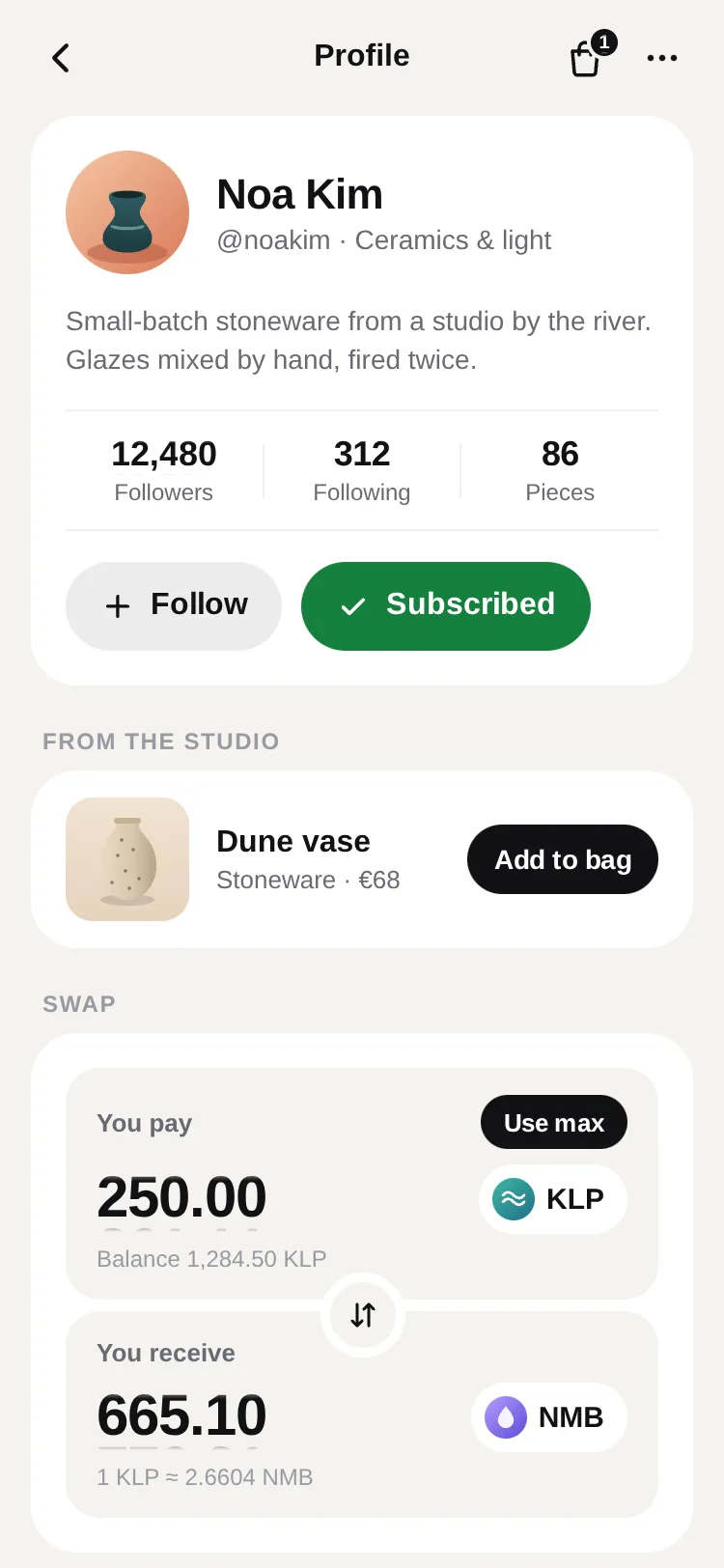
Three complete demos: a creator's profile and shop with follow, subscribe, add to bag and a swap card; a live portfolio with ticking prices; and one greeting in five languages.
0 reviews · 0 bugs
Ship it0With fixes0Skip0· 0 reviews
0 bugs0 open0 fixed
Members who have it review it and report its bugs. Sign in
No reviews or bugs yet.
React Native · Expo SDK 57
Built withExpo HapticsReanimatedSVGSafe Area Context
Copy the files into your app
At your app’s root, the folders side by side as they are: the files import each other by relative paths.
Install the packages with Expo
npx expo install expo-haptics react-native-reanimated react-native-svg react-native-workletsAnd what the demos use
npx expo install react-native-safe-area-contextSee it in your app
Make demos/buttons.tsx your app’s App.tsx:
UpFork installs every revision just so into a fresh Expo app (SDK 57), type-checks it and builds it for the web before it goes on sale. An AI assistant can do it for you through UpFork’s MCP server: Install mobile components has both ways.
import Buttons from './demos/buttons';

export default function App() {
  return <Buttons scheme="light" />;
}


