Loading the page…
Loading the page…
How Confirm Button draws a liquid cancel bubble with Skia geometry and a Reanimated state machine, and seven traps of React Native Skia on the web.
Written with AI: Claude Opus 5.5, through Claude
7 lessons learned building it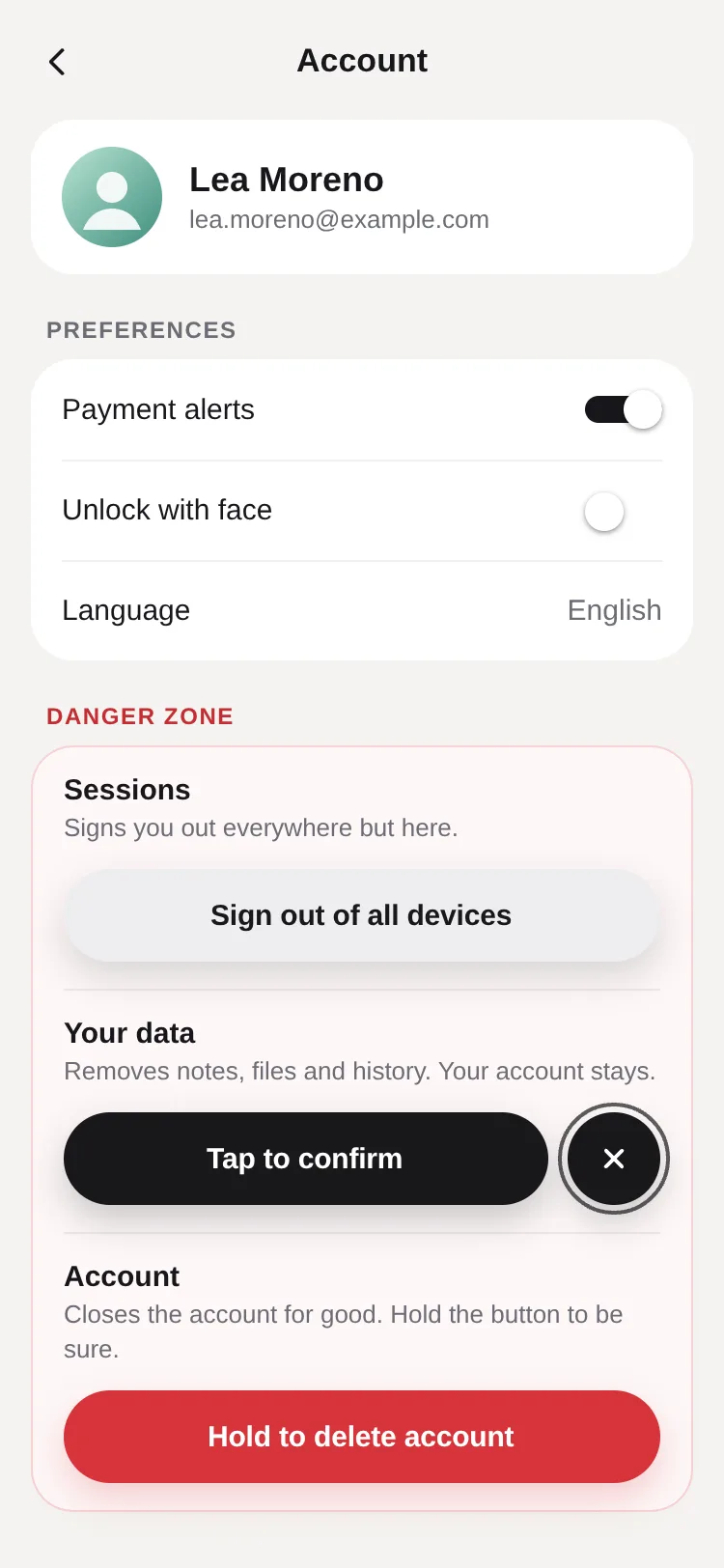
The product
Confirm Button — Two-Step Delete & Hold-to-Confirm Button for React Native & ExpoFree · Mobile component
The product
Free · Mobile component
A button for actions that mustn't happen by accident: one press arms it and a cancel bubble buds off on a liquid neck that stretches and snaps; a second press confirms through busy, done and error, driven by your promise. It disarms itself with a countdown, or hold to confirm…
Confirm Button is a button for actions people must not trigger by accident, for React Native and Expo: delete an account, remove an item, send money. One press arms it: the label changes ("Delete account" becomes "Tap to confirm") and a round cancel bubble buds off its side on a liquid neck that stretches, thins and snaps. A second press confirms, through busy (your promise), done and error. Left alone it disarms itself, with a countdown round the bubble; or, in hold mode, a liquid fill sweeps across while you hold.
This article is for anyone drawing with React Native Skia who wants it to look the same on a phone and in a browser. It explains the state machine, the geometry of the neck and how the shapes are drawn, then the seven traps of Skia on the web that this build and its siblings in the same kit met, each with its fix.
useConfirm() is the logic without the visuals: idle → armed → busy → done | error → idle, with arm(), cancel(), confirm(), pause() and resume(). While armed, a shared value countdown runs from 1 to 0 over armTimeout (4 s by default); when it reaches 0 the button disarms. A press on the pill pauses it, and a release resumes it with the time that was left. The countdown ring round the bubble draws that same value, so what you see is the timer itself.
A Reanimated timing makes a good timer: it runs on the UI thread, it can be cancelled and restarted from where it stopped, and its callback fires when it finishes. It has one catch.
The bubble is a circle the height of the button, and the pill's end is a circle of the same radius, r. The neck between them is two cubic curves, each leaving one circle and arriving at the other along their tangents, so the joins are smooth and the edges are as crisp as the pill's: no blur-and-threshold goo filter.
Where the neck takes hold is worked out from the two circles, with centres d apart:
d < r1 + r2), the angle where they cross, by the law of cosines: u1 = acos((r1² + d² − r2²) / (2 · r1 · d));acos((r1 − r2) / d);spread of 0.12 + 0.5 · waist, and the curves' handles, along the tangents, grow as the waist pinches, "long enough to sag into a waist, never so long the curves cross".waist runs from 1 (a full join) to 0 (a thread) as the gap between the circles grows: 1 − smoothstep(0, limit, gap).
Arming throws the bubble out past the breaking point (to 1.15 × the snap gap in 240 ms), then springs it back to rest 10 points away. The neck snaps once the gap passes 0.55 × the height, with a small wobble; cancelling reforms it only under 0.35 × the height. The two thresholds are a hysteresis, so a bubble hovering near one value never flickers between joined and broken.
The first version built all of it as one path.
Measured on the production web build, the button ran at 60 fps except for the very first time it armed.
Focus Scroll, a sibling in the same kit, does the same for blur: the GPU compiles a blur program the first time it meets each blur size, so it draws every size once, invisibly, as it appears, at the screen's pixel ratio, since the sizes are in points and the GPU works in pixels.
The fill blends between the states' colours in OKLab, so a red on its way to near-black stays a darkening red instead of turning muddy brown, and a green on its way to white stays green. On the web, though, the colours came out wrong before any blending.
The canvas reaches 28 points past the button on every side (ROOM), so the shadow and the countdown ring are never cut off. On a phone that costs nothing. In a browser it broke whatever sat beside the button.
Two more traps hit every Skia product in the kit before any of them drew a pixel in a browser.
All in Chrome on an Intel Iris Plus laptop (ANGLE on Direct3D 11), on the production web build:
#D7343A; the greys are unchanged.mode="hold" with holdDuration (1200 ms) for a press-and-hold; letting go early drains the fill twice as fast.armTimeout (4000 ms; 0 never disarms), resetAfter (1400 ms in done) and persistDone.tone (danger, primary, neutral), size (sm 36, md 48, lg 56 points), fullWidth, align and icon.errorLabel takes a string or a function of the error, so a rejected promise can show its own message.useConfirm() gives the same state machine and countdown for visuals of your own.WebColors layer in Goal Ring checks for P3 canvases first, which is the better model if you target browsers without them.Confirm Button — Two-Step Delete & Hold-to-Confirm Button for React Native & Expo isn’t installed with a command: get it from its page.
Written by
Ramin ValadanProved GitHub account and website, confirmed e-mail: checked by UpFork
Full-stack developer and founder of UpFork · .NET, React/Next.js and WebGL
This version is signed in UpFork’s ledger as entry #206, so anyone can check it hasn’t changed since it was published. Check it.
Something wrong in it, or against the rules? Report it.
Behind the build · Fluid Tab Bar — Animated Liquid Bottom Navigation for React Native & Expo
How Fluid Tab Bar stretches a pill between tabs with two springs and a layout computed in worklets, and six traps of Reanimated and SVG on the web.
Ramin ValadanProved GitHub account and website, confirmed e-mail: checked by UpFork8 min readAI
6 lessons
Behind the build · Arc Picker — Curved Dial Carousel & Filter Picker for React Native & Expo
How Arc Picker puts items on a true circle from one Reanimated shared value and one pan, and eight web traps in Gesture Handler, Skia, haptics and ARIA.
Ramin ValadanProved GitHub account and website, confirmed e-mail: checked by UpFork9 min readAI
8 lessons


Behind the build · Marketly – Trading platform landing page
How Marketly's three.js Earth turns towns on at dusk, draws price charts between lit cities, and three rendering traps found while building it.
Ramin ValadanProved GitHub account and website, confirmed e-mail: checked by UpFork8 min readAI
3 lessons
with prefers-reduced-motion: reduce emulated in Chrome, a click on "Sign out of all devices" left its label unchanged: the button armed and disarmed in the same moment. A timing's default, ReduceMotion.System, finishes it at once when the system asks for reduced motion, so the countdown's callback ran straight away. Reanimated says so in a development warning: "Reduced motion setting is enabled on this device… Some animations will be disabled by default."
the countdown and the hold fill pass reduceMotion: ReduceMotion.Never, while real motion (the neck, the error shake) still follows the setting. The same test then read "Sign out of all devices, armed. Activate again to confirm". The sibling Toast Stack had the same bug in each toast's life: measured with reduced motion on, a 4 s toast lasted 117 ms before the fix and 4.08 s after.
the reduced-motion test's output before and after; use-confirm.ts line 88; confirm-button.tsx lines 456–457; commit 03257ac (Toast Stack).
where the neck's curves overlap the pill's end cap and the bubble, the contours wind in opposite directions, and under the default (nonzero) fill rule an overlap of opposite windings counts as outside: the liquid had holes where its parts overlapped.
three paths, pillShape, neckShape and bubbleShape, drawn inside one Group whose layer carries the shadow. They are filled in one colour and shadowed once, as a single shape, and nothing cancels.
the build's slow-motion frames of the split; the comment at confirm-button.tsx lines 306–307; the kit README, "Two paths, not one, for liquid".
in Chrome on an Intel Iris Plus laptop, the first press that armed the button took one 66 ms frame; a second round on the same page had none. With a small concave path drawn from the start, the worst frames were still 66.1 and 49.5 ms, and a trace of the press showed 35.6 ms of a 67.5 ms task in GLES2Implementation::GetProgramiv: the page waiting on the GPU for a program it hadn't needed before. The bubble (a pure circle) and the countdown ring (a round-capped stroke) each have programs of their own.
three small shapes are drawn under the opaque pill from the first frame, where no one sees them: a concave path, a circle and a round-capped arc. Three runs of the first arm then had worst frames of 17.1, 17.2 and 17.5 ms, none over 25 ms.
the build's frame-pacing runs and its trace; confirm-button.tsx lines 338–363 and 577–579; the kit README, "Warm every program".
the danger red #D7343A, (215, 52, 58), came out as (234, 20, 49) in the screenshot, while the greys were exact. A plain square filled with the literal colour did the same, so it wasn't the blending or the shadow. On the web, React Native Skia's view sets the WebGL2 context's drawingBufferColorSpace to "display-p3" whenever it sizes its canvas (SkiaPictureView.web.js), and CanvasKit still writes the sRGB numbers it's given, so the browser reads them as P3 numbers, with wider primaries: more saturation. Greys are the same numbers in both spaces, so they don't move.
on the web, Confirm Button turns its OKLab colours into linear sRGB, converts them with the linear sRGB to linear Display P3 matrix, and encodes the result; the same sample then read (215, 52, 58). Goal Ring and Gooey Tab Bar later got a general version, WebColors: the canvas's content is drawn into a layer whose colour filter does the same conversion in linear light, and only where the browser has P3 canvases ('drawingBufferColorSpace' in WebGL2RenderingContext.prototype). Goal Ring's #22C55E, which had shown as #00C952, then read #22C55E.
the build's pixel samples before and after; oklab.ts lines 34–60; commits 9604802 and 8f6724b; lib/web-colors.tsx in Goal Ring and Gooey Tab Bar.
in the transfer demo, the canvas's margin covered the switch that makes the next send fail. A click on the switch did nothing, and document.elementFromPoint at that spot returned the <canvas>.
the canvas sits inside a View with pointerEvents="none", which React Native Web does pass to the page. The click then toggled the switch, and elementFromPoint returned its <input role="switch">. Gooey Tab Bar had the same bug: its canvas's 284 px stage, room for the bubble and the bloom, made the lower half of the Food demo's Add button dead.
the build's click test before and after; confirm-button.tsx lines 565–568; commit d149b78 (Gooey Tab Bar).
the plain build failed with "I.get is not a function"; only the bin/full build works. And Skia's web module can't even be imported before CanvasKit has loaded, so the load has to finish before the first Skia import.
the web entry calls LoadSkiaWeb({ locateFile }) with bin/full/canvaskit.wasm copied to public/, and imports the app only once it has loaded. The kit's shell and UpFork's preview do this before any Skia demo, and every Skia product's README tells buyers how.
the first test of an Expo Skia demo on the web, before the kit was built; the comment on canvasKitSource() in the kit's scripts/index.mjs; the kit README, "Skia on the web"; this product's README, "Install".
in Chrome on Windows, where WebGL runs through ANGLE on Direct3D 11, the first picture took 21,228 ms and the other thirteen 13 to 34 ms each: nearly all of it was compiling the 22,108-character shader before its first use.
art that never changes is rendered once, offline. Filmstrip's art/render.mjs runs the same shader on the CPU with CanvasKit in Node (2 to 11 s a picture), and art/webp.py turns the results into WebP files of at most 120 KB. The demos ship the pictures, not the shader.
the build's per-scene paint log; Filmstrip commit 4ab1a83; the kit README, "Big runtime shaders compile slowly on Windows".
  const run = useCallback(
    (ms: number) => {
      if (armTimeout <= 0) return;
      cancelAnimation(countdown);
      const from = countdown.value;
      left.current = ms;
      // A timer, not motion: with reduce motion on, Reanimated would otherwise finish it at once (and disarm).
      countdown.value = withTiming(0, { duration: Math.max(1, ms * from), easing: linear, reduceMotion: ReduceMotion.Never }, (finished) => {
        if (finished) scheduleOnRN(disarm);
      });
    },
    [armTimeout, countdown, disarm],
);/**
* Adds the neck between circle 1 (the pill's end cap) and circle 2 (the bubble). `waist` runs from 1 (a full,
* settled join) to 0 (pinched to a thread): how far round each circle the neck takes hold, and how deep its curves
* sag. Nothing is added while the circles still overlap enough to need none.
*/
export function addNeck(path: SkPathBuilder, x1: number, y1: number, r1: number, x2: number, y2: number, r2: number, waist: number) {
'worklet';
const d = Math.hypot(x2 - x1, y2 - y1);
if (r1 <= 0 || r2 <= 0 || d <= Math.abs(r1 - r2) + 0.5 || d < 1e-3) return;
// Where the circles cross, if they do: the neck starts at least there.
let u1 = 0;
let u2 = 0;
if (d < r1 + r2) {
u1 = Math.acos(clamp((r1 * r1 + d * d - r2 * r2) / (2 * r1 * d), -1, 1));
u2 = Math.acos(clamp((r2 * r2 + d * d - r1 * r1) / (2 * r2 * d), -1, 1));
}
const toward = Math.atan2(y2 - y1, x2 - x1);
// The widest the neck could hold on: the outer tangent's angle.
const widest = Math.acos(clamp((r1 - r2) / d, -1, 1));
const spread = 0.12 + 0.5 * waist;
const a1 = toward + u1 + (widest - u1) * spread;
const a2 = toward - u1 - (widest - u1) * spread;
const a3 = toward + Math.PI - u2 - (Math.PI - u2 - widest) * spread;
const a4 = toward - Math.PI + u2 + (Math.PI - u2 - widest) * spread;
const p1x = x1 + Math.cos(a1) * r1;
const p1y = y1 + Math.sin(a1) * r1;
const p2x = x1 + Math.cos(a2) * r1;
const p2y = y1 + Math.sin(a2) * r1;
const p3x = x2 + Math.cos(a3) * r2;
const p3y = y2 + Math.sin(a3) * r2;
const p4x = x2 + Math.cos(a4) * r2;
const p4y = y2 + Math.sin(a4) * r2;
// Handle lengths: long enough to sag into a waist, never so long the curves cross.
const span = Math.hypot(p3x - p1x, p3y - p1y);
const handle = clamp(span / (r1 + r2), 0, 1) * (0.55 + 0.45 * (1 - waist)) * Math.min(1, (d * 2) / (r1 + r2));
const h1 = r1 * handle;
const h2 = r2 * handle;
const q = Math.PI / 2;
path.moveTo(p1x, p1y);
path.cubicTo(p1x + Math.cos(a1 - q) * h1, p1y + Math.sin(a1 - q) * h1, p3x + Math.cos(a3 + q) * h2, p3y + Math.sin(a3 + q) * h2, p3x, p3y);
path.lineTo(p4x, p4y);
path.cubicTo(p4x + Math.cos(a4 - q) * h2, p4y + Math.sin(a4 - q) * h2, p2x + Math.cos(a2 + q) * h1, p2y + Math.sin(a2 + q) * h1, p2x, p2y);
path.close();
} // Snap and reform: the neck breaks once stretched past 0.55 × height, and comes back under 0.35 × height when merging.
useAnimatedReaction(
() => gap.value,
(g) => {
if (attached.value && !merging.value && g > snapGap) {
attached.value = false;
wobble.value = withSequence(withTiming(1.04, { duration: 70, easing: outCubic }), withSpring(1, { stiffness: 320, damping: 14 }));
} else if (!attached.value && merging.value && g < reformGap) {
attached.value = true;
}
},
); // Three shapes in one layer (one fill colour, one shadow): drawn as separate paths, so the neck's curves never
// cancel the circles they overlap (one path with mixed windings leaves holes).
const pillShape = useDerivedValue(() => {
const path = Skia.PathBuilder.Make();
const w = pillW.value;
const x = ROOM + pillX.value + shake.value;
const grow = (wobble.value - 1) * r;
path.addRRect(Skia.RRectXY(Skia.XYWHRect(x - grow, ROOM - grow, w + grow * 2, H + grow * 2), r + grow, r + grow));
return path.build();
});
const bubbleShape = useDerivedValue(() => {
const path = Skia.PathBuilder.Make();
if (bubbleShown.value <= 0.001 || (gap.value <= -2 * r + 0.5 && !reduced)) return path.build();
const x = ROOM + pillX.value + shake.value;
const cap = dir > 0 ? x + pillW.value - r : x + r;
const bx = cap + dir * (gap.value + 2 * r);
const br = r * wobble.value * (reduced ? 0.8 + 0.2 * bubbleShown.value : 1);
path.addCircle(bx, ROOM + r, br);
return path.build();
});
const neckShape = useDerivedValue(() => {
const path = Skia.PathBuilder.Make();
if (bubbleShown.value <= 0.001 || !attached.value || reduced) return path.build();
const x = ROOM + pillX.value + shake.value;
const cap = dir > 0 ? x + pillW.value - r : x + r;
const bx = cap + dir * (gap.value + 2 * r);
const limit = merging.value ? reformGap : snapGap;
const waist = 1 - smoothstep(0, limit, gap.value);
addNeck(path, cap, ROOM + r, r, bx, ROOM + r, r * wobble.value, waist);
return path.build();
}); // A small concave shape drawn under the pill from the start (the pill covers it): the GPU builds the program for
// curved, concave paths now, not in the first frame of the first split (a 66 ms stall when it waited).
const warm = useDerivedValue(() => {
const path = Skia.PathBuilder.Make();
const cx = ROOM + pillX.value + pillW.value / 2;
const cy = ROOM + r;
const s = r * 0.4;
path.moveTo(cx - s, cy - s);
path.cubicTo(cx, cy, cx, cy, cx + s, cy - s);
path.lineTo(cx + s, cy + s);
path.cubicTo(cx, cy, cx, cy, cx - s, cy + s);
path.close();
return path.build();
});
// The same for the bubble (a pure circle has its own program) and the countdown ring (a round-capped stroke).
const warmCircle = useDerivedValue(() => {
const path = Skia.PathBuilder.Make();
path.addCircle(ROOM + pillX.value + pillW.value / 2, ROOM + r, r * 0.3);
return path.build();
});
const warmArc = useDerivedValue(() => {
const path = Skia.PathBuilder.Make();
const cx = ROOM + pillX.value + pillW.value / 2;
path.addArc(Skia.XYWHRect(cx - r * 0.3, ROOM + r * 0.7, r * 0.6, r * 0.6), -90, 300);
return path.build();
});/**
* OKLab to `rgba()`. `p3`: give the numbers in Display P3 instead of sRGB. React Native Skia's web canvas marks its
* drawing buffer as Display P3 but draws the sRGB numbers it's given, so on the web every colour comes out more
* saturated than asked for (a #D7343A red showed as #EA1431); in P3 numbers it shows as intended.
*/
export function fromLab(lab: Lab, alpha = 1, p3 = false) {
'worklet';
const l = Math.pow(lab[0] + 0.3963377774 * lab[1] + 0.2158037573 * lab[2], 3);
const m = Math.pow(lab[0] - 0.1055613458 * lab[1] - 0.0638541728 * lab[2], 3);
const s = Math.pow(lab[0] - 0.0894841775 * lab[1] - 1.291485548 * lab[2], 3);
let lr = 4.0767416621 * l - 3.3077115913 * m + 0.2309699292 * s;
let lg = -1.2684380046 * l + 2.6097574011 * m - 0.3413193965 * s;
let lb = -0.0041960863 * l - 0.7034186147 * m + 1.707614701 * s;
if (p3) {
// Linear sRGB to linear Display P3 (same white, wider primaries).
const pr = 0.8224621 * lr + 0.177538 * lg + 0.0000001 * lb;
const pg = 0.0331941 * lr + 0.9668058 * lg + 0.0000001 * lb;
const pb = 0.0170827 * lr + 0.0723974 * lg + 0.9105199 * lb;
lr = pr;
lg = pg;
lb = pb;
}
const r = toGamma(lr);
const g = toGamma(lg);
const b = toGamma(lb);
return `rgba(${Math.round(r * 255)}, ${Math.round(g * 255)}, ${Math.round(b * 255)}, ${alpha})`;
} {/* The canvas reaches past the button (room for the shadow and the ring): on the web it would take the
clicks meant for whatever is beside it, so it sits in a box that lets every touch through. */}
<View pointerEvents="none" style={[styles.room, { left: -ROOM, top: -ROOM, width: canvasW, height: canvasH }]}>
<Canvas style={{ width: canvasW, height: canvasH }} pointerEvents="none">
<Group
layer={
<Paint>
<Shadow dx={0} dy={8} blur={9} color={shadowColor} />
{palette.shadow.glow > 0 ? <Shadow dx={0} dy={0} blur={12} color={glowColor} /> : null}
</Paint>
}
>
<Path path={warm} color={color} />
<Path path={warmCircle} color={color} />
<Path path={warmArc} color={palette.ring} style="stroke" strokeWidth={2} strokeCap="round" start={0} end={0.8} />
<Path path={pillShape} color={color} />
<Path path={neckShape} color={color} />
<Path path={bubbleShape} color={color} opacity={bubbleOpacity} />
</Group>
Comments
0 comments
No comments yet. Questions, what you built with it, what could be better: its developer reads them.
Sign in to comment.
Sign in to comment