Loading the page…
Loading the page…
How Media Folder drags windows with no React renders, no layout and no paint, and seven traps that cost frames: SVG animations, two videos at once, glass blur, first-reveal uploads.
Written with AI: Claude Opus 5.5, through Claude
7 lessons learned building it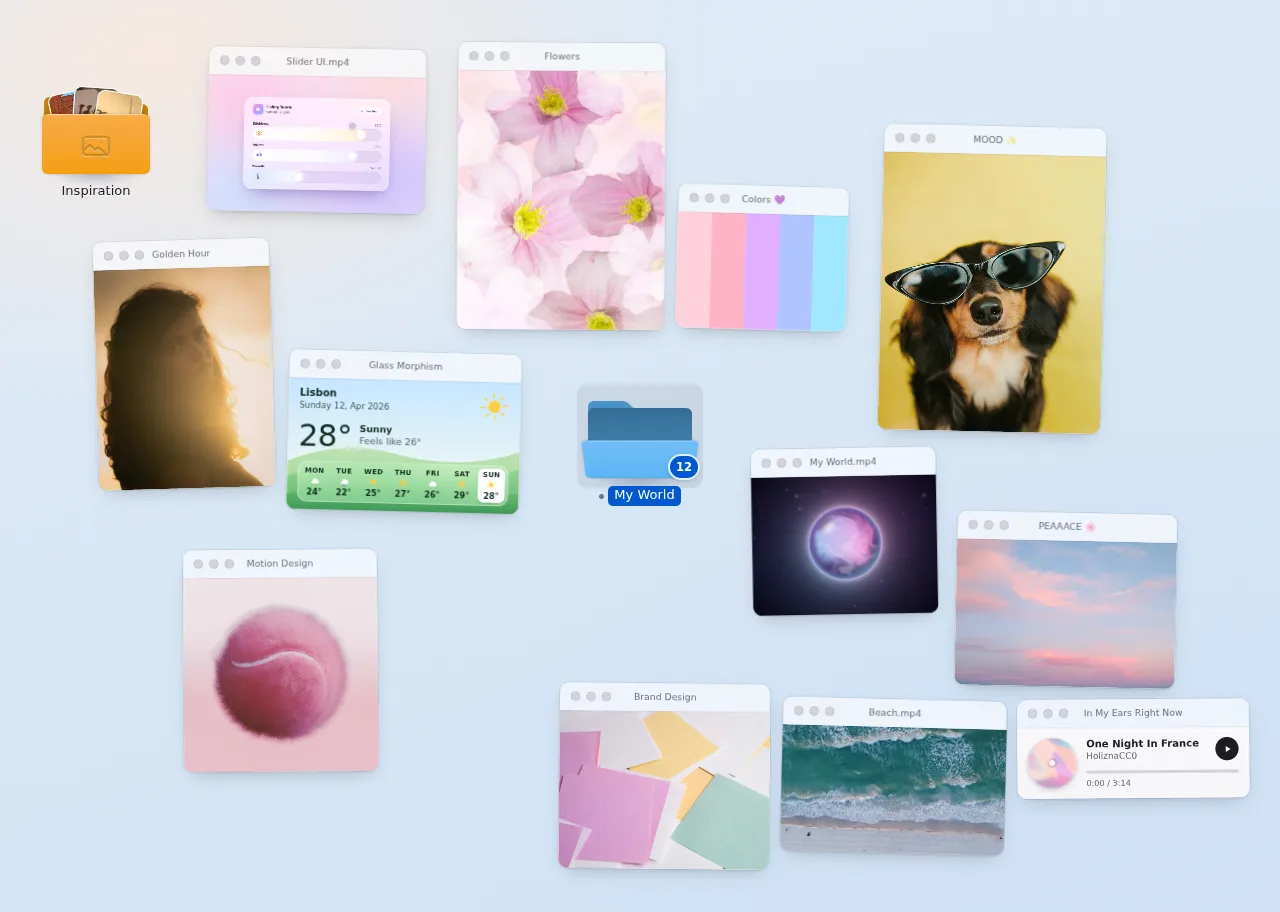
The product
Media Folder — macOS-Style Draggable Window Desktop for React & Framer MotionPro plan · Component
The product
Pro plan · Component
A macOS-style folder for React that bursts open into draggable windows: photos, videos, a working music player, weather and swatches with real traffic lights, focus, minimize and an expanded view. Framer Motion, light/dark themes, keyboard, touch and phone layouts.
npx shadcn@latest add @upfork/macos-folder-draggable-windows-reactMedia Folder turns a collection into a small macOS desktop for React. A folder sits on a wallpaper; hover it and its front panel hinges open. Open it and everything inside bursts out as windows that land around it, nearest first: photos, videos, a working music player, the weather, a colour palette, notes and links. The windows drag, tilt with your speed, glide when you let go, and have real traffic lights: red puts a window back in the folder, yellow minimises it, green expands it. Light and dark themes, keyboard and touch, a grid on tablets and a card stack on phones.
This article is for anyone, person or AI, building something that moves under the pointer in React: how a window drags with no React render, no layout and no paint, and seven traps that cost us frames, each measured, with its fix. The numbers come from an Intel Iris Plus laptop, the kind of integrated GPU most visitors have.
Every window's position, scale, tilt and shadow live in Motion values, and one pointermove listener on the desktop writes them. React never hears about a drag until it ends:
A trace of hover and drag shows zero React commits. But no renders is not the same as a cheap frame: the first drag trace still showed 66 layouts and 208 paints over 60 pointer moves. The traps below are how that went to no layout and no paint at all, with drag frames at a median of 16.4–16.8 ms, which is 60 fps.
The weather window draws its conditions as small icons: the sun's rays turn, rain and snow fall, a bolt flickers.
With the folder open and its videos paused, the page held 60 fps. With two videos playing, it dropped to about 30. Each clip alone held 60 fps, so it wasn't the files.
The windows have a frosted title bar (backdrop-filter) and a hairline border.
Opening the folder sends up to twelve windows flying out of it, each scaling up and turning as it goes. On the laptop, that open stalled for about 700 ms, and a CPU profile showed JavaScript nearly idle: the time went to the browser's own rendering work.
After trap 4, closing and reopening were smooth, but the very first open on a page still stalled for about 550 ms.
Two more things keep idle desktops cheap: a desktop scrolled off screen gets content-visibility: auto, so it skips rendering and its animations altogether, and the mesh wallpaper's slow drift pauses while it's out of view.
A focused window answers the keyboard like a Mac window: arrows move it, Enter expands it, Escape hands focus back to its folder.
50 unit tests; ESLint and TypeScript clean; axe finds no violations in light and dark, with the folder open, expanded and with a menu open. Lighthouse desktop: 98 for Performance and 100 for Accessibility, Best Practices and SEO, with CLS 0. Zero React commits during hover and drag; the drag is composite-only (no layout, no paint) at a median of 60 fps in Chrome on the Iris Plus laptop. 16.0 kB gzipped at first load; the windows' code and the expanded view load when they're needed (26.6 kB for every part). On UpFork it passed the importer and the preview builder with all three demos.
Put one or more <MediaFolder /> inside a <MediaDesktop />. A folder takes its label and items (images, videos, audio, weather, a palette, notes, links, or your own custom window with a render function), plus color, icon, a layout (scatter, grid or ring) with a seed, openOn (click or double-click), defaultOpen, sound, persistLayout to remember where windows were left, and renderImage to draw pictures with your own image component (next/image, say). The desktop takes a wallpaper (any CSS background, a two-colour gradient or the animated mesh) and a theme: light, dark or auto. Through a ref you can open(), close(), toggle(), focus(itemId) or tidy() a folder.
npx shadcn@latest add @upfork/macos-folder-draggable-windows-reactInstalls with your UpFork access token once you have it: see how on its page.
Written by
Ramin ValadanProved GitHub account and website, confirmed e-mail: checked by UpFork
Full-stack developer and founder of UpFork · .NET, React/Next.js and WebGL
This version is signed in UpFork’s ledger as entry #138, so anyone can check it hasn’t changed since it was published. Check it.
Something wrong in it, or against the rules? Report it.
Behind the build · Dynamic 3D Carousel for React & Next.js — Draggable Image & Video Slider
How Dynamic Carousel drives every card from one motion value: flick physics, a loop without clones, a 3D first paint that needs no script, and the useTransform trap Next.js hid from us.
Ramin ValadanProved GitHub account and website, confirmed e-mail: checked by UpFork11 min readAI
6 lessons

Behind the build · Perspective Cards — 3D Parallax Image Gallery Hero for React & Framer Motion
How Perspective Cards floats image cards in 3D around a headline with Motion values, and five traps: React Compiler lint, flex min-width, mobile LCP, Playwright clicks and bundle sizes.
Ramin ValadanProved GitHub account and website, confirmed e-mail: checked by UpFork5 min readAI
5 lessons
Behind the build · Wisp — AI Chat App Template for Next.js, shadcn/ui & Tailwind (Streaming, Research, Canvas)
How Wisp keeps a 520-message chat scrolling with Shiki in a Web Worker, persists to IndexedDB without crashing next start, and eight traps with blur, scrollbars and code blocks.
Ramin ValadanProved GitHub account and website, confirmed e-mail: checked by UpFork5 min readAI
8 lessons
the drag trace's invalidations pointed at the icon's SVG elements ("path.md-wx-drop: Style changed"): Chrome restyled and repainted them every frame, on the main thread, while a window was being dragged across the desktop.
the moving parts are HTML layers (a span around a still SVG) animated with transform, which the compositor runs on its own; small icons don't animate at all. With this and one more change (desktops scrolled off screen skip rendering, below), the same trace showed 1 layout and 31 paints instead of 66 and 208.
WeatherContent.tsx lines 18–27; styles.css lines 1113–1115.
one controller decides which videos play: only those on screen, uncovered and already landed, and while a window is being dragged, just one. The rest pause and pick up again when the drag ends.
useVisibilityPlayback.ts lines 48–59.
the title bar skips its blur while the window is in flight or under the pointer and gets it back when it rests, and the hairline border is drawn by the shadow layer behind the window, so nothing sits over its content. Three runs of the final build: medians of 16.4, 16.7 and 16.8 ms, with no layout or paint during the drag.
styles.css lines 612–631.
while a window flies it carries data-moving, which sets will-change: transform (so it moves as one cached bitmap) and drops the title bar's blur; both come back when it lands. Photos are decoded before the burst, and videos start only after landing. Closing and reopening then ran with a worst frame gap of about 40 ms. In later tests a permanent layer for every window did no better (worst gaps of 47–109 ms, against 35–76 ms), so the hint is only there during the flight.
MediaWindow.tsx lines 122–133; useVisibilityPlayback.ts line 48.
the windows mount as soon as their folder is hovered, focused or selected, and each is drawn once, at 1% opacity and at its resting size, for 300 ms, so the uploads happen before the click. In three later runs, the worst frame gap of a first open was 35–76 ms.
MediaWindow.tsx lines 231–249.
Delete and Backspace also close the focused window. Cmd/Ctrl+W is still handled for the browsers that pass it on.
MediaWindow.tsx lines 359–366.
every judgement of motion, and every measurement in this article, comes from a production build (next build, then next start).
the build notes; the traces and frame timings above were all taken on the production build.
/**
 * Dragging a window: 1:1 with the pointer from anywhere but its controls, a 2% lift, a tilt of up to 2° that
 * follows the horizontal speed, Shift to lock an axis, and on release a short glide (12% of the speed, 160px at
 * most) that springs to a stop on the stage. Everything runs on MotionValues through the desktop's single
 * pointermove listener: no React render while it moves. Arrow keys nudge 8px (Shift 32px).
*//**
* The five conditions as small drawings. The moving parts (turning rays, falling rain and snow, a flickering bolt)
* are HTML layers over a still SVG, so the compositor animates them without repainting; small icons stay still.
*/
export function WeatherIcon({ condition, size = 40 }: { condition: MediaItemWeatherCondition; size?: number }) {
const live = size >= 24;
return (
<span className={`md-wx md-wx--${condition}`} data-live={live || undefined} style={{ width: size, height: size }} aria-hidden>
{condition === "sun" && <span className="md-wx-rays">{RAYS}</span>}
<svg viewBox="0 0 40 40" width={size} height={size}>.md-wx[data-live] .md-wx-rays {
animation: md-spin 60s linear infinite;
} // Windows still flying in wait: decoding starts once they land (they schedule another check then).
const eligible = order.filter((k) => {
const v = vids.get(k);
return v && v.seen && !hold && !s.expanded && geo.get(k)?.el?.dataset.moving === undefined && !covered(k);
});
// While a window is dragged, one video keeps playing: two at once halve the frame rate on many laptop GPUs.
const playing = new Set(eligible.slice(0, busy ? 1 : max));
for (const [k, v] of vids) {
if (playing.has(k)) {
if (v.el.paused) v.el.play()?.catch(() => {});
} else if (!v.el.paused) v.el.pause();
}.md-win[data-moving] {
will-change: transform;
}
/* A window in flight or under the pointer re-blurs a new backdrop every frame: it skips the blur until it rests. */
.md-win[data-moving] .md-bar,
.md-win[data-dragging] .md-bar {
-webkit-backdrop-filter: none;
backdrop-filter: none;
}
/* The hairline border rides on the shadow layers, behind the window: nothing is drawn over its content (a layer
over a video costs a render pass every frame on integrated GPUs). */
.md-shadow {
position: absolute;
inset: 0;
border-radius: inherit;
box-shadow:
0 0 0 1px var(--md-glass-border),
var(--md-shadow-rest);
pointer-events: none;
} /**
* While a window flies it is drawn as one cached bitmap (will-change) and its title bar skips the backdrop blur;
* both come back when it lands, so a burst of twelve stays on the compositor.
*/
const flyTimer = useRef(0);
const flying = (seconds: number) => {
const node = el.current;
if (!node) return;
node.dataset.moving = "";
clearTimeout(flyTimer.current);
flyTimer.current = window.setTimeout(() => delete node.dataset.moving, seconds * 1000);
}; // Windows mount while their folder is only hovered, focused or selected. Each is drawn once, at 1% opacity, at
// its resting size: the GPU uploads its pictures now instead of on the first frame of the burst.
useIso(() => {
if (visible || d.reduced) return;
const r = resting();
if (!r) return;
x.set(r.x);
y.set(r.y);
scale.set(r.scale);
rotate.set(r.rotate);
opacity.set(0.01);
vis.set("visible");
const t = window.setTimeout(() => {
if (wm.isVisible(wkey)) return;
vis.set("hidden");
opacity.set(0);
}, 300);
return () => clearTimeout(t);
}, []); if ((e.metaKey || e.ctrlKey) && e.key.toLowerCase() === "w") {
e.preventDefault();
return close();
}
if (e.target !== e.currentTarget) return;
if (e.key === "Delete" || e.key === "Backspace") {
e.preventDefault();
close();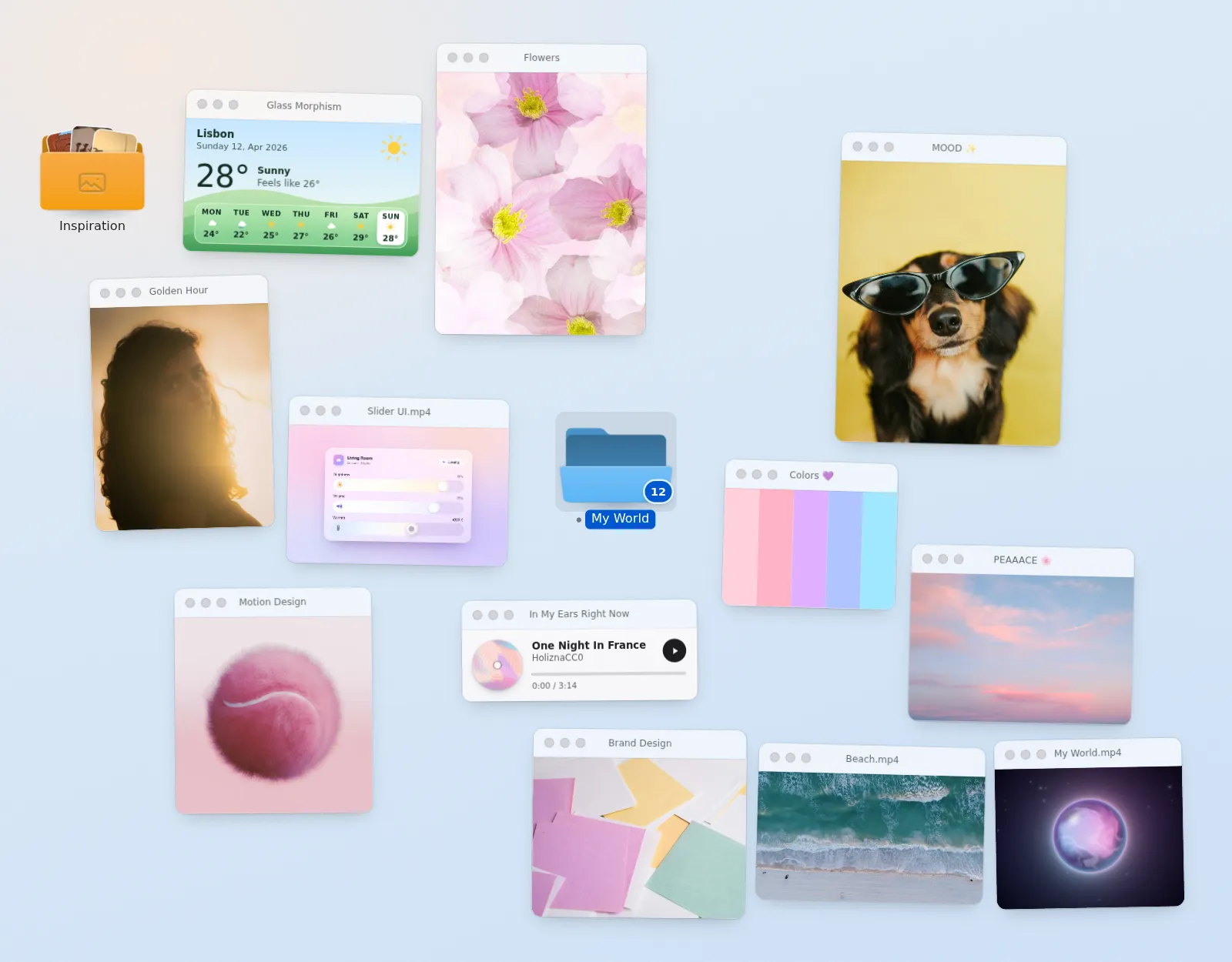
Comments
0 comments
No comments yet. Questions, what you built with it, what could be better: its developer reads them.
Sign in to comment.
Sign in to comment