A garment rail in React Native where each piece turns on its hook: perspective, bunching, swing
How Turnrail turns a garment from its front photo to its side photo in perspective, bunches the rail's ends, swings each piece as a pendulum and keeps a drag at 1:1, with Reanimated on the web too.
Ramin ValadanProved GitHub account and website, confirmed e-mail: checked by UpFork·32 min read·
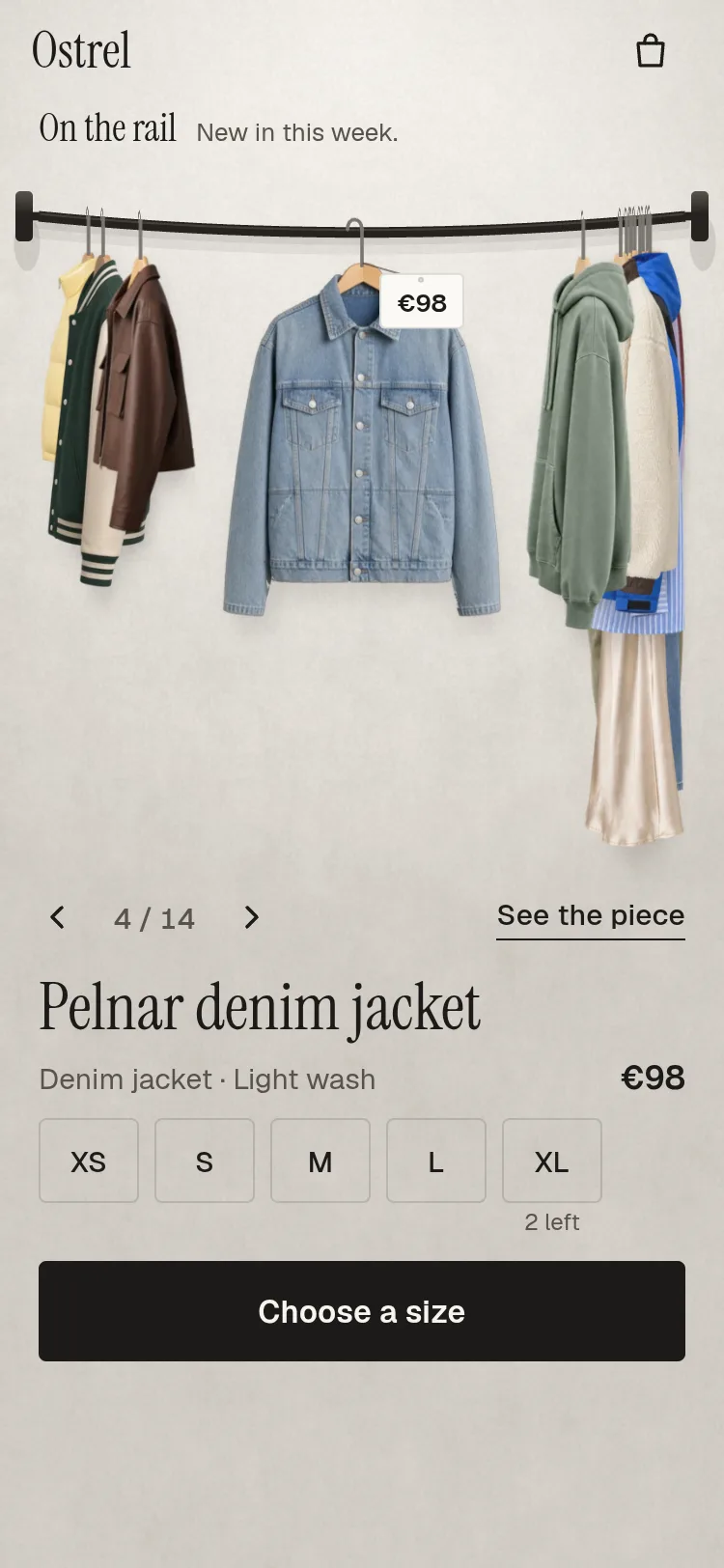
A clothing shop's rail for React Native and Expo: garments hang on a curved rail and turn to face you as they pass the front. Open one and it flies into a detail sheet with views, zoom, colours and sizes; add it and it flies into the bag. Light and dark.
Turnrail is a clothing rail for shop apps, written in React Native for Expo. Garments hang on hangers along a short rail. The piece in front faces you and can be bought right under the rail; its neighbours hang side-on, and the rest bunch up at the brackets like hangers pushed aside. Drag the rail and each piece turns as it passes the front, the pieces swing a little as the rail stops, and they settle.
This article is about the rail itself: the one number that places every piece, the pictures a turn needs, how a flat front photo turns in perspective and hands over to a side photo, how the ends bunch, how a drag stays under the finger and catches a moving rail, the pendulum, and what each frame costs on the web, with what helped and what did not. The tags, the flight into the detail sheet and into the bag, and React Native Web's traps are in a second article.
The demo's fourteen garments are AI-generated pictures (front, side, back, worn and close views of each piece), made for this product. None is a photograph of a real garment, and none shows a brand, a label or a person; the product's PHOTOS.md lists every one.
One number moves the rail
Everything on the rail is a function of one float, the rail's position p. p = 2 means piece 2 hangs in front; p = 2.5 means the rail is half way to piece 3. A drag writes p, a flick or a tap aims a spring at a whole number, and every piece's angle, place, stacking and bunching follow from p in worklets (on a phone, on the UI thread). React renders only when a move ends.
For piece i the signed distance to the front is d = i − p. Its turn angle is
θ = rest × smoothstep(|d|), with smoothstep(x) = x²(3 − 2x) on x clamped to 0..1,
where rest is 90° for a piece with a side photo and 70° for one without. So the front piece faces you (θ = 0), a piece one step or more away is side-on, and the turn happens while a piece crosses the middle. The ease is clamped before it is applied, because on the web a Reanimated timing's first frame can arrive at a slightly negative time (L-78XY).
Each piece's place comes from the pieces between it and the front. Two neighbouring hooks are held apart by what actually faces between them: piece a's reach towards b, a gap, and b's reach towards a, each at its present angle:
D(a, b) = reach_a,right(θ_a) + gap + reach_b,left(θ_b)
That is why the neighbours make room in the same motion as the turn: a piece turning to face you grows wider, and the spacing to both its neighbours grows with it in the same frame.
/** * Every piece's frame for rail position p. `settle` (model B only) is 0 while the rail moves and * runs to 1 as the piece in front turns to face you; model A ignores it. `dir` is 1, or -1 for * right-to-left (the order runs the other way). */export function railFrames(sizes: PieceSize[], shape: RailShape, p: number, model: number, settle: number, dir: number): RailFrame[] { 'worklet'; const n = sizes.length; const out: RailFrame[] = []; if (n === 0) return out; const pc = Math.min(n - 1, Math.max(0, p)); const angle = (i: number): number => { const d = i - pc; if (model === 0) return middleAngle(sizes[i], d); // Model B: side-on while moving; the piece nearest the front turns as the rail settles. const nearest = Math.round(pc); return i === nearest ? sizes[i].rest * (1 - smooth(settle)) : sizes[i].rest; }; const thetas: number[] = []; for (let i = 0; i < n; i++) thetas.push(angle(i)); const xs: number[] = new Array(n).fill(0); const f = Math.min(n - 1, Math.floor(pc)); const t = pc - f; const pair = (a: number, b: number): number => { // From hook a to hook b (the next piece): a's reach towards b, the gap, b's reach towards a. // The pictures are never mirrored, so right to left the next piece hangs to the left and the // reaches that meet are a's left and b's right (the first RTL screens put a tag off the edge). const ea = extents(sizes[a], thetas[a]); const eb = extents(sizes[b], thetas[b]); return dir > 0 ? ea[1] + shape.gap + eb[0] : ea[0] + shape.gap + eb[1]; }; if (f + 1 < n) { const D = pair(f, f + 1); xs[f] = -t * D; xs[f + 1] = xs[f] + D; } else { xs[f] = 0; } for (let i = f + 2; i < n; i++) xs[i] = xs[i - 1] + pair(i - 1, i); for (let i = f - 1; i >= 0; i--) xs[i] = xs[i + 1] - pair(i, i + 1); // Past an end (the rubber band) the whole rail slides on, at the end pair's spacing, and the far // bunch takes it up: the rail follows the finger a little instead of stopping dead. const over = p - pc; if (over !== 0 && n > 1) { const D = over > 0 ? pair(n - 2, n - 1) : pair(0, 1); for (let i = 0; i < n; i++) xs[i] -= over * D; } // Stacking by rank: the piece nearest the front on top. A z from the distance itself changed on // nearly every frame for every piece, and each change made Chrome repaint and re-layer the rail //; a rank changes only when two pieces swap order, at the half-way points. const order: number[] = []; for (let i = 0; i < n; i++) order.push(i); order.sort((a, b) => Math.abs(a - pc) - Math.abs(b - pc) || a - b); const rank: number[] = new Array(n).fill(0); for (let k = 0; k < n; k++) rank[order[k]] = k; for (let i = 0; i < n; i++) { const e = extents(sizes[i], thetas[i]); const [x, bunch] = bunchPlace(shape, shape.centre + dir * xs[i], e[0], e[1]); const d = i - pc; out.push({ x, y: sagAt(shape, x), theta: thetas[i], z: 1000 - rank[i], bunch, d }); } return out;}
The front pair is placed at −t × D and (1 − t) × D around the middle, where t is the fraction of p, and the rest are chained outwards from them. Past either end (p < 0 or p > n − 1) the whole rail slides on at the end pair's spacing and the far bunch takes it up: the rubber band. The last part of the function stacks the pieces, which the performance section comes back to.
Pictures made for a turn
A turn needs two pictures of the same garment on its hanger: one from the front and one from the side, at one camera height, one light and one scale. No such pair turned up among free photographs. In a search of a large free media library, every matched front, side and back series of one garment was a museum record shot on a dress form, and a garment on a form stands with its shoulders filled out, where on a hanger it falls from two points. Of 432 photographs that a search for clothes on hangers returned, about 60 showed a garment at all, 4 were front views on a hanger, and none had a side view to go with it. So the demo's pictures were made with an AI image tool, from one set of prompts, and then cut out, levelled and sized for phones.
Three things decide whether such pictures can turn at all.
The narrowest frame of the turn
Real lengths, not the picture's height
Catalogue pictures, real or generated, fill their frame the same way, so a cropped cardigan and a long dress arrive the same height. The rail draws every piece from its length in centimetres instead, from the hanger's top to the hem. The layout picks one scale, points per centimetre, so that the longest piece in the data fits under the rail, and each picture's height follows from its length and where its hook sits in it:
/** The rail's shape and scale for a box: the rail across the top, the longest piece fitting below. */export function railLayout(width: number, top: number, bottom: number, longest: number): RailLayout { const bracket = 14; const left = bracket + 6; const right = width - bracket - 6; const y = top + 24; const sag = 0.025 * (right - left); const drop0 = 16; const room = bottom - (y + sag + drop0) - 8; // At most 3 pt per cm: larger, and the three pieces with room no longer leave the bunches any // (and the rail pictures are made for 3 pt per cm at 2x, so nothing is enlarged). const cap = Math.min(5, RAIL_PICTURE_PT_PER_CM * Math.max(1, width / 430)); const ptPerCm = Math.max(0.8, Math.min(cap, room / Math.max(1, longest))); const k = ptPerCm / 2.6; return { shape: { left, right, centre: width / 2, y, sag, gap: Math.max(8, 15 * k), bunchDepth: Math.max(30, 0.1 * width) }, ptPerCm, drop: Math.max(11, drop0 * Math.min(1, k * 1.15)), used: y + sag + Math.max(11, drop0 * Math.min(1, k * 1.15)) + longest * ptPerCm + 26, };}/** Each piece's drawn sizes at the rail's scale, from its photos and its real length. */export function pieceGeometry(g: Garment, colourway: number, layout: RailLayout, frontOnly = false, draw = 0): PieceGeometry { const cw = g.colourways[Math.min(colourway, g.colourways.length - 1)]; const F = cw.front; const S = frontOnly ? undefined : cw.side; const L = g.length ?? DEFAULT_LENGTH; const hf = (L * layout.ptPerCm) / Math.max(0.5, 1 - F.hook[1]); const wf = (F.width * hf) / F.height; if (S) { const hfSide = (L * layout.ptPerCm) / Math.max(0.5, 1 - S.hook[1]); return { wf, hf, ws: (S.width * hfSide) / S.height, hx: F.hook[0], hs: S.hook[0], rest: SIDE_ANGLE, draw, hfSide, hyFront: F.hook[1], hySide: S.hook[1], drop: layout.drop }; } return { wf, hf, ws: 0.3 * wf, hx: F.hook[0], hs: 0, rest: FRONT_ONLY_ANGLE, draw: 0, hfSide: hf, hyFront: F.hook[1], hySide: F.hook[1], drop: layout.drop };}
The front and the side of one piece get the same scale from the same length, which is also what makes them join at the hook and the hem.
Two pictures joined at the hook
The two pictures must line up where the garment really is the same in both views. The brief said "the hook point and the shoulder line"; only one of those holds.
One more property of a hanging garment does the levelling, and it matters again for the swing below.
The turn: perspective, then a wipe to the side photo
The obvious drawing is the brief's: the garment as a box turning on its hook, the front photo on one face foreshortened by cos θ and the side photo on the other by sin θ, with a shading band at the fold. It was built first, and it is still in the code as draw: 1, kept to compare on the strips.
The angle at which the front hands over
The front turns from 0 to an angle φ_side while the piece turns from 0 to 81°, and it must arrive exactly as wide as the side photo it hands over to. Its drawn width at a perspective angle φ, front plus edge, is
w(φ) = wf cos φ + e sin φ, with e = 0.045 × wf the edge's depth.
The target is 88% of the side photo's width ws, and never under 0.34 of the front: a hair narrower than the side photo, so the front's outline sits inside the side's while the wipe line crosses it (at the full width its leading edge stood a hair outside and showed as a line). Writing w(φ) as one cosine,
w(φ) = R cos(φ − α), with R = √(wf² + e²) and α = atan2(e, wf),
so φ_side = α + acos(target / R), and the front's angle runs linearly with the piece's, φ = φ_side × min(θ, 81) / 81. From 81° to 89° the wipe runs from 0 to 1 on a smoothstep, and the piece's reach left and right of its hook is blended from the turned front's to the side photo's by the same amount, so the spacing on the rail stays continuous through the hand-over.
/** * The drawn edge's depth for the perspective turn, as a share of the front's width. The edge is * the front's own outline pushed back by this much (an extrusion), not a squeezed copy of the * picture: a squeezed copy read as a second, thin jacket beside the first. */export const EDGE = 0.045;/** The wipe from the turned front to the side photo, in degrees of turn. */export const WIPE_FROM = 81;export const WIPE_TO = 89;export type Turn = { /** The front picture's perspective angle, in degrees. */ phi: number; /** 0: all front; 1: all side photo. Between: a wipe whose line runs from the trailing edge. */ wipe: number; /** The piece's reach left and right of its hook. */ left: number; right: number;};/** * The perspective turn (draw 0). Two photos of a whole garment cannot be joined as the faces of * a box: each is a full view, so between 35° and 55° the composite drew two jackets side by side *. Instead the front picture turns in perspective with a drawn edge, narrowing until * front and edge are exactly as wide as the side photo (angle phiSide), and near side-on a short * wipe hands over to the side photo at that width. One silhouette at a time, both opaque, and * never narrower than the side photo, which is a third or more of the front. * Without a side photo it is the front-only turn: perspective and edge all the way to 70°. */export function perspectiveTurn(s: PieceSize, theta: number): Turn { 'worklet'; const e = EDGE * s.wf; if (s.rest < SIDE_ANGLE) { const c = Math.cos(theta * DEG); const sn = Math.sin(theta * DEG); return { phi: theta, wipe: 0, left: s.hx * s.wf * c, right: (1 - s.hx) * s.wf * c + e * sn }; } // The front hands over a little narrower than the side photo (88%), so its outline sits inside // the side's while the wipe line crosses: at full width its leading edge stood a hair outside // and showed as a line. Never under a third of the front's width. // wf cos φ + e sin φ = target, as R cos(φ − α) = target. const target = Math.max(0.88 * s.ws, 0.34 * s.wf); const R = Math.hypot(s.wf, e); const alpha = Math.atan2(e, s.wf); const phiSide = (alpha + Math.acos(Math.min(1, target / R))) / DEG; const phi = phiSide * Math.min(theta, WIPE_FROM) / WIPE_FROM; const wipe = smooth((theta - WIPE_FROM) / (WIPE_TO - WIPE_FROM)); const c = Math.cos(phi * DEG); const sn = Math.sin(phi * DEG); const lf = s.hx * s.wf * c; const rf = (1 - s.hx) * s.wf * c + e * sn; const ls = s.hs * s.ws; const rs = (1 - s.hs) * s.ws; return { phi, wipe, left: lf + (ls - lf) * wipe, right: rf + (rs - rf) * wipe };}
Drawing it: the edge, the wipe, and no animated widths
A piece is a stack of Animated.Images that all share one source. The front is drawn, then a black-tinted copy over it whose opacity is 0.26 × (1 − cos φ) (the side turning away from the light), then a surface-tinted copy for depth in a bunch. Behind the front, the edge is the same picture again, turned with it and shifted by e × sin φ towards the receding side, under a black copy at 40%. Shading by tinted copies of the picture itself keeps every shade inside the garment's outline: nothing spills onto the wall.
  // ── The front face ─────────────────────────────────────────────────────────────────────────
  const frontT = (th: number) => {
    'worklet';
    if (composite) {
      const f = turnFaces(geo, th);
      return [{ translateX: f.frontShift }, { scaleX: Math.max(Math.cos(th * DEG), 0.0001) }];
    }
    return [{ perspective: PERSPECTIVE }, { rotateY: `${-perspectiveTurn(geo, th).phi}deg` }];
  };
  // The drawn edge: the front's own outline, turned with it and pushed back towards the receding
  // side by the garment's depth, filled with its own colour darkened, behind the front. It meets
  // the outline everywhere, and at 0° it hides exactly behind the front.
  const edgeT = (th: number) => {
    'worklet';
    const phi = perspectiveTurn(geo, th).phi;
    return [{ translateX: EDGE * geo.wf * Math.sin(phi * DEG) }, { perspective: PERSPECTIVE }, { rotateY: `${-phi}deg` }];
  };
  // The side photo: still in the default drawing, compressed by sin θ in the composite.
  const sideT = (th: number) => {
    'worklet';
    if (composite) {
      const f = turnFaces(geo, th);
      return [{ translateX: f.sideShift }, { scaleX: Math.max(Math.sin(th * DEG), 0.0001) }];
    }
    return [{ translateX: -geo.hs * geo.ws }];
  };
  const frontZ = (th: number) => {
    'worklet';
    return composite && th >= 45 ? 10 : 20;
  };
  const frontShadeOf = (th: number) => {
    'worklet';
    const phi = composite ? th : perspectiveTurn(geo, th).phi;
    return 0.26 * (1 - Math.cos(phi * DEG));
  };
The wipe is two clipping boxes, one ending at a moving line and one starting at it. Each box slides with the line, and the picture inside it slides back by the same amount, so the pictures stay put while the line sweeps across the garment. The line is at right + 4 − wipe × (right + left + 8): just past the turned front's trailing edge at wipe = 0 and just past the side photo's other edge at wipe = 1. Nothing animates a width: on the web an animated width lays the page out again every frame.
The front-only turn, for shops with no side photos, is the same perspective turn with its edge and no wipe, resting at 70° so the front is still recognisable side-on.
Making room, and bunching at the brackets
Chaining hooks outwards from the front gives places that run off both ends of the rail. Towards each bracket the places are compressed: identity inside a band, and an exponential approach to a limit outside it. For a place x past the inner limit hi,
x' = hi + B × (1 − e^(−(x − hi)/B)),
which follows x at first and never passes hi + B, however far x goes. B is the bunch's depth (a tenth of the rail's width, at least 30 pt). How deep a piece is in the bunch, clamp((x − hi) / 2B), tints it towards the wall a little and damps its swing more.
/** * Pieces near a bracket pile up: identity inside, an easing towards the bracket outside. The * limit is the piece's own outline, not its hook: with the hook as the limit, a side-on piece's * body hung past the bracket and off the screen (first stills). */export function bunchPlace(shape: RailShape, x: number, reachL = 0, reachR = 0): [number, number] { 'worklet'; const B = shape.bunchDepth; const hi = shape.right - reachR - B; const lo = shape.left + reachL + B; if (x > hi) { const over = x - hi; return [hi + B * (1 - Math.exp(-over / B)), clamp01(over / (2 * B))]; } if (x < lo) { const over = lo - x; return [lo - B * (1 - Math.exp(-over / B)), clamp01(over / (2 * B))]; } return [x, 0];}
Right to left, the rail runs the other way, but a shop cannot show its garments flipped: a pocket or a zip would be on the wrong side. So every photo stays as shot, and only the order is mirrored.
Drag at 1:1, flicks, and catching a moving rail
A drag must keep the piece under the finger under the finger. One step of the rail is not a fixed number of points: it is the distance between the two hooks the front lies between, at their present angles, and it changes as they turn. So each move of the finger is divided by the step width at that moment:
/** * How many points one step of the rail is at position p: the distance between the two hooks the * front lies between, at their present angles. A drag moves p by its pixels over this, so the * piece under the finger follows it 1:1. */export function stepWidth(sizes: PieceSize[], shape: RailShape, p: number, model: number, settle: number, dir = 1): number { 'worklet'; const n = sizes.length; if (n < 2) return 1; const pc = Math.min(n - 1, Math.max(0, p)); const a = Math.min(n - 2, Math.floor(pc)); const angleOf = (i: number): number => { if (model === 0) return middleAngle(sizes[i], i - pc); return i === Math.round(pc) ? sizes[i].rest * (1 - smooth(settle)) : sizes[i].rest; }; const ea = extents(sizes[a], angleOf(a)); const eb = extents(sizes[a + 1], angleOf(a + 1)); return Math.max(1, dir > 0 ? ea[1] + shape.gap + eb[0] : ea[0] + shape.gap + eb[1]);}
The pan uses Gesture Handler 2.32 on all platforms, with three lessons from earlier UpFork products applied as found: dx is taken from absoluteX between updates rather than from translationX, which on the web counts from activation (L-S7AS); the flick's speed comes from the pan's own samples of the last 100 ms when velocityX reads 0 (L-ACFA); and a release more than 80 ms after the last real move counts as a release at rest (L-9DC7). Past an end, the finger's travel counts at 0.32.
  const pan = Gesture.Pan()
    .enabled(n > 1)
    .activeOffsetX([-10, 10])
    .failOffsetY([-10, 10])
    .onBegin((event) => {
      // A hand on a moving rail catches it, where it is.
      cancelAnimation(p);
      aim.value = Math.round(p.value);
      startX.value = event.absoluteX;
      lastX.value = event.absoluteX;
      startTime.value = Date.now();
      lastMove.value = Date.now();
      samples.value = [event.absoluteX, Date.now()];
      // A finger resting on a piece shows its price (a mouse has shown it already, by hovering).
      pointAt(pieceAt(event.x, event.y + topBar));
    })
    .onStart(() => {
      scheduleOnRN(startSwing);
      scheduleOnRN(markMoved);
    })
    .onUpdate((event) => {
      // Measured from pointer-down, not from activation, so the first pixels count (L-S7AS).
      const dx = event.absoluteX - lastX.value;
      lastX.value = event.absoluteX;
      if (dx !== 0) {
        lastMove.value = Date.now();
        samples.value = [...samples.value.slice(-12), event.absoluteX, Date.now()];
      }
      const step = stepWidth(geos, shape, p.value, 0, 1, dirN);
      const beyond = p.value < 0 || p.value > last;
      p.value -= (dirN * dx * (beyond ? RUBBER : 1)) / step;
    })
    .onEnd((event) => {
      const resting = Date.now() - lastMove.value > RESTING_MS;
      const speed = Math.abs(event.velocityX) > 1 ? event.velocityX : trackedSpeed(samples.value);
      const step = stepWidth(geos, shape, p.value, 0, 1, dirN);
      const velocity = resting ? 0 : (-dirN * speed) / step;
      const from = Math.round(p.value);
      let target = Math.round(p.value + velocity * FLICK_CARRY);
      // A deliberate flick always moves at least one piece.
      if (target === from && Math.abs(velocity) > 1.4) target = from + Math.sign(velocity);
      springTo(target, velocity);
    })
    .onFinalize((event, success) => {
      // A lifted finger lets its tag go, after the grace; a mouse keeps it while it stays.
      if (event.pointerType !== PointerType.MOUSE) pointAt(-1);
      if (success) return;
      const still = Math.abs(event.absoluteX - startX.value) < 10 && Date.now() - startTime.value < 450;
      // The gesture's view starts topBar below the rail view, whose points the tags are in.
      if (still) tapAt(event.x, event.y + topBar);
      else springTo(p.value);
    });
At the release, the velocity in steps per second is carried forward for 0.32 s and rounded to a piece, and a deliberate flick (over 1.4 steps a second) always moves at least one. One spring takes it there, critically damped for mass 1, so its damping is 2√k:
ẍ = −k (x − target) − c ẋ, with k = 90 and c = 2√90 ≈ 18.97.
Its natural frequency is √90 ≈ 9.5 rad/s and a step settles in about 700 ms, with no overshoot past the piece it aims at. The flick's speed is passed to the spring as its initial velocity, so the release is continuous. A hand landing on a moving rail cancels the spring in onBegin and the drag carries on from wherever the rail is: that is what "catching" a moving rail means here, and it needs nothing more because p is the only state.
/** * Critically damped (damping = 2 sqrt(stiffness) for mass 1), so it never overshoots a piece. One * step settles in about 700 ms: inside the 550-750 ms aimed for, and a touch softer on landing than * the first 650 (an eased landing, never a stop). Arrow steps use the same spring. */export const SNAP = { stiffness: 90, damping: 18.97, mass: 1, restDisplacementThreshold: 0.002, restSpeedThreshold: 0.004 };/** Reduced motion: no spring, a short settle. */export const REDUCED = { duration: 160 };/** How far a flick carries, in seconds of its speed: a flick at 6 steps a second goes about 2. */export const FLICK_CARRY = 0.32;/** Past an end, the rail gives this much of the finger's travel (the rubber band). */export const RUBBER = 0.32;/** A release this long after the last real move is a release at rest (L-9DC7). */export const RESTING_MS = 80;/** * Speed from the pan's own samples [x, t, x, t, ...] over the last 100 ms, in points a second: * Gesture Handler's velocityX can be 0 at the end of a quick web flick (L-ACFA). */export function trackedSpeed(samples: number[]): number { 'worklet'; const n = samples.length; if (n < 4) return 0; const x1 = samples[n - 2]; const t1 = samples[n - 1]; let k = n - 4; while (k >= 2 && t1 - samples[k - 1] <= 100) k -= 2; const dt = t1 - samples[k + 1]; return dt > 0 ? ((x1 - samples[k]) / dt) * 1000 : 0;}
In a scrolling page the rail is one section among others, and a vertical swipe that starts on it must still scroll the page.
The swing
Each piece is a damped pendulum about the point where its hook meets the rail, pushed by the rail's acceleration. A garment on a hook that speeds up to the right hangs back to the left; when the hook stops, the garment's lag behind it swings it forward and it settles. Per frame, for each piece,
ψ is the piece's swing in degrees, positive clockwise on screen;
ω = 2π × 1.3 rad/s, about 1.3 swings a second;
ζ = 0.68 of critical, plus 0.45 × bunch in a bunch, where hangers knock together;
a is its hook's acceleration on screen in points per second squared, worked out from the rail's position over the last frames and the step width: a = −dir × (Δv / Δt) × step;
g = 0.0061 degrees per pt/s² is how far it hangs back;
lag is two frames per step from the front, so the push travels outwards along the rail, as on a real one.
It is integrated with semi-implicit Euler at the frame's own interval, clamped to 50 ms, inside a useFrameCallback that stops itself after 120 ms still (under 0.05° and 0.3°/s), so at rest nothing runs.
/** * Pendulum constants: about 1.3 swings a second. Damped at 0.68 of critical, a garment's second * swing is about 5% of its first: one small swing on landing, where 0.5 rocked it back * by a fifth. */export const SWING = { omega: 2 * Math.PI * 1.3, zeta: 0.68, /** Degrees a garment hangs back per point per second squared of its hook's acceleration. */ gain: 0.0061, /** Never more than this many degrees. */ max: 2.6, /** Frames of delay per step from the front: the push travels outwards. */ delayPerStep: 2,};export type SwingState = { psi: number[]; vel: number[]; /** The hooks' recent accelerations on screen, newest first, in points per second squared. */ accel: number[]; lastP: number; lastV: number; quiet: number;};export function swingState(n: number, p: number): SwingState { 'worklet'; return { psi: new Array(n).fill(0), vel: new Array(n).fill(0), accel: new Array(16).fill(0), lastP: p, lastV: 0, quiet: 0 };}/** * One frame of every pendulum, as a new state (a shared value's object is never changed in place). * Each garment is pulled towards the angle it would hang at under its hook's present acceleration * (it hangs back as the rail speeds up); its lag behind that pull is what swings it forward when * the rail stops. `step` is the rail's points per step at the front, `dir` 1 or -1 (right-to-left), * `ds` each piece's distance to the front in steps, `bunch` how deep in a bunch (more damping: * hangers that knock together). `quiet` counts the still time; the caller stops at 120 ms. */export function swingStep(s: SwingState, p: number, dtMs: number, step: number, dir: number, ds: number[], bunch: number[]): SwingState { 'worklet'; const dt = Math.min(0.05, Math.max(0.001, dtMs / 1000)); const v = (p - s.lastP) / dt; // A rising p slides the hooks left on screen (right in right-to-left). const a = -dir * ((v - s.lastV) / dt) * step; const accel = [Number.isFinite(a) ? a : 0, ...s.accel.slice(0, s.accel.length - 1)]; let moving = Math.abs(v) > 0.002; const w = SWING.omega; const psi: number[] = []; const vel: number[] = []; for (let i = 0; i < s.psi.length; i++) { const lag = Math.min(accel.length - 1, Math.round(Math.abs(ds[i] ?? 0) * SWING.delayPerStep)); const zeta = SWING.zeta + 0.45 * (bunch[i] ?? 0); // Rotate(+) turns clockwise on screen, which swings a hanging garment's hem to the left: the // way it hangs back when its hook accelerates to the right. const rest = Math.max(-SWING.max, Math.min(SWING.max, SWING.gain * accel[lag])); const acc = -w * w * (s.psi[i] - rest) - 2 * zeta * w * s.vel[i]; const nv = s.vel[i] + acc * dt; const np = Math.max(-SWING.max, Math.min(SWING.max, s.psi[i] + nv * dt)); // Still once under what the eye can see (0.05 degrees): stricter, the frames ran 1.9 s. if (Math.abs(np) > 0.05 || Math.abs(nv) > 0.3) moving = true; psi.push(np); vel.push(nv); } return { psi, vel, accel, lastP: p, lastV: v, quiet: moving ? 0 : s.quiet + dtMs };}
On a phone Reanimated runs all of this on the UI thread. On the web the worklets run on the page's own thread, and Reanimated's web style writer turns every animated style into DOM writes. Every number in this section is from the production web export in installed Chrome, headless with ANGLE, at 390 × 844, on a development machine that other test suites kept 40–63% busy. Nothing in it was measured on a real phone.
Layers, stacking by rank, and numbers that settle
The first slow drag ran at a median of 23.9 ms a frame and a p95 of 55.8 ms. A trace put 4.7 ms a frame into Chrome's Layerize and 7,800 paints into 2 s; a CPU profile put Reanimated's web style writer at the top.
  // The numbers the styles below are made from, each a shared value of its own. Away from the front
  // they stop changing (a piece in a bunch keeps its angle while the rail moves on), and a shared
  // value set to the number it already holds tells no one, so those styles do not run again. Every
  // style that read the frames itself was worked out and written to the page on every frame for
  // every piece: about 250 style writes a frame, the slowest part of a drag.
  const thV = useDerivedValue(() => thetaOf(frames.value[index]));
  const bunchV = useDerivedValue(() => {
    const f = frames.value[index];
    return f ? Math.round(f.bunch * 200) / 200 : 0;
  });
  const liftV = useDerivedValue(() => liftOf(frames.value[index]));
  const psiV = useDerivedValue(() => (swing ? Math.round((swing.value[index] ?? 0) * 100) / 100 : 0));
The rank is worked out in railFrames itself (the last part of the first excerpt): sort the pieces by distance to the front, and give each 1000 − rank. It changes only at the half-way points, where two pieces swap which is nearer.
Writing the hot transform yourself
Even with settled values, the root of every moving piece has to change every frame of a drag, and each of those goes through Reanimated's style mapper and React Native Web's style resolver. On the web the worklets run on the page's thread anyway, so the hottest ones skip both: an animated reaction builds the transform string and writes it to the element, and only when the string changed.
  // The piece swings about where its hook meets the rail, so the hook never leaves the rail's
  // curve: placed at that point, turned by the swing, then hung down by the hook's drop.
  const root = useAnimatedStyle(() => {
    if (WEB) return {};
    const f = frames.value[index];
    if (!f) return { opacity: 0 };
    return { opacity: 1, zIndex: f.z, transform: [{ translateX: f.x }, { translateY: f.y }, { rotate: `${psiV.value}deg` }, { translateY: geo.drop }] };
  });
  // On the web the worklets run on the page's own thread, so the root writes its transform to its
  // element directly, and only when it changed: through a style mapper, React Native Web converted
  // the whole style for every piece on every frame. A phone keeps the mapper.
  const rootRef = useRef<View>(null);
  if (WEB) {
    // eslint-disable-next-line react-hooks/rules-of-hooks -- WEB is fixed for the app's life.
    useAnimatedReaction(
      () => {
        const f = frames.value[index];
        return f ? `translate(${f.x}px, ${f.y}px) rotate(${psiV.value}deg) translateY(${geo.drop}px)|${f.z}` : '';
      },
      (v, was) => {
        if (v === was) return;
        const el = rootRef.current as unknown as { style: Record<string, string> } | null;
        if (!el) return;
        if (!v) {
          el.style.opacity = '0';
          return;
        }
        const bar = v.indexOf('|');
        el.style.transform = v.slice(0, bar);
        el.style.zIndex = v.slice(bar + 1);
        el.style.opacity = '1';
      },
      [geo.drop],
    );
  }
Mounting fewer pieces, at the right moment
With 40 pieces on the rail, a move drew 40 pieces' layers. Only the front, its neighbours and about eight in each bunch are mounted (front ±10 on a phone, ±12 on a tablet), and the window moves with the rail.
  // Only the pieces near the front are mounted: with 40 on the rail, a move drew 40 pieces' layers.
  const reach = tablet ? MOUNT_TABLET : MOUNT_PHONE;
  // The window moves with the rail when it settles, a render at rest; mid-move only when the front
  // comes within four of its edge (moving it at every third piece mounted pieces mid-flick: 172 ms).
  const [center, setCenter] = useState(index);
  const centerAt = useSharedValue(index);
  const windowed = n > 2 * reach + 1;
  useEffect(() => {
    // Only when the window is in use: otherwise the extra render after each settle is wasted.
    if (!windowed) return;
    centerAt.value = index;
    setCenter(index);
  }, [index, centerAt, windowed]);
  useAnimatedReaction(
    () => Math.round(p.value),
    (now) => {
      if (Math.abs(now - centerAt.value) > reach - 4) {
        centerAt.value = now;
        scheduleOnRN(setCenter, now);
      }
    },
    [reach],
  );
  // At first only the front and two each side: their pictures are asked for first and nothing else
  // competes with them; the rest fill in once the front's picture is in (loading). The first
  // render with every piece put the front's picture 0.5-0.75 s after the scripts on fast 4G.
  const [warm, setWarm] = useState(false);
  const warmUp = useCallback((i: number) => {
    if (i === settledRef.current) setWarm(true);
  }, []);
  useEffect(() => {
    if (warm) return undefined;
    const t = setTimeout(() => setWarm(true), 1500);
    return () => clearTimeout(t);
  }, [warm]);
  const lo = !warm ? Math.max(0, index - 2) : n > 2 * reach + 1 ? Math.max(0, center - reach) : 0;
  const hi = !warm ? Math.min(last, index + 2) : n > 2 * reach + 1 ? Math.min(last, center + reach) : last;
  const mount = useMemo(() => ({ lo, hi }), [lo, hi]);
Measuring it honestly
Where the budgets stand
At 1× CPU on the busy machine, after all of the above: a slow drag's p95 is about 19.5 ms, a flick 18–19.5 ms, an arrow step 17.5–18.1 ms, a fling to the end 18.2–18.5 ms, and the flights 17 ms. The budget aimed for was 17.5 ms, so the drag still misses it by about 2 ms. At rest, 0 animation frames and 0 DOM changes.
At 4× CPU slowdown the budget of 16.7 ms is not met: the drag's p95 is 84–114 ms, a flick 179 ms, a step 252 ms. What is left in a frame is mostly the browser's own Layerize, which grows with the number of layers, and the turning photos need theirs. A low-end phone's web view would run this rail at well under 60 fps. On a phone app, where Reanimated runs the same worklets on the UI thread, none of this was measured.
The next step, not taken, would be to hand the rail's own motion to the compositor on the web once the finger lifts (keyframes for the settle), so a throttled main thread could not drop its frames.
What was measured, and what was not
Measured on the production web export, frame by frame: hooks within 0.001 pt of the rail in every frame of every film; the thinnest piece 0.338 to 0.401 of its front; 0 frames with two cards showing; the swing at most 2.6°; still 458 to 966 ms after the last move; the frame budgets above.
Not measured: anything on a real phone, iOS or Android; the 4× budget on a quiet machine; a finger scrolling the page past the rail (only a real touch swipe sideways and vertically on the rail itself).
Make it yours
Turnrail — Fashion Shop Product Carousel & Detail Sheet for React Native and Expo isn’t installed with a command: get it from its page.
The rail needs, per garment, a cut-out front photo and, for the full turn, a side photo of the same piece, each with its hook point [x, y] (0..1, where the hanger's neck meets its hook) and the garment's length in cm. A piece without a side photo turns front-only and rests at 70°. dir="rtl" runs the rail right to left without mirroring a single photo. The pendulum's constants are in motion.ts (SWING), the snap spring's in SNAP, and the bunch's depth and the gap in railLayout. The tags that hang from these hooks, and the flight off the hook into the detail and into the bag, are the subject of the second article.
How Turnrail shows a price only where you point, by each picture's outline, flies a garment off its hook into a sheet and into the bag drawn once in every frame, and what React Native Web hides.
Ramin ValadanProved GitHub account and website, confirmed e-mail: checked by UpFork·28 min read··AI
20 lessons
Behind the build
Behind the build · Fluid Tab Bar — Animated Liquid Bottom Navigation for React Native & Expo

Comments
0 comments
No comments yet. Questions, what you built with it, what could be better: its developer reads them.
Sign in to comment.
Sign in to comment