Swing tags and a flight off the hook in React Native: outline hit-tests, shared elements, web traps
How Turnrail shows a price only where you point, by each picture's outline, flies a garment off its hook into a sheet and into the bag drawn once in every frame, and what React Native Web hides.
Ramin ValadanProved GitHub account and website, confirmed e-mail: checked by UpFork·28 min read·
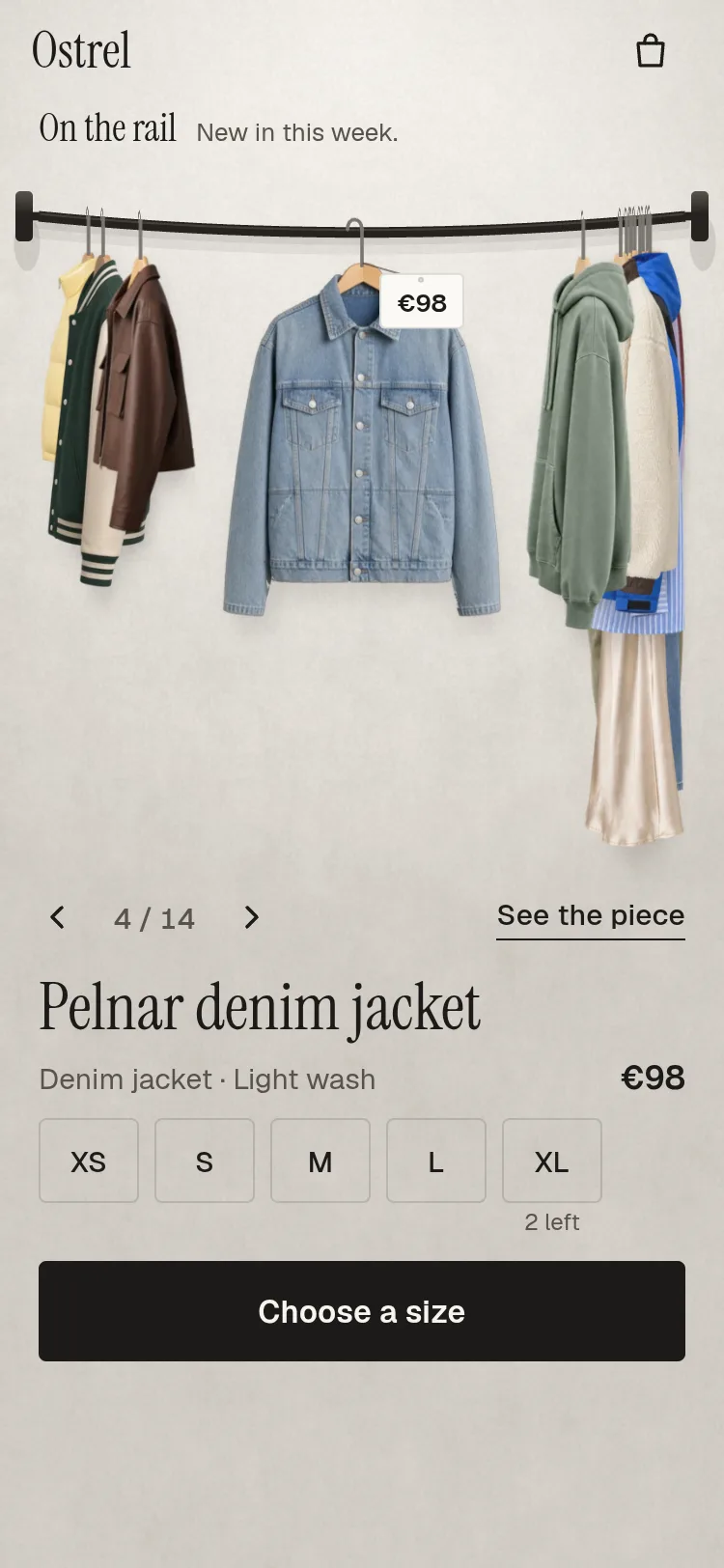
A clothing shop's rail for React Native and Expo: garments hang on a curved rail and turn to face you as they pass the front. Open one and it flies into a detail sheet with views, zoom, colours and sizes; add it and it flies into the bag. Light and dark.
Turnrail is a clothing rail for shop apps in React Native for Expo: garments on hangers, the piece in front facing you, the rest side-on and bunched at the brackets. The piece in front wears a paper swing tag with its price; any other piece shows its own price while you point at it. Open a piece and it flies off its hook into a detail sheet; add it to the bag and a copy flies into the bag button, wherever that button is.
This article is about everything that hangs from or leaves the rail: the swing tags and the hit test that decides which garment you are pointing at, the shared-element flight into the detail sheet and back, the flight into the bag, the traps React Native Web 0.21 sets for touches and screen readers, and what it took to ship the pictures at every screen density. How the rail turns, bunches and swings is in a first article.
The demo's garments are AI-generated pictures made for the product: none is a photograph of a real garment, and none shows a brand, a label or a person. The product's PHOTOS.md lists every one.
Swing tags: one at rest, one under the pointer
A tag is a small paper card on a thread from the hanger's neck, swinging with its piece. Where it hangs is worked out every frame in one worklet, tagLayout, from the rail's frames, each tag's measured size and each piece's swing; the drawing and the tap test read the same boxes.
The front's tag hands over at edge-on
The front piece's tag hangs beside its neck, on the reading side, so it never covers the garment's face. As its piece turns away, the tag narrows with it:
scaleX = max(0.06, |cos 2θ|)
which is 1 facing you, a sliver at 45° and wide again side-on. The full tag is shown only while θ < 45°. So when the rail moves one piece, the old front's tag narrows to a sliver as its piece passes 45°, and the new front's tag grows from a sliver as the new piece passes 45° the other way. The words and the place change only while both are slivers, and the eye never sees the swap. A pointed-at piece's price hangs under its own hook instead, facing you.
The thread starts at the hanger's neck as it swings: for a swing ψ and a hook drop h, the neck is at (x − h sin ψ, y + h cos ψ) from the point where the hook meets the rail.
/** A tag's tilt in degrees: a little of its piece's swing, and the swing in while it unfurls. */export function tilt(b: TagBox): number { 'worklet'; return b.psi * 0.6 + (1 - b.g) * 9;}/** * Where the tags hang this frame: the front piece's (full, beside the neck), and the one piece * pointed at (`hover`, unfurled by `grow`), under its own hook. `screenLeft` is the visible * screen's left edge in rail points. */export function tagLayout(frames: RailFrame[], sizes: number[], swing: number[] | undefined, drop: number, screenLeft: number, screenWidth: number, bottom: number, dirN: number, hide: number, lo: number, hi: number, hover: number, grow: number): TagBox[] { 'worklet'; const out: TagBox[] = []; for (let i = 0; i < frames.length; i++) { const f = frames[i]; const cw = sizes[i * 4], ch = sizes[i * 4 + 1], fw = sizes[i * 4 + 2], fh = sizes[i * 4 + 3]; // Edge-on at 45 degrees: the full tag before (the front piece), the price alone after. const full = f && f.theta < 45 ? 1 : 0; const shown = full || (i === hover && grow > 0.001); if (!f || i < lo || i > hi || cw === 0 || !shown) { out.push({ cx: 0, y: 0, w: 0, h: 0, full: 0, sx: 1, psi: 0, nx: 0, ny: 0, on: 0, g: 0 }); continue; } // The front's narrows with its turn (the hand-over at edge-on); a pointed-at one faces you. const sx = full ? Math.max(0.06, Math.abs(Math.cos(2 * f.theta * DEG))) : 1; const w0 = full ? fw : cw; const h = full ? fh : ch; const psi = swing ? swing[i] ?? 0 : 0; const nx = f.x - Math.sin(psi * DEG) * drop; const ny = f.y + Math.cos(psi * DEG) * drop; // The front's beside the neck, on the reading side, so it never covers the garment's face; a // pointed-at piece's under its own hook. let cx = full ? nx + dirN * (BESIDE + w0 / 2) : nx; const w = w0 * sx; cx = Math.min(screenLeft + screenWidth - GAP - w / 2, Math.max(screenLeft + GAP + w / 2, cx)); out.push({ cx, y: ny + THREAD, w, h, full, sx, psi, nx, ny, on: hide === i ? 0 : 1, g: full ? 1 : grow }); } // Two tags at most: a pointed-at one that would lie on the front's is held below it, by the whole // of the overlap while they share width, easing off over 6 pt as they part (no jump). Each is // taken as the box of its paper as drawn, tilted (its swing, and an unfurling tag's swing in): // upright boxes let tilted corners touch, 1-3 pt² in a film. const order: number[] = []; for (let i = 0; i < out.length; i++) if (out[i].on && out[i].h > 0) order.push(i); order.sort((a, b) => Math.abs(frames[a].d) - Math.abs(frames[b].d)); const tiltX = (t: TagBox) => t.h * Math.abs(Math.sin(tilt(t) * DEG)); const tiltY = (t: TagBox) => (t.w / 2) * Math.abs(Math.sin(tilt(t) * DEG)); for (let k = 0; k < order.length; k++) { const a = out[order[k]]; for (let j = 0; j < k; j++) { const b = out[order[j]]; const need = (a.w + b.w) / 2 + tiltX(a) + tiltX(b) + GAP; const dx = Math.abs(a.cx - b.cx); const wgt = dx < need ? 1 : dx < need + 6 ? 1 - (dx - need) / 6 : 0; const ya = tiltY(a); const yb = tiltY(b); if (wgt > 0 && a.y - ya < b.y + b.h + yb + GAP && a.y + a.h + ya > b.y - yb - GAP) { const below = b.y + b.h + yb + ya + GAP; a.y = a.y + (Math.max(a.y, below) - a.y) * wgt; } } if (a.y + a.h > bottom) a.y = bottom - a.h; } return out;}
Unfurling, not fading
The tilt matters again for keeping two tags apart. There are at most two at once, the front's and a pointed-at one, and a pointed-at tag that would lie on the front's is held below it. A box w wide and h tall, hung from the middle of its top edge and turned by an angle β, reaches h |sin β| further sideways (its bottom corners swing out) and (w/2) |sin β| further up and down (its top corners rise and fall). Those two terms are tiltX and tiltY in the excerpt above. The hold eases off over 6 pt once the tags part, so nothing jumps.
Pointing at a garment, not its box
Which garment is the pointer on? In a bunch, the pieces overlap: each stands a little in front of the one behind, and only slivers of the back pieces show. A box per piece cannot tell them apart.
The test runs in the same worklet for a mouse (Gesture.Hover), a finger resting on the rail, and a tap, so a tap always brings forward the piece whose price showed. A pointer is answered only while the rail is at rest, so the picture drawn is either the front, facing, or the side photo, turned; over a hook, above the picture, only a strip 5 pt either side of the hook line counts.
  // The piece under (x, y), in the rail view's points: the highest in the stack whose picture, as
  // drawn now, is cloth there (its outline, where the web could read it), or else whose box holds
  // the point, from just above its hook to its hem. A pointer is answered only at rest, so the
  // picture drawn is the front (facing) or the side (turned); a tap may catch a turn, and the nearer
  // of the two is asked then.
  const pieceAt = (x: number, y: number) => {
    'worklet';
    const f = frames.value;
    const masks = outlines.value;
    let best = -1;
    let bestZ = -1;
    for (let i = 0; i < f.length; i++) {
      if (f[i].z <= bestZ) continue;
      const g = geos[i];
      const e = extents(g, f[i].theta);
      const left = f[i].x - e[0];
      const right = f[i].x + e[1];
      if (x < left || x > right) continue;
      const side = g.rest === 90 && g.draw === 0 && perspectiveTurn(g, f[i].theta).wipe > 0.5;
      const h = side ? g.hfSide : g.hf;
      const top = f[i].y + g.drop - (side ? g.hySide : g.hyFront) * h;
      if (y < f[i].y - 14 || y > top + h) continue;
      const grid = g.draw === 0 ? masks[i * 2 + (side ? 1 : 0)] : null;
      let hit = true;
      if (grid && y < top) hit = Math.abs(x - f[i].x) < 5;
      else if (grid) {
        // The front drawn turned (a piece with no side photo) spans its picture, then its edge.
        const span = side ? right - left : Math.max(1, g.wf * Math.cos(perspectiveTurn(g, f[i].theta).phi * DEG));
        const u = (x - left) / Math.max(1, span);
        const col = Math.min(OUTLINE_COLS - 1, Math.floor(u * OUTLINE_COLS));
        const row = Math.min(OUTLINE_ROWS - 1, Math.max(0, Math.floor(((y - top) / h) * OUTLINE_ROWS)));
        hit = u > 1 || grid[row * OUTLINE_COLS + col] === 1;
      }
      if (hit) {
        best = i;
        bestZ = f[i].z;
      }
    }
    return best;
  };
The grid itself is a canvas 64 × 96 that the picture is drawn into once. Reading it needs the picture element, and the obvious way to get it does not work.
/** * On the web: where a picture is cloth, as OUTLINE_COLS × OUTLINE_ROWS cells (1 = cloth), read * once from its alpha at that size. `holder` is the element React Native Web draws a picture in; it * keeps the picture in a hidden <img>, already loaded, so nothing is fetched again. (The load event * is no help: it reaches the handler as a copy without its target.) With the outlines a mouse * names the garment it is on, not the box around it: in a bunch the front pieces' boxes covered * the pieces showing behind them, and five of fourteen could not be pointed at (hit_check.mjs). * * Null off the web, and for a picture from another site that does not allow reading it: the box * is used then. */export async function readOutline(holder: unknown): Promise<number[] | null> { if (Platform.OS !== 'web') return null; try { const img = (holder as { querySelector?: (s: string) => Picture | null } | null)?.querySelector?.('img'); if (!img) return null; if (!img.complete || !img.naturalWidth) await img.decode?.(); if (!img.naturalWidth) return null; const doc = (globalThis as unknown as { document: { createElement(tag: 'canvas'): Canvas } }).document; const c = doc.createElement('canvas'); c.width = OUTLINE_COLS; c.height = OUTLINE_ROWS; const g = c.getContext('2d', { willReadFrequently: true }); if (!g) return null; g.drawImage(img, 0, 0, OUTLINE_COLS, OUTLINE_ROWS); // Throws for a picture from a site that does not allow reading it. const d = g.getImageData(0, 0, OUTLINE_COLS, OUTLINE_ROWS).data; const out = new Array<number>(OUTLINE_COLS * OUTLINE_ROWS); for (let k = 0; k < out.length; k++) out[k] = d[k * 4 + 3] > 24 ? 1 : 0; return out; } catch { return null; }}
Off the hook: the flight into the detail sheet
Tap the piece in front and the garment leaves its hook (the hook stays) and flies on a short arc into the detail sheet's first picture, while the sheet rises and the rail behind steps back to 0.94. Closing flies it back from wherever the picture is drawn then: scrolled, shrunk or pulled down with the sheet.
One progress value, two curves
The sheet and the flight share one shared value, rise, from 0 (down) to 1 (up), animated with an out-cubic ease on time: rise = 1 − (1 − t)³. The flying copy cannot use rise itself as its progress: an out-cubic moved the copy 12% of its way in its first frame. So the copy recovers the time from rise and applies its own curve, the standard ease (cubic Bézier 0.4, 0, 0.2, 1):
t = 1 − ∛(1 − rise) opening, t = 1 − ∛rise closing, then e = standard(t)
e is how far the copy is from the hook (0) to the picture in the sheet (1). Its place is a straight line between the two hook points with an arc on top, Y = Y₀ + (Y₁ − Y₀) e − 22 sin(π e), and its size runs from the piece's front on the rail (scaled by the rail's step back) to the picture's size. Its box is always the picture's size, scaled down at the rail's end, so no width or height is ever animated. Its turn follows the piece's swing, ψ (1 − e), so it leaves at exactly the angle the garment hung at.
/** The standard ease: a gentle start, a long landing. */const STANDARD = Easing.bezierFn(0.4, 0, 0.2, 1);/** * Where the copy is along its path (0 on the hook, 1 on the hero) for the sheet's `rise`, from the * same time. The sheet decelerates (outCubic), which moved the copy 12% of its way in one frame; * smoothstep left it half way when the sheet was up, so it grew in a second step (strip p3/1). The * standard ease starts gently and keeps up with the sheet. */function flightAt(rise: number, opening: boolean) { 'worklet'; const r = Math.min(1, Math.max(0, rise)); const time = opening ? 1 - Math.cbrt(1 - r) : 1 - Math.cbrt(r); const e = STANDARD(time); return opening ? e : 1 - e;}
  // The copy: placed on the rail piece's own front (its frame, swing and the rail's step back) and
  // on the hero, and carried between them on a short arc, opaque all the way. Its box is the
  // hero's size, scaled down at the rail end, so no width is animated.
  const BW = hr.w;
  const BH = hr.h;
  const flyerStyle = useAnimatedStyle(() => {
    const t = rise.value;
    const i = flyIdx.value;
    const geo = geos[i];
    const f = frames.value[i];
    const opening = flight.value > 0;
    if (flight.value === 0 || flyerOn.value === 0 || !geo || !f) return { opacity: 0, transform: [{ translateX: -10000 }, { translateY: 0 }, { rotate: '0deg' }, { scaleX: 1 }, { scaleY: 1 }] };
    const psi = swing.value[i] ?? 0;
    const s = steps ? 1 - STEP_BACK * t : 1;
    const a = psi * DEG;
    // The hook point: where the hook meets the rail, then down the hook, turned by the swing.
    const hx0 = f.x - Math.sin(a) * geo.drop;
    const hy0 = f.y + Math.cos(a) * geo.drop;
    const rx = W / 2 + (hx0 - W / 2) * s + freeShift * t;
    const ry = H / 2 + (hy0 - H / 2) * s;
    const to = opening ? hero : heroFrom.value;
    const tx = to[0] + geo.hx * to[2];
    const ty = to[1] + geo.hyFront * to[3];
    const e = flightAt(t, opening);
    const X = rx + (tx - rx) * e;
    const Y = ry + (ty - ry) * e - ARC * Math.sin(Math.PI * e);
    const w = geo.wf * s + (to[2] - geo.wf * s) * e;
    const h = geo.hf * s + (to[3] - geo.hf * s) * e;
    return { opacity: 1, transform: [{ translateX: X - geo.hx * BW }, { translateY: Y - geo.hyFront * BH }, { rotate: `${psi * (1 - e)}deg` }, { scaleX: w / BW }, { scaleY: h / BH }] };
  });
  // Its shadow leaves the rail with it and fades on the way: the hero hangs in the sheet's light.
  const flyerShadow = useAnimatedStyle(() => ({ opacity: shadowOpacity * 0.65 * (1 - rise.value) ** 2 }));
  const k0 = fgeo ? fgeo.wf / Math.max(1, BW) : 1;
The start is worked out on the UI thread from the piece's own frame: where its hook meets the rail, down the hook turned by the swing, and through the step back, rx = W/2 + (hx − W/2) s. That is the number measure() would return, without a layout read in the tap's frame.
  const openWorklet = (i: number, fly: boolean) => {
    'worklet';
    flyerOn.value = fly ? 1 : 0;
    flyIdx.value = fly ? i : -1;
    hideIdx.value = fly && !keepOnRail ? i : -1;
    dismiss.value = 0;
    flight.value = 1;
    rise.value = withTiming(1, { duration: fly ? OPEN_MS : 300, easing: outCubic, ...SHEET_TIMING }, (done) => {
      // One frame later: the frame that ends the timing draws the copy exactly on the hero, and
      // the next swaps them in place. Swapped in the same frame, the hero took over from the copy's
      // previous place, a frame's step short (up to 4 pt on a busy machine).
      if (done) requestAnimationFrame(() => {
        if (rise.value < 1) return;
        flight.value = 0;
        scheduleOnRN(detailRisen);
      });
    });
  };
  // Leaves from where the hero is drawn now: scrolled, shrunk and pulled down with the sheet.
  const closeWorklet = (fly: boolean) => {
    'worklet';
    const free = fly && view.value === 0;
    const sc = Math.max(0, scrollY.value);
    const k = 1 - Math.min(0.18, sc / 900);
    const pull = side ? 0 : Math.max(0, dismiss.value);
    const sw = DL.sheetW;
    heroFrom.value = [DL.sheetX + sw / 2 + (hr.x - sw / 2) * k, DL.galleryTop - sc + hr.y * k + pull, hr.w * k, hr.h * k];
    flyerOn.value = free ? 1 : 0;
    // With no flight the piece is back on its hook at once: it is under the opaque sheet.
    if (!free) hideIdx.value = -1;
    flight.value = -1;
    rise.value = withTiming(0, { duration: free ? CLOSE_MS : 300, easing: outCubic, ...SHEET_TIMING }, (done) => {
      if (!done) return;
      requestAnimationFrame(() => {
        if (rise.value > 0) return;
        flight.value = 0;
        hideIdx.value = -1;
        flyIdx.value = -1;
        dismiss.value = 0;
        scheduleOnRN(detailClosed);
      });
    });
  };
The sheet rises only once its first picture has decoded (the gallery says so in onLoad, or after 350 ms), so the copy never lands on a blank. Beside a side panel on a tablet the piece stays on its hook while the copy flies from over it: the rail there is live, and a piece missing from a live rail would pop back the moment the rail moved.
The step back, on a layer
A related lesson for a different case, windows that scale and turn as they fly, is L-RCHQ: there the layer is set only while each flies.
A new colourway is a wipe between two opaque pictures
Choosing a colourway, or the next piece while the sheet is up, changes the picture under the shopper's eyes. Remounting it is a hard cut, and on the web a new picture is blank for frames while it decodes.
  // A new colourway: the old front stays drawn over the new one and is wiped off once the new
  // picture has loaded, so the swap is a moving edge between two opaque pictures, never a
  // crossfade and never a frame with no picture.
  const [was, setWas] = useState({ src: frontSrc, box: ff });
  const [old, setOld] = useState<Old | null>(null);
  const [ready, setReady] = useState(false);
  const swaps = useRef(0);
  if (was.src !== frontSrc) {
    swaps.current += 1;
    setOld({ src: was.src, box: was.box, key: swaps.current });
    setReady(false);
    setWas({ src: frontSrc, box: ff });
  }
Into the bag
Adding to the bag sends a copy of the picture the shopper is looking at into whichever bag button is showing: the detail's own while the detail is up, else Turnrail's top bar, else a host's own button anywhere on the page. Every bag button registers itself while mounted; the flight picks one and measures it in the window. It does not fly mid-move, from a zoomed picture, or from a picture scrolled under the sheet's head: then only the count changes.
The copy starts exactly over the picture on screen, turned by the piece's swing about its hook, and travels 640 ms on a quadratic Bézier from the picture's centre A to the button's centre B, through a control point above both,
eased in and out. It shrinks to about 22 pt by the button, turns up to 10°, and in the last 18% of its time scales to nothing, into the button. It is opaque throughout.
  const bagStyle = useAnimatedStyle(() => {
    const f = bagPath.value;
    const t = bagT.value;
    if (copyOn.value === 0) return { opacity: 0, transform: [{ translateX: -10000 }, { translateY: 0 }, { rotate: '0deg' }, { scale: 1 }] };
    const e = inOutCubic(t);
    const ax = f[0] + f[2] / 2;
    const ay = f[1] + f[3] / 2;
    const bx = f[4];
    const by = f[5];
    // A short arc: up from the picture, then over and down into the button.
    const cx = ax + (bx - ax) * 0.3;
    const cy = Math.min(ay, by) - Math.max(60, Math.abs(bx - ax) * 0.25);
    const x = (1 - e) * (1 - e) * ax + 2 * (1 - e) * e * cx + e * e * bx;
    const y = (1 - e) * (1 - e) * ay + 2 * (1 - e) * e * cy + e * e * by;
    // Down to about 22 pt by the button, then into it.
    const end = 22 / Math.max(1, f[2], f[3]);
    const s = (1 + (end - 1) * Math.min(1, e * 1.08)) * (1 - smooth((t - 0.82) / 0.18));
    const rot = f[6] * (1 - e) - 10 * dirN * e;
    return { opacity: 1, transform: [{ translateX: x - f[2] / 2 }, { translateY: y - f[3] / 2 }, { rotate: `${rot}deg` }, { scale: s }] };
  });
The button bumps once as the copy lands: a timing up to 1.12 in 110 ms, then a spring back to 1 at stiffness 380. At damping 15 the spring's damping ratio is 15 / (2√380) ≈ 0.38, and a spring released from 1.12 passes 1 by 0.12 × exp(−πζ/√(1 − ζ²)) ≈ 0.032: it dipped to 0.968 and read as a wobble. At damping 27 (ζ ≈ 0.69) the formula gives about 0.006, and the lowest measured was 0.997: one bump.
/** * The bag button with its count. The flight to the bag lands here: it bumps once (a spring * to about 1.12x) and the count rolls to the new number. A host passes `count` and `onPress`. */export function BagButton({ count, onPress, colours, labels, textFont, accent, owner, role = 'host' }: Common & { count: number; onPress: () => void; /** Turnrail's own buttons name their Turnrail and place; a host's button leaves both out. */ owner?: number; role?: BagTarget['role'];}) { const ref = useRef<View>(null); const size = useSharedValue(1); const skin = useSkin(); const face = useFace(); // Held by the button itself while a copy flies, so a landing renders this button and nothing // else: released from Turnrail's state, the landing frame took 56 ms. const [heldAt, setHeldAt] = useState<number | null>(null); const shownRef = useRef(count); useEffect(() => { mounted += 1; const target: BagTarget = { owner, role, at: mounted, measure: (done) => { const v = ref.current as unknown as { measureInWindow?: (cb: (x: number, y: number, w: number, h: number) => void) => void } | null; if (v?.measureInWindow) v.measureInWindow(done); }, hold: () => setHeldAt(shownRef.current), focus: () => focusOn(ref.current), land: () => { setHeldAt(null); // Once: up to 1.12 and back with a spring damped enough not to dip below 1 (at damping 15 // it fell to 0.968 and swung back, which read as a wobble). size.value = withSequence(withTiming(1.12, { duration: 110, easing: outCubic }), withSpring(1, { stiffness: 380, damping: 27, mass: 1 })); }, }; targets.add(target); return () => { targets.delete(target); }; }, [owner, role, size]);
React Native Web traps: touches and screen readers
Four things React Native Web 0.21 does that its docs do not say, each found by a check that tried to use the controls the way a person would.
Hidden is not untouchable
The card under the rail keeps the cards of the front ±3 mounted, stacked and hidden, so a move changes cards with no render. Hidden cards are pointerEvents="none". On a phone that covers the whole subtree. On the web it did not.
/** * A subtree that must take no touches and no focus, on the web too. pointerEvents="none" is not * enough there: React Native Web gives a disabled Pressable `pointer-events: box-none`, which sets * `pointer-events: auto` on its children, and they take touches through any parent's "none". A * hidden card's disabled arrow took every tap meant for the card shown under it (2026-11-11). The * browser's own `inert` takes the whole subtree out of hit-testing, focus and the accessibility * tree. On a phone, pointerEvents="none" already covers the subtree. */export function useInert(inert: boolean) { const ref = useRef<View>(null); useLayoutEffect(() => { if (Platform.OS !== 'web') return; const node = ref.current as unknown as { inert?: boolean } | null; if (node) node.inert = inert; }, [inert]); return ref;}
What a screen reader on the web is never told
L-225G already says that React Native Web does not pass accessibilityValue to the DOM, and its fix (aria-valuetext) is what the rail uses. Two more props behave the same way.
  // A closing sheet is inert on the web too: its disabled steppers would take taps through 'none' (useInert).
  const inertRef = useInert(!live);
  return (
    // Beside a side panel (tablet, landscape) the rail stays live: the dim is lighter, takes no
    // touches, and the panel is not modal. Over a phone's rail the sheet is modal.
    <View ref={inertRef} style={StyleSheet.absoluteFill} accessibilityViewIsModal={live && !side} pointerEvents={!live ? 'none' : side ? 'box-none' : 'auto'}
      // The web knows a modal sheet only by these: accessibilityViewIsModal sets nothing there.
      role={live && !side ? 'dialog' : undefined} aria-modal={live && !side ? true : undefined}>
Pictures at every density: Metro, the export, and its cache
Each garment ships its pictures for 1×, 2× and 3× screens (g01-front-rail.webp, @2x, @3x), and Metro picks the right one for the screen. Two things about that were not what they seemed.
Shipping it
Three more surprises came from the checks a product goes through on its way to UpFork: a fresh Expo app's strict type check, the listing file, and the site's own save.
What was measured, and what was not
Measured on the production web export, frame by frame, in light and dark: hover in 16 runs (14 of 14 pieces, 0 tags on tags, 0 half-transparent, 0 hand-over faults); pointing accuracy 94–96% right, 3–4% another piece, at 390 × 844 and 320 × 568; touch 5 of 5 (the tag under a resting finger, and the tap bringing that piece forward); 12 hand-overs per flight run within 0.02 pt; 4 bag flights within 0.02 pt at take-off and 0.0 pt at the button; the walk through every card, 62 of 62.
Not met: the tap that opens a piece mounts the detail sheet before the flight starts, about 200 ms at 1× CPU on the busy machine; the flight's own frames then run at about 17 ms. Keeping one sheet mounted and only changing its piece would remove that wait, at the cost of memory while it is closed. Not done.
Not measured: anything on a real phone. The outline hit test exists only on the web; on a phone the box is used, and a finger there was checked only by emulation.
Make it yours
Turnrail — Fashion Shop Product Carousel & Detail Sheet for React Native and Expo isn’t installed with a command: get it from its page.
labels holds every word a tag or a screen reader says, and formatPrice how a price is written; count(n) draws the bag's numbers, so a Persian shop can pass its own digits. Pass chrome="none" and place BagButton in your own header: an add flies into it wherever it is, and it bumps and rolls its count. A tag's look (corner, paper, ink) follows the colours and the skin you pass; its timings are at the top of turnrail.tsx (HOVER_IN, HOVER_OUT, HOVER_GRACE), the flight's in OPEN_MS, CLOSE_MS and ARC, and the bag's in BAG_MS.
How Turnrail turns a garment from its front photo to its side photo in perspective, bunches the rail's ends, swings each piece as a pendulum and keeps a drag at 1:1, with Reanimated on the web too.
Ramin ValadanProved GitHub account and website, confirmed e-mail: checked by UpFork·32 min read··AI
18 lessons
Behind the build
Behind the build · Fluid Tab Bar — Animated Liquid Bottom Navigation for React Native & Expo
Comments
0 comments
No comments yet. Questions, what you built with it, what could be better: its developer reads them.
Sign in to comment.
Sign in to comment