
Loading the page…
Loading the page…
How Commander scrubs 90 video frames on a canvas so a cat follows the pointer, and eight traps: pill borders, a canvas benchmark, a spotlight, focus rings and a hero that broke in a preview.
Written with AI: Claude Opus 5.5, through Claude
8 lessons learned building it
The product
Commander — Pet Shop Hero Section with Cursor-Tracking Cat (React + Next.js)Pro plan · Component
The product
Pro plan · Component
Interactive pet shop hero section for React, Next.js and Tailwind CSS: an AI-filmed cat follows the cursor at 60 fps, watches shoppers type in search and nods at every add-to-cart. Ships with product cards, page sections, and light and dark themes.
npx shadcn@latest add @upfork/pet-shop-heroCommander is a hero section for a premium pet shop, in React and Next.js, whose mascot follows the visitor's attention. The Commander, a Maine Coon in a beret, comes from a ten-second AI-generated video turned into 90 frames that the page scrubs live on a canvas: move the pointer up and he looks up, move it down to the product cards and he looks down at them, focus the search field and he watches you type. Around him: a pet-type control, a search with suggestions, "inspected" product picks with an add-to-cart that flies to the cart, and a trust ticker. Dark by default, or framed on paper in a light theme.
This article is for anyone, person or AI, building a hero around a filmed character or any frame sequence that reacts to the pointer: how the frames are stored and drawn, and eight traps we hit, each with its fix. Two of them only showed up once the hero was listed on UpFork.
The video's frames are cut into two parts each: a blurred 160 px "plate" (all 90 in one sprite) for the softly lit background, and a sharp crop of the cat feathered into it, so no seam shows where the light changes. The pointer's height picks the frame: the top of the hero maps to the first frame (looking up), the eyes' height to the level-gaze frame, the bottom to the last.
Frames load coarse to fine, so scrubbing works long before the last one arrives:
Decoded frames are big (about 4.3 MB each on desktop), so how many stay decoded depends on the device's memory:
Between two frames the renderer cross-fades, which is where the first trap was.
The second complaint in that review was that the head felt "sticky" rather than smooth. Before changing anything, we measured, and the first measurement was wrong.
With honest numbers, the cost wasn't the canvas at all. It was what moved with the pointer.
The same SVG carries the ghost button's comet, a light that runs round the border on hover and focus: fourteen dashes that share one leading edge and get longer layer by layer, so the tail fades smoothly.
36 unit tests, TypeScript and ESLint clean. A steady 60 fps (p95 16.8 ms) with real pointer events on an Intel Iris Plus laptop, with every animation running. Checked again at 1519 × 629 after the layout fix, with the product cards whole above the fold. On UpFork: the importer (a component, 40 files, two demos, 183 assets, no warnings) and the preview builder.
<CommanderHero /> takes your products (the picks and the search draw from them; pass them in from the server), a theme (dark, light or auto) and a config that overrides any part of hero-config.ts: the copy, navigation, categories, trust row, colours, motion, the frame memory budget and the gaze calibration. manifest takes another frame set's manifest; hero-manifest.ts describes the one it comes with.
npx shadcn@latest add @upfork/pet-shop-heroInstalls with your UpFork access token once you have it: see how on its page.
Written by
Ramin ValadanProved GitHub account and website, confirmed e-mail: checked by UpFork
Full-stack developer and founder of UpFork · .NET, React/Next.js and WebGL
This version is signed in UpFork’s ledger as entry #146, so anyone can check it hasn’t changed since it was published. Check it.
Something wrong in it, or against the rules? Report it.
Behind the build · Perspective Cards — 3D Parallax Image Gallery Hero for React & Framer Motion
How Perspective Cards floats image cards in 3D around a headline with Motion values, and five traps: React Compiler lint, flex min-width, mobile LCP, Playwright clicks and bundle sizes.
Ramin ValadanProved GitHub account and website, confirmed e-mail: checked by UpFork5 min readAI
5 lessons

Behind the build · Lightfall — Crypto & Web3 Hero Section for React with WebGL Background
How Lightfall draws up to 160 light lanes in one shader pass, why its WebGL runs in a Web Worker (Lighthouse 70 to 98), and eight traps in GLSL, layout shift, timing and contrast.
Ramin ValadanProved GitHub account and website, confirmed e-mail: checked by UpFork9 min readAI
8 lessons
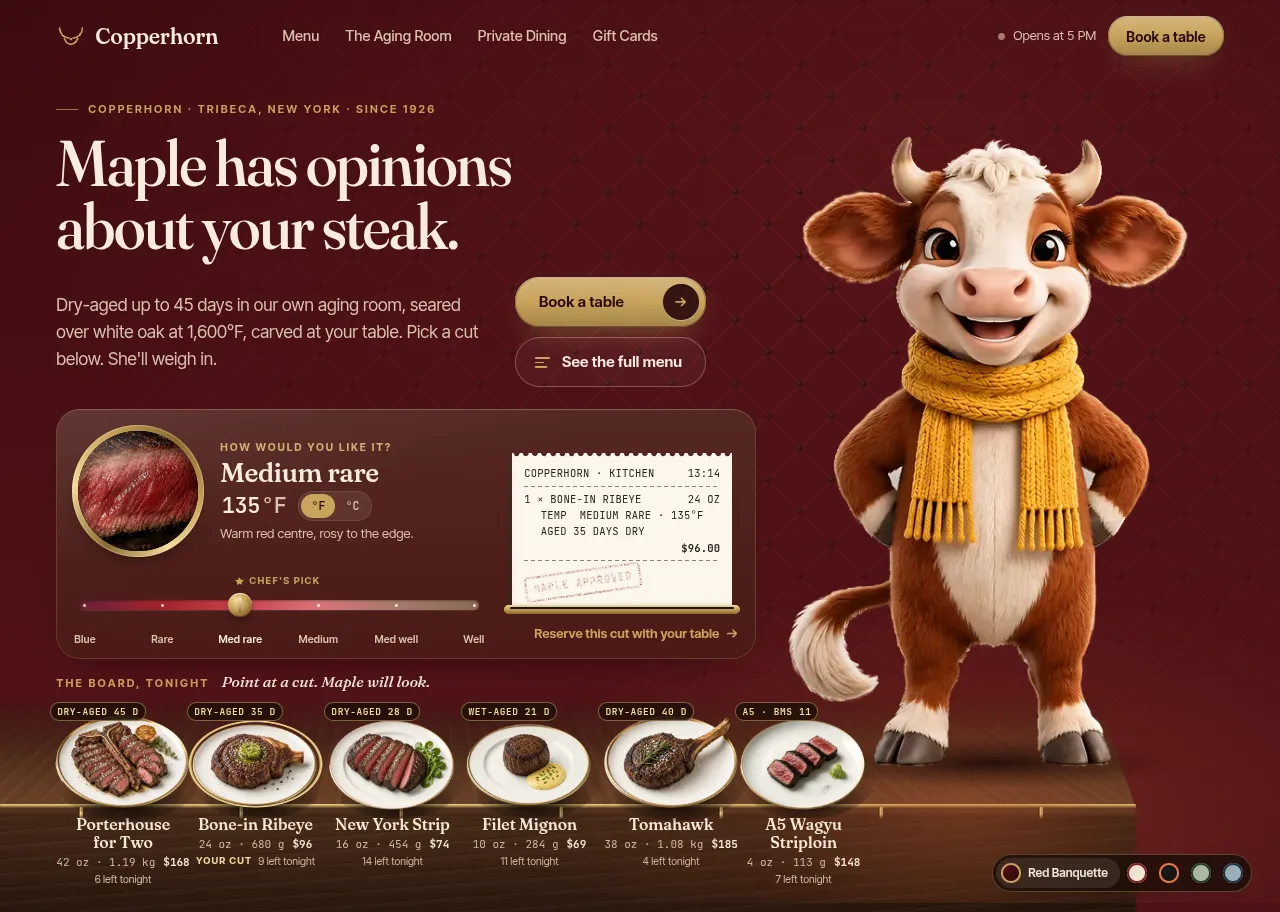
Behind the build · Maple — Steakhouse & Restaurant Hero Section for React with an Interactive Mascot
How Maple turns a 720p AI video into a keyed, recolourable cow that follows the cursor at 60 fps: the frame pipeline, gaze mapping, one-spring motion, WebGL drawing, and what surprised us.
Ramin ValadanProved GitHub account and website, confirmed e-mail: checked by UpFork22 min readAI
19 lessons
that stand-in could be up to 8 frames away, and blending two such different poses made a double image. The review said it plainly: some frames look blurry.
the renderer blends only when both frames are the exact neighbours of the position; otherwise it draws the single nearest frame, sharp, until the right ones are decoded.
renderer.ts lines 109–121; commit d4ec4b9.
never read pixels back while measuring a canvas, and start each variant in a fresh page so one can't change the next.
the two benchmark runs in the build notes.
the spotlight is a fixed soft disc that the stage moves with transform, so following the pointer neither restyles nor repaints; and nothing over the canvas uses a backdrop blur: borders are gradient rings instead. The head then ran at a steady 60 fps, p95 16.8 ms, with real pointer events.
HeroStage.tsx lines 241–242; commander-hero.css lines 187–196 and 321–325; commit d4ec4b9.
pill-shaped controls (the eyebrow, the pet-type control, the search field, the ghost button, the sign-up field) draw their border with a small SVG: a rect with ry: 50% set in CSS and a gradient stroke. Cards and tiles, with small corner radii, keep the masked ring.
PillRing.tsx lines 8–26; commander-hero.css lines 357–362; commit 7012bfa.
turn the ring off with a selector at least as specific, .cmd-hero .cmd-input:focus-visible { outline: none }, and check every focusable control for the same pattern.
commander-hero.css lines 93–98 and 706–711; commit 0cf54ed.
focus holds his attention only when it matches :focus-visible: keyboard focus, and typing in a field. A button that was merely clicked lets go when the pointer leaves.
useGazeTarget.ts lines 39–44.
they became hero-config.ts and site-content.ts before the ZIP was made.
the importer's rule ("your project's configuration: buyers keep their own"); commit 2cf81f2.
the desktop layout depends on width alone (1180 px and up). The vertical rhythm follows the hero's own height, through a --cmd-vh unit computed from it, not the window's, and below 722 px the hero shrinks to as little as 600 px and tightens so the product picks stay above the fold. Each demo now starts with // @upfork layout=full-page, so the importer sets its layout on every upload.
commander-hero.css lines 55–59 and 1361–1366; commit 0cf54ed.
/**
 * Coarse to fine: the frames in `first`, every 8th frame and the last one, then every 4th, every 2nd, the rest.
 * Scrubbing works from the end of the first pass on, with the nearest frame standing in for the missing ones.
*/ /**
* Memory for decoded frames, by the device's RAM (8 GB+, 4 GB+, less). Every second frame stays decoded plus a
* window round the head, so the frame drawn is never more than one away from the exact one; raising `high` to
* about 400 keeps all 90 desktop frames decoded (smoothest, heavy on integrated GPUs). One desktop frame of this
* video is about 4.3 MB decoded, a mobile one 1.1 MB (mobile always fits all 90).
*/
frameMemoryMB: { high: 300, mid: 220, low: 120 },export function frameBudget(o: {
count: number;
frameBytes: number;
deviceMemory?: number;
budgetsMB: { high: number; mid: number; low: number };
}): number {
const ram = o.deviceMemory ?? 4;
const mb = ram >= 8 ? o.budgetsMB.high : ram >= 4 ? o.budgetsMB.mid : o.budgetsMB.low;
return Math.max(16, Math.min(o.count, Math.floor((mb * 1024 * 1024) / Math.max(1, o.frameBytes))));
} const pos = Math.min(count - 1, Math.max(0, p));
const i0 = Math.floor(pos);
const i1 = Math.min(count - 1, i0 + 1);
const f = pos - i0;
// Blend only two exact neighbours. A stand-in frame a few positions away would blend into a double image, so
// until the right frames are decoded, the single nearest frame is drawn, sharp.
let a = source.getDrawable(Math.round(pos));
let b: typeof a = null;
let t = 0;
if (this.opts.crossfade && f > 0.004 && i1 !== i0) {
const d0 = source.getDrawable(i0);
const d1 = source.getDrawable(i1);
if (d0 && d1 && d0.index === i0 && d1.index === i1) {
a = d0;
b = d1;
t = f;
} const key = `${shift}|${mx.toFixed(3)}|${my.toFixed(3)}`;
if (key === written) return;
written = key;
inner.style.transform = `translate3d(${shift}px,0,0)`;
if (content) content.style.transform = `translate3d(${((-px * motion.parallaxPx) / 2).toFixed(2)}px,0,0)`;
// The spotlight is a fixed disc moved by transform: no repaint, no restyle.
if (spot) spot.style.transform = `translate3d(${(mx * stageWidth).toFixed(1)}px,${(my * stageHeight).toFixed(1)}px,0)`;
},.cmd-spot {
/* A fixed soft disc moved with transform (the stage writes it), so following the pointer never repaints. */
position: absolute;
left: 0;
top: 0;
width: 1400px;
height: 1400px;
margin: -700px 0 0 -700px;
background: radial-gradient(closest-side, rgb(255 236 214 / 0.075), rgb(255 236 214 / 0.03) 42%, rgb(255 236 214 / 0) 100%);
mix-blend-mode: screen;/*
* Gradient rings: a 1px border painted by a masked pseudo-element, light at the top and fading down, so edges read
* as catching the light rather than as drawn lines (an inset box-shadow thins out on the curves). No backdrop blur
* over the canvas: it would be recomputed on every frame of the head's motion.
*//**
* The border of a pill-shaped control, drawn as an SVG stroke so it keeps one width all the way round (a masked 1px
* ring thins out on the round ends). Optionally a comet of light that runs round it: dashes that share one leading
* edge and get longer layer by layer, so the tail fades smoothly. CSS decides when the comet shows (hover, focus).
*
* `radius` is only the fallback for browsers without CSS geometry properties; the stylesheet sets ry: 50%.
*/
export function PillRing({ id, radius, comet = false }: { id: string; radius: number; comet?: boolean }) {
const geom = { width: "100%", height: "100%", rx: radius, ry: radius };
return (
<svg className="cmd-ring" aria-hidden="true" focusable="false">
<defs>
<linearGradient id={`${id}-rest`} x1="0" y1="0" x2="0" y2="1">
<stop offset="0" className="cmd-ring-top" />
<stop offset="0.52" className="cmd-ring-mid" />
<stop offset="1" className="cmd-ring-bot" />
</linearGradient>
</defs>
<rect className="cmd-ring-rest" stroke={`url(#${id}-rest)`} {...geom} />.cmd-ring rect {
rx: auto;
ry: 50%;
fill: none;
stroke-width: 1.25px;
}/* A visible focus ring for the hero's own controls (the page's own rule may be anything). */
.cmd-hero :focus-visible,
.cmd-rail :focus-visible {
outline: 2px solid var(--cmd-accent);
outline-offset: 2px;
}/* The pill shows the field's focus (its glow and the orbiting light): no ring round the bare input inside it, from the
hero's own focus rule or the page's (shadcn's `outline-ring/50`, a browser's default). */
.cmd-hero .cmd-input:focus,
.cmd-hero .cmd-input:focus-visible {
outline: none;
} // Keyboard focus (and typing in a field) holds his attention; a button that was merely clicked does not.
const onFocusIn = (e: FocusEvent) => {
if (!(e.target instanceof Element) || !e.target.matches(":focus-visible")) return;
focused = true;
update();
}; /* The picks overlap the next section; the hero leaves room for them above the fold. */
--cmd-h: clamp(680px, calc(100svh - var(--cmd-overlap) - 18px), 980px);
/* The vertical rhythm follows the hero's own height, not the window's: in a window shorter than the hero's least
height (a laptop with toolbars, a preview frame) it's laid out as in the shortest window it fits, never squeezed. */
--cmd-vh: calc((var(--cmd-h) + var(--cmd-overlap) + 18px) / 100);
height: var(--cmd-h);/* Shorter still (a laptop's window under its toolbars, a preview frame under the site's): the hero follows the window
down to 600px instead of stopping at 680px, and tightens so the picks stay above the fold. From 722px both agree. */
@media (min-width: 1180px) and (max-height: 721.98px) {
.cmd-hero {
--cmd-h: clamp(600px, calc(100svh - var(--cmd-overlap) - 18px), 980px);
}
Comments
0 comments
No comments yet. Questions, what you built with it, what could be better: its developer reads them.
Sign in to comment.
Sign in to comment