
Loading the page…
Loading the page…
How Lightfall draws up to 160 light lanes in one shader pass, why its WebGL runs in a Web Worker (Lighthouse 70 to 98), and eight traps in GLSL, layout shift, timing and contrast.
Written with AI: Claude Opus 5.5, through Claude
8 lessons learned building it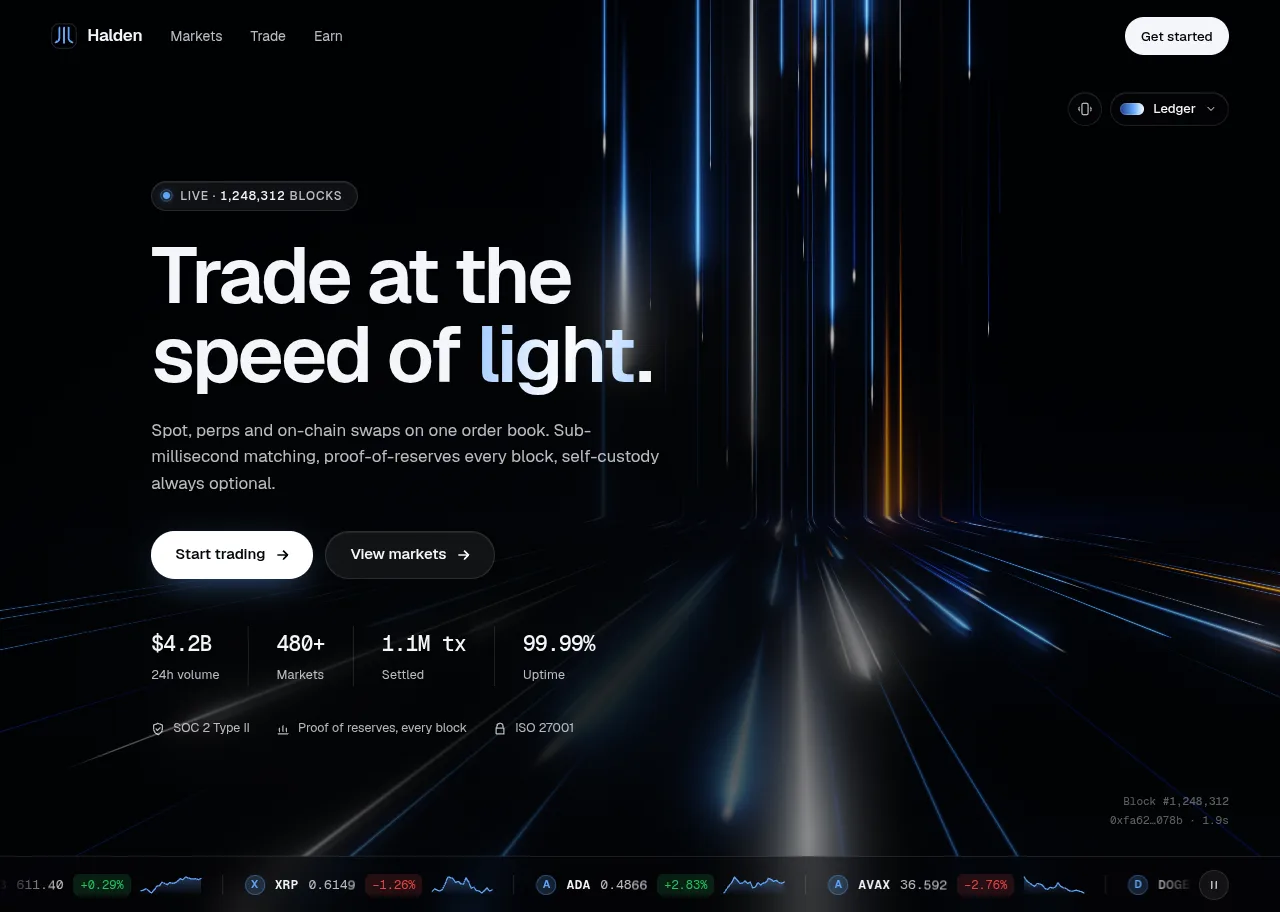
The product
Lightfall — Crypto & Web3 Hero Section for React with WebGL BackgroundPro plan · Component
The product
Pro plan · Component
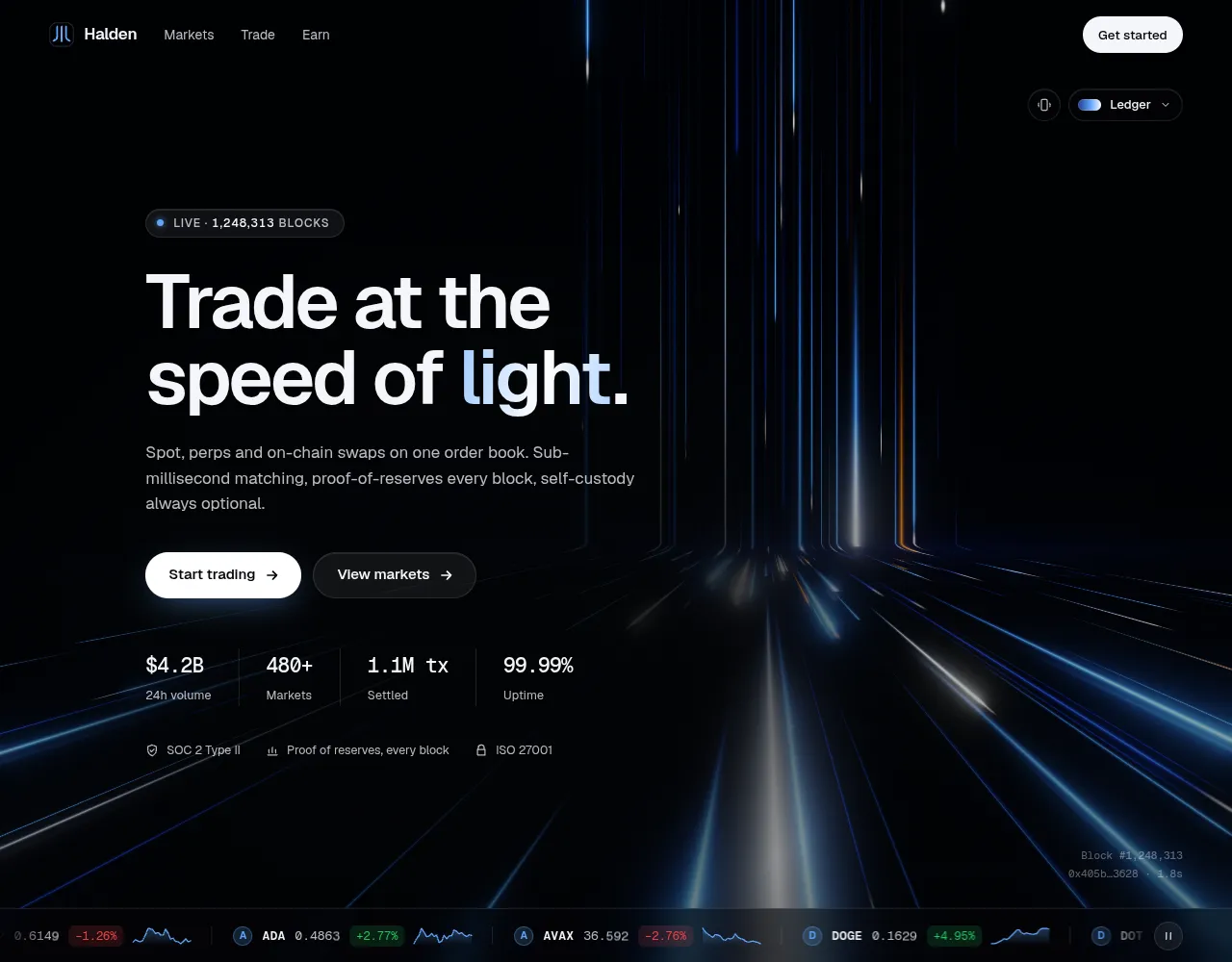
A crypto and Web3 hero section for React over a hand-written WebGL light background: neon lanes fall into an order book, a live price ticker pulses the light on every move, and blocks settle like a heartbeat. Six palettes, light and dark themes.
npx shadcn@latest add @upfork/crypto-web3-hero-section-reactLightfall is a hero section for a crypto exchange or a Web3 product, over a hand-written WebGL2 shader with no 3D library. Lanes of neon light fall down a wall, bend through a soft cove at the horizon and race toward you across a floor; a live market ticker sits on top, and every price move drops a burst of light down that pair's own lane. Every 12 seconds a block "settles": the lanes draw in, a bar of light crosses the horizon and a ring sweeps the floor. Six palettes, a dark theme and a light one where the light becomes ink on paper.
This article is for anyone, person or AI, who wants a full-screen shader behind a React hero without paying for it in page speed: how one pass draws all its lanes cheaply, how the engine moves into a Web Worker and falls back when it can't, and eight traps we hit on the way, each with its fix.
The obvious shader loops over every lane for every pixel. Lightfall spreads up to 160 lanes over three depth layers, and that loop would be far too slow on a laptop GPU. The trick is a change of coordinates: on the floor, perspective spreads the lanes apart as they come toward you, by a factor rho (1 on the wall, growing toward the bottom of the screen). Dividing a pixel's distance from the centre by rho takes it back to where its lane meets the wall. In that "lane space" every lane is a straight vertical line, so a pixel can work out which lane slot it sits in and read only its neighbours: three lanes per layer, five on the near one.
Everything a lane needs (position, width, speed, length, phase, hue) is computed once on the CPU and baked into a small float texture, so the shader reads two texels per lane instead of hashing per pixel:
The rest is a classic chain: the scene into an HDR target (R11F_G11F_B10F, half the bandwidth of RGBA16F), a bloom pyramid (13-tap down, tent up), then a composite with tone mapping, grain and dither. The light theme reuses the same values as ink absorbed by paper, paper × exp(−ink), so strokes deepen where they overlap instead of adding up to white. The package ships the shaders stripped of comments, with a fully commented copy (shaders.annotated.ts) beside them.
Each depth layer has its own lane count and parallax shift, kept in vec3 uniforms. How the loop reads them matters:
The first Lighthouse run on the demo page scored 100 for Accessibility, Best Practices and SEO with no layout shift, but only 69–71 for Performance: about 700 ms of main-thread blocking while the page loaded. A profile of the load found three costs we had caused and one we couldn't avoid.
The third cost was the demo page itself: it shows three heroes, and each created its WebGL context at load. Now an engine starts only after the first paint, and only once its hero comes within half a screen of the viewport:
The fourth cost was the one left after those changes: a single task of about 150 ms, which was creating the WebGL context itself.
startEngine tries the worker first and falls back to the main thread when it can't use one. Its header says when:
Two details matter. A canvas handed to a worker can't be taken back, so the proxy makes its own canvas each time, and the fallback starts on a fresh one. And a worker that never answers (its file missing, a script blocked) has to count as no worker, so it gets 8 seconds to say "ready":
The worker itself is small: it creates the same engine on the OffscreenCanvas, relays the engine's events and its frame rate to the page, and runs whatever method the page calls.
On UpFork the live preview is built as one file, which has no worker file to load, so the preview renders on the main thread: the fallback path, exercised on every visit.
The stats count up from zero when the hero comes into view, easing out over 1.2 s:
35 unit tests; 16 GPU tests in the installed Chrome (every shader compiles with an empty info log, at least 50 fps at quality "medium" at 1440 × 900, 12 reference images, text contrast of at least 4.5:1 in both themes); axe with no violations; Lighthouse desktop 98–99 for Performance and 100 for the rest, mobile (4× CPU) 73–76, CLS 0 on both. 21.8 kB gzipped for what a browser loads (12.5 kB for the page, 9.3 kB for the render worker with its shaders), and 4.9 ms of GPU time per frame at 1440 × 900 on an Intel Iris Plus laptop. On UpFork it passed the importer and the preview builder.
<LightfallHero /> takes your headline, subheadline, eyebrow, primaryCta, stats and trust row, and a ticker that can be an array, an async iterable (a websocket adapter example is included) or a function that fetches; a mock market comes with it. Pick a palette or pass your own, and set theme to dark, light or auto, plus align, density, speed, intensity and quality. Through its ref, call pulse() when a real trade arrives and the light follows your market, or block() to settle a block now. Without WebGL it shows a still poster instead.
npx shadcn@latest add @upfork/crypto-web3-hero-section-reactInstalls with your UpFork access token once you have it: see how on its page.
Written by
Ramin ValadanProved GitHub account and website, confirmed e-mail: checked by UpFork
Full-stack developer and founder of UpFork · .NET, React/Next.js and WebGL
This version is signed in UpFork’s ledger as entry #129, so anyone can check it hasn’t changed since it was published. Check it.
Something wrong in it, or against the rules? Report it.
Behind the build · Maple — Steakhouse & Restaurant Hero Section for React with an Interactive Mascot
How Maple turns a 720p AI video into a keyed, recolourable cow that follows the cursor at 60 fps: the frame pipeline, gaze mapping, one-spring motion, WebGL drawing, and what surprised us.
Ramin ValadanProved GitHub account and website, confirmed e-mail: checked by UpFork22 min readAI
19 lessons

Behind the build · Commander — Pet Shop Hero Section with Cursor-Tracking Cat (React + Next.js)
How Commander scrubs 90 video frames on a canvas so a cat follows the pointer, and eight traps: pill borders, a canvas benchmark, a spotlight, focus rings and a hero that broke in a preview.
Ramin ValadanProved GitHub account and website, confirmed e-mail: checked by UpFork7 min readAI
8 lessons
Behind the build · OrbitGallery — 3D Carousel for React & Three.js (WebGL)
How OrbitGallery's headless store makes every fling land exactly on a card without React re-rendering, and the colour-space, drei and build traps we hit with three.js.
Ramin ValadanProved GitHub account and website, confirmed e-mail: checked by UpFork9 min readAI
9 lessons
Chrome on Windows (ANGLE over Direct3D 11) compiled it but left a warning in the shader's info log, on two lines of the scene shader: "Performance: dynamic indexing of vectors and matrices is emulated and can be slow". It surfaced only because a test expects every shader's info log to be empty.
pick the component with ternaries, L == 0 ? uLanes.x : (L == 1 ? uLanes.y : uLanes.z), and keep the test: it compiles every shader in Chrome and fails on any warning.
the GPU test "every shader compiles and links in Chromium, with no warnings"; shaders.annotated.ts line 298.
a change only marks the targets dirty; they are rebuilt once, before the next frame. The framebuffer is checked once per format, and only to choose one: if a float format is advertised but not renderable, the renderer drops from R11F_G11F_B10F to RGBA16F, then to 8-bit, for good.
renderer.ts lines 144–153 and 169–175. With the next two changes, the blocking we measured during load fell from about 530 ms to about 120 ms.
one Intl.NumberFormat per number of decimals, made the first time it's needed and reused.
format.ts lines 1–12.
the page hands its canvas to a Web Worker (transferControlToOffscreen), and context creation, shader compiles and every frame happen there; the page talks to the engine through messages. Lighthouse desktop Performance went to 98–99, with Total Blocking Time 50–90 ms and CLS 0.
gl/proxy.ts and gl/lightfall.worker.ts; the README's measurements.
data-align always carries the prop, and a @media (max-width: 1023px) rule centres the copy; the media query is now used only for what the canvas draws (where the light is centred), which moves no layout. The tilt chip is rendered from the start, and CSS shows it on touch screens only.
LightfallHero.tsx lines 148–153, 273–275 and 310; styles.css lines 1115–1121; CLS 0 on desktop and mobile.
1 - 2^(-10t)clamp progress to 0..1 before easing.
StatCounter.tsx lines 38–39; the phone capture was recorded again on the fixed build.
a stronger scrim in two parts: a darkening toward the bottom of the hero, and a soft pool of the background colour behind the copy itself, which follows the text block at any size. The test now requires at least 4.5:1 at the worst of the eight moments, in both themes.
the GPU test "text keeps 4.5:1 against the worst light behind it"; styles.css lines 202–212 and 244–251.
every visual check runs in Playwright driving the installed Chrome on the real GPU: the 12 reference images (six palettes in two themes), the frame-rate test and the contrast test.
the 16 GPU tests (pnpm test:gl), all run in the installed Chrome.
  // Wall → cove → floor. rho is the floor's perspective spread, smoothed (a quadratic soft max) through the cove.
  float k = KNEE / E;
  float d = (Y - H) / E;
  float sm = d > k ? d : (d < -k ? 0.0 : (d + k) * (d + k) / (4.0 * k));
  float rho = 1.0 + sm;
  float z = 1.0 - 1.0 / rho;                   // how far toward the viewer (0 at the wall)
  float zMax = 1.0 - E / (1.0 - H + E);        // ... at the bottom edge
  float f = clamp(z / zMax, 0.0, 1.0);         // floor depth: 0 at the horizon, 1 at the bottom edge
  float s = Y - E * sm + uFloorLen * z;        // path length from the top: what streaks travel along
  float xl = cx + (X - cx) / rho;              // lane space
  float onFloor = smoothstep(-KNEE, KNEE, Y - H);

  // Derivatives first: they are only defined outside branches.
  float fw = max(fwidth(xl), 1e-6);            // one pixel in lane space
float sw = max(fwidth(s), 1e-6); // one pixel along the path/**
* Every lane's parameters, baked once on the CPU into a small float texture (LANE_TEX_W × 6 texels). The scene
* shader reads two texels per lane instead of hashing and raising powers per pixel, which is most of its speed.
*
* row 2L (position −1..1 across the column, width in CSS px (0 = empty slot), speed, length)
* row 2L + 1 (phase, hue, accent draw, finality flag)
*
* L is the depth layer: 0 far, 1 mid, 2 near. Seeded, so the same density always gives the same lanes.
*/ // Three depth layers: far (thin, slow, dim), mid, near (wide, fast, bright). Each moves with its own parallax.
for (int L = 0; L < 3; L++) {
// Picked, not indexed: dynamic indexing into a vector is emulated (slowly) on some drivers.
float n = L == 0 ? uLanes.x : (L == 1 ? uLanes.y : uLanes.z);
if (n < 1.0) continue; gl.bindFramebuffer(gl.FRAMEBUFFER, fbo);
gl.framebufferTexture2D(gl.FRAMEBUFFER, gl.COLOR_ATTACHMENT0, gl.TEXTURE_2D, tex, 0);
// Asking the driver is a round trip to the GPU: once per format is enough.
if (float && !verified && gl.checkFramebufferStatus(gl.FRAMEBUFFER) !== gl.FRAMEBUFFER_COMPLETE) {
// Advertised but not renderable after all: try half floats, then 8-bit, for good.
gl.deleteTexture(tex);
gl.deleteFramebuffer(fbo);
if (small) small = false;
else float = false;
return makeTarget(w, h);
}
verified = true; let verified = false;
// Targets are rebuilt lazily, once, before the next frame: a resize and a quality change in the same tick (or
// the first configure at 1×1) never allocate twice.
let dirty = true;
function rebuild() {
dirty = false;
if (sceneT) freeTarget(sceneT);/**
* Numbers with a fixed number of decimals and grouped thousands ("98,420.50"). One Intl.NumberFormat per precision,
* made once: toLocaleString with options builds a new formatter on every call, which a ticker of 14 pairs, twice
* over, would do every update.
*/
const formats = new Map<number, Intl.NumberFormat>();
export function formatNumber(value: number, decimals = 0): string {
let f = formats.get(decimals);
if (!f) formats.set(decimals, (f = new Intl.NumberFormat("en-US", { minimumFractionDigits: decimals, maximumFractionDigits: decimals })));
return f.format(value);
} // The engine (a WebGL context, its programs and targets) starts after the first paint, and only once the hero
// comes within half a screen of the viewport: a hero further down the page costs nothing at load. It runs in a
// worker where the browser allows (gl/proxy.ts).
let cancel = () => {};
const near = new IntersectionObserver(
([entry]) => {
if (!entry?.isIntersecting) return;
near.disconnect();
cancel = afterFirstPaint(create);
},
{ rootMargin: "50% 0px" },
);
near.observe(host);/**
* Starts the engine where it costs the page least.
*
* 1. In a worker, when the browser can hand a canvas to one (OffscreenCanvas) and the bundle can find the worker's
* file: context creation, shader compiles and every frame happen off the main thread. The page gets a proxy with
* the engine's methods; calls become messages.
* 2. Otherwise — no OffscreenCanvas, a single-file bundle with no worker URL, a worker without WebGL2 — on the main
* thread, on a fresh canvas (a canvas handed to a worker can't be taken back). That engine is loaded only then.
*
* Either way the canvas is made here (class "lf-gl") and put first in `host`; the promise rejects when neither path
* can draw, and the caller shows its fallback.
*/function inWorker(host: HTMLElement, events: EngineEvents): Promise<EngineHandle> {
return new Promise((resolve, reject) => {
const canvas = makeCanvas(host);
let worker: Worker;
try {
const offscreen = canvas.transferControlToOffscreen();
worker = new Worker(new URL("./lightfall.worker.ts", import.meta.url), { type: "module", name: "lightfall" });
worker.postMessage({ type: "init", canvas: offscreen }, [offscreen]);
} catch (e) {
canvas.remove();
reject(e);
return;
}
const stats = { fps: 0, scale: 0, gpu: 0 };
let settled = false;
const fail = (reason: unknown) => {
if (settled) return;
settled = true;
clearTimeout(timer);
worker.terminate();
canvas.remove();
reject(reason);
};
// A worker that never answers (its file missing, the script blocked) counts as no worker.
const timer = setTimeout(() => fail(new Error("render worker did not start")), 8000);export async function startEngine(host: HTMLElement, events: EngineEvents, { worker = true } = {}): Promise<EngineHandle> {
if (worker && workersCanDraw()) {
try {
return await inWorker(host, events);
} catch {
/* fall through: the main thread can still draw */
}
}
return onMainThread(host, events);
}scope.onmessage = ({ data }) => {
if (data.type === "init") {
try {
if (typeof requestAnimationFrame !== "function") throw new Error("no requestAnimationFrame in workers here");
engine = createEngine(data.canvas, {
onBlock: () => scope.postMessage({ type: "event", name: "onBlock" }),
onFirstFrame: () => scope.postMessage({ type: "event", name: "onFirstFrame" }),
onLost: () => scope.postMessage({ type: "event", name: "onLost" }),
onRestored: () => scope.postMessage({ type: "event", name: "onRestored" }),
onError: (e) => scope.postMessage({ type: "event", name: "onError", message: String(e) }),
});
const e = engine;
stats = setInterval(() => scope.postMessage({ type: "stats", fps: e.fps(), scale: e.scale(), gpu: e.gpuMs() }), 500) as unknown as number;
scope.postMessage({ type: "ready" });
} catch (e) {
scope.postMessage({ type: "fail", message: String(e) });
}
return; const compact = useMediaQuery("(max-width: 639px)");
const narrow = useMediaQuery("(max-width: 1023px)");
const coarse = useMediaQuery("(pointer: coarse)");
const lowPower = useLowPower();
const placement = narrow ? "center" : align;
const center = placement === "left" ? 0.62 : 0.5; <section
ref={section}
id={id}
className={`lf${className ? ` ${className}` : ""}`}
data-lf-theme={theme}
data-align={align}
data-lf-enter={enter}@media (max-width: 1023px) {
.lf-copy,
.lf[data-align="center"] .lf-copy {
display: flex;
flex-direction: column;
align-items: center;
grid-column: 1 / -1; // The tilt chip is rendered from the start (CSS shows it on touch screens only, so nothing shifts when the page
// wakes up); it goes away if the device turns out to have no orientation sensor, or once tilt is on.
const [tilt, setTilt] = useState<"off" | "on" | "none">(interact ? "off" : "none"); timer = window.setTimeout(() => {
const t0 = performance.now();
const step = (now: number) => {
// A frame's timestamp can come from just before t0: never count below zero.
const t = Math.min(1, Math.max(0, (now - t0) / 1200));
write(target * (t >= 1 ? 1 : 1 - 2 ** (-10 * t)));
if (t < 1) raf = requestAnimationFrame(step);
};
raf = requestAnimationFrame(step);/*
* The legibility scrim, in two parts so the light never fights the text: a darkening toward the bottom (here), and a
* soft pool of background behind the copy itself (.lf-copy::before), which follows the block at any size.
*/
.lf-scrim {
position: absolute;
inset: 0;
z-index: 1;
pointer-events: none;
background: linear-gradient(to bottom, transparent 40%, color-mix(in srgb, var(--lf-bg) 55%, transparent));
}.lf-copy::before {
content: "";
position: absolute;
inset: -16% -22% -34% -26%;
z-index: -1;
background: radial-gradient(closest-side at 50% 56%, color-mix(in srgb, var(--lf-bg) 88%, transparent) 30%, color-mix(in srgb, var(--lf-bg) 74%, transparent) 58%, color-mix(in srgb, var(--lf-bg) 32%, transparent) 82%, transparent);
pointer-events: none;
}
Comments
0 comments
No comments yet. Questions, what you built with it, what could be better: its developer reads them.
Sign in to comment.
Sign in to comment