How to make a product fly from a grid to its detail view in React, with no animation library
How a shoe flies from a shelf into its detail view on the Web Animations API: the measuring, one flight for every move, and how a 178 ms click became 75 ms, with what still misses budget.
Ramin ValadanProved GitHub account and website, confirmed e-mail: checked by UpFork·28 min read··Updated
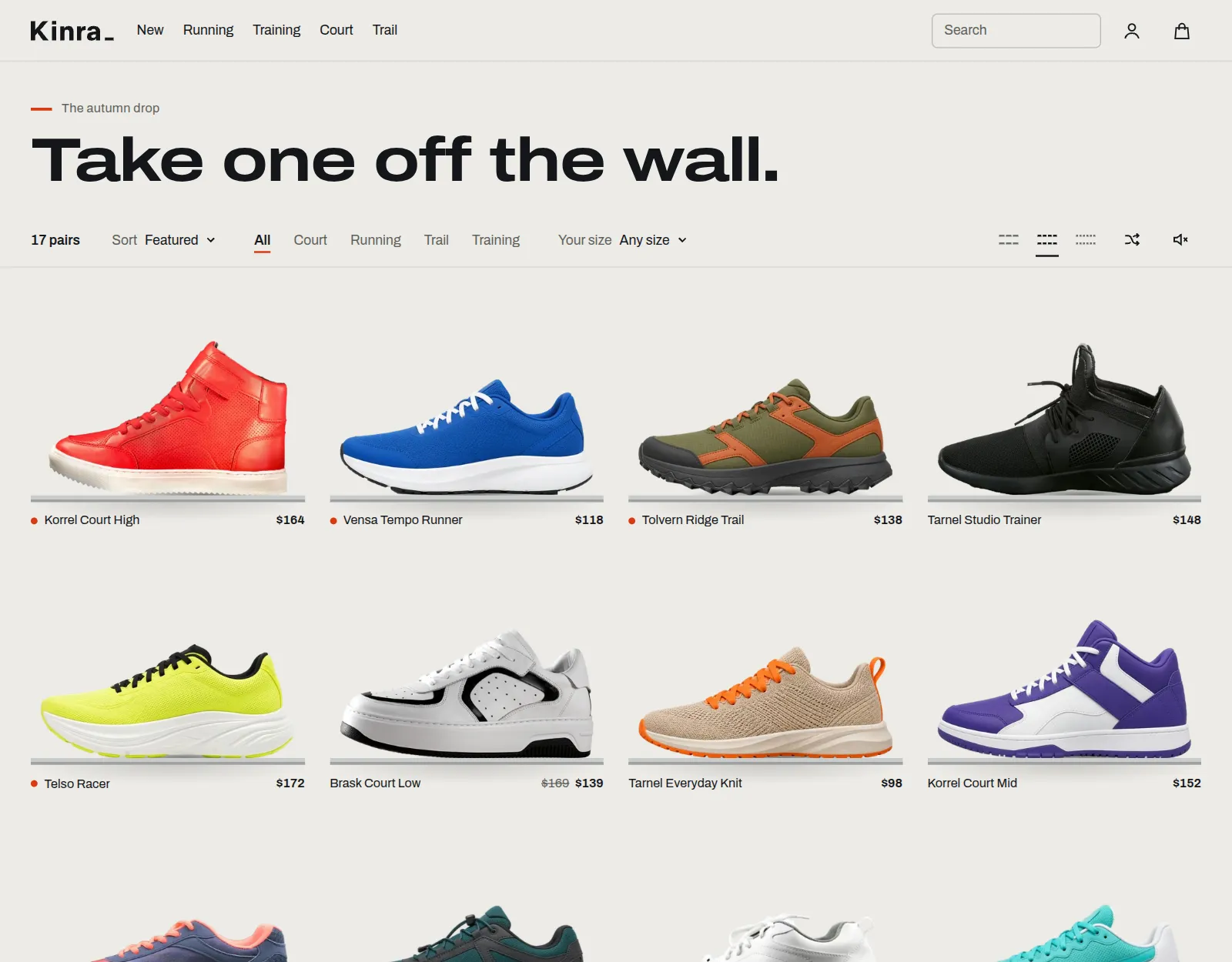
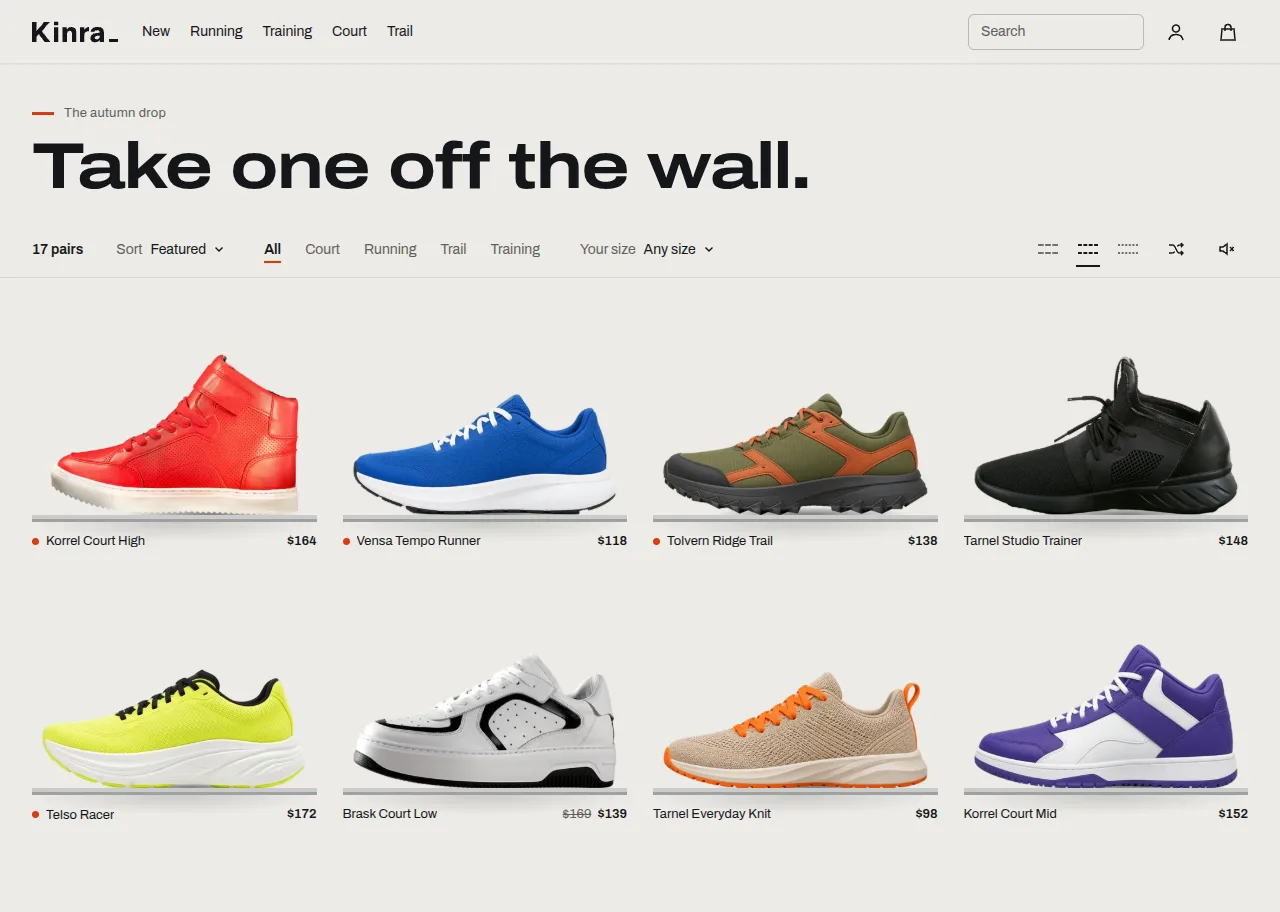
An animated product grid for shoe and sneaker stores in React and Tailwind CSS: shoes stand on slim shelves, shoppers sort and filter by size, and the shoe itself travels into a detail view with sizes and add to bag. No animation library.
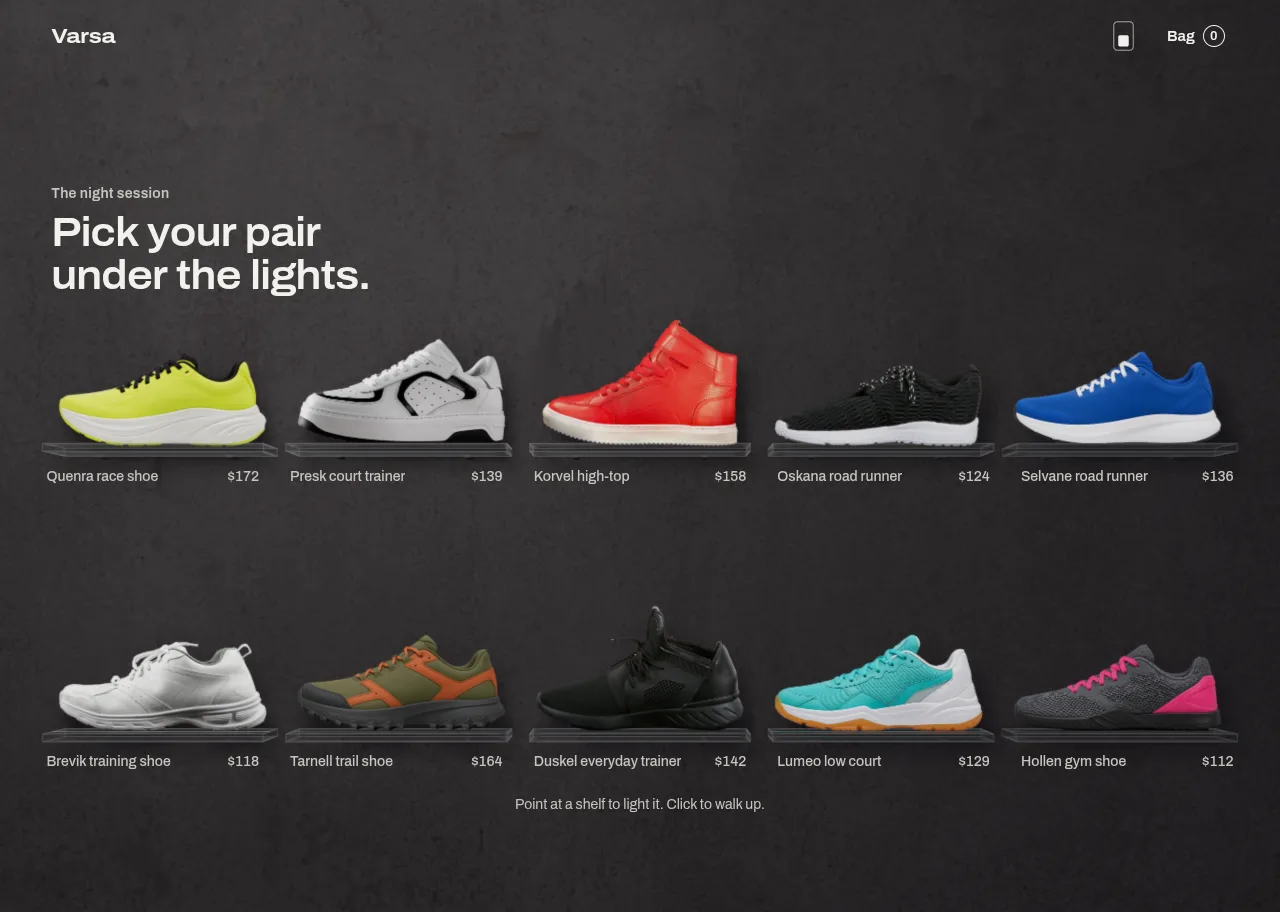
Pacewall is an animated product grid for shoe and sneaker stores, in React and Tailwind CSS. Shoes stand on slim shelves. A shopper can sort them, filter them by size, and shuffle them, and the shoes cross the wall to their new places. Click one and that same shoe travels into a detail view while its shelf stretches into a long rail under it. Close the view and it travels back. There is no animation library: the component is 19.9 KB of gzipped JavaScript without React.
This article explains how that motion works, in enough detail to rebuild it: how a slot is measured and moved, why the Web Animations API, how shuffle, sort, filter and density share one flight, how the shoe gets into the detail view and back, and how the click that starts it came down from 178 ms to 75 ms. Each number says how it was measured. Some budgets were not met, and the section on measuring says which.
The wall a shoe flies over
The wall is a real list: a <ul> of <li>, each holding a real <a href>, so that crawlers, middle-click and "open in a new tab" all work, and DOM order always equals visual order. Every slot has three layers that matter for motion: a stage that holds the slot's place in the layout and never moves, a flier inside it that carries the shoe and is the only thing transformed, and a shelf and ticket underneath.
The hard part of a still wall is that every sole must sit exactly on its shelf, though every picture has a different amount of empty space under the sole. Each photo carries a measured baseline, the share of its height where the sole meets the shelf. The empty part below it becomes a negative margin, so the bottom edge of the box is the sole:
The flier is pinned to the bottom of the stage, with its transform origin at the centre of the sole. That is what lets a shoe change size in flight and still land on its shelf line, instead of scaling around the middle of a picture:
.pw-stage { position: relative; /* Row pitch comes from the shoe, not from a fixed gap. The tallest shoe always fits. */ padding-top: calc(max(var(--pw-air), var(--pw-tallest, 0.6)) * 100%);}.pw-downlight { position: absolute; inset: 0 calc(var(--pw-gap) * -0.5) -2px; background: radial-gradient(closest-side, var(--pw-down-a), var(--pw-down-b) 52%, transparent); pointer-events: none;}.pw-fly { position: absolute; inset-inline: 0; bottom: 0; /* The centre of the sole, so a shoe that changes size never leaves its shelf line. */ transform-origin: 50% 100%;}
Checked in Chrome across 108 layouts (9 window sizes × 7, 17, 18 and 48 shoes × 3 densities), the worst sole was 0.45 px off its shelf.
The last row has its own problem. A lone shoe at the end of a row looks broken, so free slots keep a faint shelf. How many are free depends on the column count, which depends on the component's width, which the server cannot know.
/** Free slots at the end of the last row, for every column count the wall can have. */function freeSlots(count: number, columns: number): number { return (columns - (count % columns)) % columns;}const COLUMN_COUNTS = [1, 2, 3, 4, 6];
Every rearrangement is the same three steps, a technique usually called FLIP:
Measure where each shoe is now.
Commit: let React change the order, once, synchronously.
Measure where each shoe is now supposed to be, start each flier at the difference, and animate back to no transform at all.
So React's layout is always the truth, and the animation only plays the way from the old truth to the new one.
Measuring reads the stage rather than the flier. The stage never moves, so its rectangle is the shoe's place in the layout whatever the shoe is doing. If a shoe is in the air, the flier's current matrix is added on top. That one read is what makes interruptions work: a new command in mid-flight starts from where the shoe really is.
    this.fadeCopies(kind === "density" ? ".pw-under" : ".pw-ticket", kind === "density" ? 200 : 130);
    this.release();

    // The one and only React commit of this move.
    commit();
    const slots = this.slots();
    const last = this.poses(false);
Why the Web Animations API
Three obvious choices lost:
CSS transitions cannot follow a curved path with a separately timed lift and landing, and restarting one from a mid-air position means reading that position anyway.
A requestAnimationFrame loop would run every shoe's position on the main thread, so a busy page would stutter every shoe.
An animation library would be a dependency in a component meant to install into anyone's shop, for what comes down to a path function and a few keyframes.
element.animate() takes a list of keyframes, and if they touch only transform and opacity, Chrome can run them on the compositor. Once started, the flight keeps going even if the main thread is busy. It also gives a clean way to read the current state (getComputedStyle(el).transform) and to stop (animation.cancel()).
Four rules follow, and the engine keeps them all: only transform and opacity; distances in px, never in percent or container units (L-99KD); will-change only while a shoe is flying (L-RCHQ); and React commits once at the start and never during a flight.
React's part is one flushSync, so that the second measurement sees the new order:
  // A shoe's place in the first layout, fixed for good: a move must not re-render every slot.
  const firstPlace = useMemo(() => new Map(shoes.map((s, i) => [s.id, i])), [shoes]);
One flight for every move
Every shoe's path comes from one function, pathAt(t), where t runs from 0 to 1 and the result is relative to where the shoe will land. It has three phases:
/** Where the shoe is at t in 0..1, relative to where it lands. */export function pathAt(t: number, p: PathInput): { x: number; y: number; s: number } { const distance = Math.hypot(p.dx, p.dy); const arc = clamp(0.18 * distance, 24, 96) * (1 + p.jitter * 0.18); const liftEnd = p.lift ? 0.22 : 0; const travelEnd = p.lift ? 0.82 : 0.8; const startY = p.lift ? p.dy - 18 : p.dy; const liftScale = p.lift ? p.scale * 1.05 : p.scale; if (t < liftEnd) { const e = easeOut(t / liftEnd); return { x: p.dx, y: p.dy - 18 * e, s: p.scale * (1 + 0.05 * e) }; } if (t < travelEnd) { const u = easeInOut((t - liftEnd) / (travelEnd - liftEnd)); const midX = p.dx / 2; const midY = (startY - 12) / 2 - arc; const a = (1 - u) ** 2; const b = 2 * u * (1 - u); const c = u ** 2; return { x: a * p.dx + b * midX, y: a * startY + b * midY + c * -12, s: liftScale + (1.03 - liftScale) * u, }; } const v = damped((t - travelEnd) / (1 - travelEnd)); return { x: 0, y: -12 * v, s: 1 + 0.03 * v };}
Lift, the first 22%. The shoe rises 18 px and grows 5%. Its contact shadow fades out and a soft wall shadow fades in, so it is plainly in front of the wall. Crossing a shelf now reads as passing in front of it, not through it.
Travel, to 82%. A quadratic Bézier curve from the lifted position to a point 12 px above the target, with u running through an ease-in-out:
P(u) = (1-u)²·P₀ + 2u(1-u)·P₁ + u²·P₂
P₀ is the lifted start and P₂ is the point above the target. The control point P₁ sits halfway across, and above the midpoint by an arc height of 0.18 × distance, clamped to 24–96 px and multiplied by 1 + 0.18 × jitter. The per-shoe jitter keeps the paths from lying on top of one another.
Land, the last 18%. Straight down, with a critically damped curve:
/** From rest at 1 to exactly 0, with no overshoot: it never passes below the shelf. */const OMEGA = 6;const RESIDUE = (1 + OMEGA) * Math.exp(-OMEGA);const damped = (v: number) => ((1 + OMEGA * v) * Math.exp(-OMEGA * v) - RESIDUE) / (1 - RESIDUE);
Critically damped motion, (1 + ωv)·e^(-ωv), falls from 1 towards 0 without ever crossing it, which is what a shoe landing on a shelf should do. It reaches 0 only at infinity, so the code subtracts the residue at v = 1 and rescales, to end at exactly 0 with ω = 6. Because the curve never overshoots, the shoe cannot dip below the shelf line.
Duration grows with distance, 420 ms + 0.18 ms per px, clamped to 480–760 ms. Each shoe waits up to 220 ms according to its distance from the control that was pressed, so the move spreads out from the shopper's hand:
The path is sampled into keyframes, and the browser interpolates linearly between them. The samples are not evenly spaced. More of them go where the path bends and where the landing eases, because each keyframe is parsed in the click's own frame, for every shoe:
/** * Where to sample a flight, as shares of its time. Most keyframes go where the path bends and the * landing eases: the browser parses every one in the click's own frame, 18 shoes at a time. */const SAMPLE_AT = [0, 0.04, 0.09, 0.15, 0.22, 0.3, 0.38, 0.46, 0.52, 0.58, 0.64, 0.7, 0.76, 0.82, 0.845, 0.87, 0.9, 0.93, 0.965, 1];
The ticket, the contact shadow and the wall shadow are separate elements fading at their own offsets. No shadow is ever animated, only faded.
Whether the landing really stays above the shelf was proved rather than assumed: a test sampled every shoe on every frame of every kind of move. The deepest any shoe went below its shelf line was 0 px, and no ancestor of anything that moves clips it.
Shuffle, sort, filter and density share it
The only thing that differs between these moves is what commit changes. run("shuffle", origin, commit) and run("filter", origin, commit) go through the same move(). The few real differences are small:
Shuffle uses a derangement, so no shoe stays where it was. Sattolo's algorithm guarantees that, because it always produces a single cycle. It tries up to 60 of them and keeps the one with the fewest shoes of the same category side by side. It is seedable, so a test can ask for the same shuffle twice.
/** A derangement: no shoe stays where it was, and two of one category do not stand together if it can be helped. */export function shuffle(list: Shoe[], random: () => number): string[] { const ids = list.map((s) => s.id); if (ids.length < 2) return ids; const category = new Map(list.map((s) => [s.id, s.category])); let best = ids; let bestScore = Infinity; for (let attempt = 0; attempt < 60; attempt++) { const next = [...ids]; // Sattolo's algorithm always gives a single cycle, so no element keeps its place. for (let i = next.length - 1; i > 0; i--) { const j = Math.floor(random() * i); [next[i], next[j]] = [next[j], next[i]]; } let score = 0; for (let i = 1; i < next.length; i++) { if (category.get(next[i]) === category.get(next[i - 1])) score++; } if (score < bestScore) { best = next; bestScore = score; if (score === 0) break; } } return best;}
Filter adds two more kinds of shoe. One leaving the wall has no element to animate after the commit, so a clone is made beforehand, and it rises 18 px and fades where it stood in 240 ms. One arriving comes down onto its shelf.
  /** A shoe that leaves the wall: its copy rises a little and fades where it stood. */
  private leaving(gone: { fly: HTMLElement; pose: Pose }[]) {
    const box = this.box();
    const layer = this.overlay();
    if (!box || !layer) return;
    const origin = box.getBoundingClientRect();
    for (const { fly, pose } of gone) {
      const copy = fly.cloneNode(true) as HTMLElement;
      const rectHeight = fly.getBoundingClientRect().height;
      copy.style.cssText = `position:absolute;left:${pose.x - pose.width / 2 - origin.left}px;top:${pose.y - rectHeight - origin.top}px;width:${pose.width}px;bottom:auto;right:auto;`;
      layer.appendChild(copy);
      const anim = copy.animate(
        [
          { transform: "translate3d(0,0,0) scale(1)", opacity: 1 },
          { transform: "translate3d(0,-18px,0) scale(1.03)", opacity: 0 },
        ],
        { duration: 240, easing: "cubic-bezier(0.3,0,0.6,1)", fill: "both" },
      );
      anim.onfinish = () => copy.remove();
      anim.oncancel = () => copy.remove();
    }
  }
Density changes the scale too. The shelves arrive while the shoes are in the air, widening from 72%. The section's height is animated once, only if its bottom edge is in view, and the page scrolls by the amount that keeps the shoe nearest the middle of the view where it was.
    // The section's height, once, with the same timing, only if its bottom edge is in view.
    const afterHeight = box.offsetHeight;
    if (Math.abs(afterHeight - beforeHeight) > 1 && bottomInView) {
      box.animate([{ height: `${beforeHeight}px` }, { height: `${afterHeight}px` }], {
        duration: 620,
        easing: "cubic-bezier(0.3,0.1,0.25,1)",
      });
    }
Tickets are the one thing that cannot just fly. Their text changes at the commit, so copies of the old ones fade out in an overlay while the real ones wait to fade in on landing.
  /** Copies of what is about to change, fading out where they are: a ticket never just vanishes. */
  private fadeCopies(selector: string, duration: number) {
    const box = this.box();
    const layer = this.overlay();
    if (!box || !layer) return;
    const origin = box.getBoundingClientRect();
    const top = window.innerHeight * -0.2;
    const bottom = window.innerHeight * 1.2;
    for (const slot of this.slots()) {
      const source = slot.querySelector<HTMLElement>(selector);
      if (!source) continue;
      const rect = source.getBoundingClientRect();
      if (rect.bottom < top || rect.top > bottom) continue;
      const copy = source.cloneNode(true) as HTMLElement;
      copy.style.cssText = `position:absolute;left:${rect.left - origin.left}px;top:${rect.top - origin.top}px;width:${rect.width}px;margin:0;`;
      layer.appendChild(copy);
      const fade = copy.animate([{ opacity: 1 }, { opacity: 0 }], { duration, easing: "ease-out", fill: "both" });
      fade.onfinish = () => copy.remove();
      fade.oncancel = () => copy.remove();
    }
  }
Shoes off screen at both ends simply jump, and at most 24 fly at once, those nearest the middle of the view first.
An interruption needs no special path. move() reads every current position including the mid-air ones, cancels all animations, commits, and starts again, with shoes still in the air skipping their lift. Six shuffles in one second left 18 shoes, 18 unique, none moving afterwards and nothing stray.
The journey into the detail view
The detail view is a dialog in a portal. It holds its own shoe element at its final place, on a long rail, so the view is laid out normally and the flight is once again FLIP: read where the shoe on the wall is, start the shoe in the view at that spot, animate to no transform. The wall's slot is marked away in the same frame, so the viewer sees one shoe.
Opening never waits for a download, because the dialog's shoe starts with the very picture the wall has already decoded, currentSrc:
  // Started from the wall's picture, so opening never waits for a download.
  const [first] = useState(() => ({ id: shoe.id, src: from?.querySelector("img")?.currentSrc || shoe.photo.src }));
  const baseSrc = first.id === shoe.id ? first.src : shoe.photo.src;
Everything happens in a layout effect, before the browser paints. Positions are read first, for the source's stage and shelf and for the dialog's shoe and rail:
    const seen = measureWall();
    if (!reduced && morph && from && sourceStage && sourceShelf) {
      // The shoe here takes over from the one on the shelf, in the same place, in the same frame.
      const a = sourceStage.getBoundingClientRect();
      const b = box.getBoundingClientRect();
      const s = sourceShelf.getBoundingClientRect();
      const r = railEl.getBoundingClientRect();
      markAway(from, true);
      animations.push(
        box.animate(travelFrames(a.left + a.width / 2 - (b.left + b.width / 2), a.bottom - b.bottom, a.width / b.width, false), { duration: OPEN_MS, easing: "linear", fill: "both" }),
        railEl.animate(
          [
            { transform: `translate3d(${s.left - r.left}px, ${s.top - r.top}px, 0) scaleX(${s.width / r.width})` },
            { transform: "translate3d(0,0,0) scaleX(1)" },
          ],
          { duration: 480, delay: 40, easing: "cubic-bezier(0.5,0,0.2,1)", fill: "both" },
        ),
        ...recedeWall(seen, false, 0, 320),
      );
The shoe's offset is measured from the centre of its sole, a.left + a.width / 2 and a.bottom, which matches the transform origin at the bottom centre. The shelf turns into the rail the same way, by starting the rail at the shelf's position and width with translate3d and scaleX.
The path has more weight than a wall flight, because the shoe grows to fill the view:
/** Sampled so the arc and the weight stay plain data: the sole's centre travels, and nothing else moves. */function travelFrames(dx: number, dy: number, scale: number, reverse: boolean): Keyframe[] { const frames: Keyframe[] = []; const steps = 32; const lift = Math.min(70, Math.hypot(dx, dy) * 0.1); for (let i = 0; i <= steps; i++) { const t = i / steps; // The first moments are a rise, so the shoe answers before it sets off. const e = reverse ? easeWeighted(t) : 0.04 * Math.min(1, t * 8) + 0.96 * easeWeighted(Math.max(0, (t - 0.0625) / 0.9375)); const k = reverse ? e : 1 - e; const x = dx * k; const arc = Math.sin(Math.PI * e) * lift; const y = dy * k - arc; const s = 1 + (scale - 1) * k; frames.push({ transform: `translate3d(${x.toFixed(2)}px, ${y.toFixed(2)}px, 0px) scale(${s.toFixed(4)})` }); } return frames;}
The first sixteenth of the time is a small rise, 4% of the way, so the shoe answers before it sets off. After that a quartic ease in and out gives it weight. The arc is sin(π·e) × min(70, 0.1 × distance).
Time
Opening
0 ms
The shoe starts to move
0–320 ms
The wall recedes in a ripple from the clicked shoe: opacity to 0, scale 0.985, delayed by distance
40–520 ms
The shelf stretches into the rail
260–580 ms
The back link, the arrows and the thumbnails arrive
260 ms on
Panel items enter 60 ms apart, each for 320 ms, rising 10 px
After landing
A larger picture, if there is one, crossfades in over 180 ms
Closing is the same in reverse, with one addition that matters: the panel and controls leave in 160 ms, the shoe returns over 520 ms, and the wall starts back at 180 ms, so it reaches full strength as the shoe lands. A shoe at full size must never sit over a full-strength wall.
Measured per frame in Chrome on the production build: the first frame came 2–13 ms after the click, the travel took 633–733 ms and the close 533–566 ms in most runs, with one close at 616 ms. One first open read 1,949 ms on a loaded machine, and I did not explain that one. While the shoe was over 70% of its full size, the wall showed at most 0.04 of its strength, and 0.94–0.99 at the landing, with a layout shift of 0. The slot stayed empty until the shoe was back.
Looking closer
Views move a camera over the same picture with a transform, so the shopper feels the same shoe and not a slideshow, and zoom follows the pointer the same way. Neither may ever go past the picture's own pixels:
  // Never past the photograph's own pixels. One image pixel per screen dot on a plain screen,
  // and 1.5 per CSS pixel on a dense one, which is still crisp. If that means less zoom, zoom less.
  const focusZoom = useCallback((wanted: number) => {
    const img = large.current;
    const box = camera.current;
    if (!img || !box || !box.offsetWidth) return 1;
    const natural = img.naturalWidth || 0;
    const density = Math.min(window.devicePixelRatio || 1, 1.5);
    return Math.min(wanted, natural / (box.offsetWidth * density));
  }, []);
Buying without moving anything
The add-to-bag button is one fixed box whose text changes through its states, and a reserved line below it holds "In your bag · View bag". Nothing below may move. The browser's layout-shift score said that was already so.
The motion runs on the compositor, but it has to be started, and everything before the first frame happens on the main thread: React's render, every measurement, every animate() call. That was the slow part.
To see it, I recorded a Chrome trace of one click from a script: browser.startTracing(page, { path, categories: ["devtools.timeline", "toplevel", ...] }) in Playwright, click, wait, stop, then walk the JSON for the longest task on the renderer's main thread and the events nested inside it. The first trace of an open: a task of 195 ms, of which the click handler took 178 ms, with 56 ms of layout and 41 ms of style recalculation inside it.
These traces ran in installed Chrome, headless, with tracing on, on a laptop with Intel Iris Plus graphics and other builds running. Tracing adds cost of its own, and each figure is one run, so read them as a comparison and not as absolute times. After the first three changes below, measured together, the handler took 75 ms, with 37 ms of layout, inside a task of 129 ms. No change was traced alone.
  useLayoutEffect(() => {
    if (!wallEl || !isOpen) return;
    const wall = wallEl;
    // After the landing: inert restyles the whole wall, and the flight must not wait for that.
    // Until then the dialog's own focus trap holds the keyboard and its backdrop the pointer.
    const timer = window.setTimeout(() => wall.setAttribute("inert", ""), 760);
    return () => {
      window.clearTimeout(timer);
      wall.removeAttribute("inert");
    };
  }, [isOpen, wallEl]);
Four more changes came after that trace:
The panel mounts a frame later. See below.
Fewer keyframes. The samples were thinned to the twenty above, kept dense where the path bends.
The pointer light moved to the compositor. The soft light that follows the pointer now moves with a CSS transition on transform.
Layers are held until the last landing. A shoe that lands keeps its animation and its layer until every shoe is down, and then all let go at once, so that letting go does not repaint in the middle of other shoes' flights. This took the paints out of the landings. Shoes that have landed are marked, so an interruption does not treat them as airborne.
  private track(shoe: string, fly: HTMLElement, animations: Animation[], done: () => void) {
    const entry: Flying = { animations, fly };
    this.flying.set(shoe, entry);
    let left = animations.length;
    const finishAll = () => {
      left--;
      if (left > 0) return;
      // It stays as it is until the rest are down. Letting go of its layer here would repaint mid-flight.
      entry.landed = true;
      done();
    };
    for (const a of animations) a.onfinish = finishAll;
  }

  /** Everyone is down: every shoe lets go of its layer in one go. */
  private clearLanded() {
    for (const { animations, fly } of this.flying.values()) {
      for (const a of animations) {
        a.onfinish = null;
        a.cancel();
      }
      fly.style.willChange = "";
      const li = fly.closest<HTMLElement>(".pw-slot");
      if (li) li.style.zIndex = "";
    }
    this.flying.clear();
  }
  // The panel cannot be seen for its first 260 ms. Mounting it a frame later keeps its layout out of
  // the click's frame, and by then the flight runs on the compositor and does not wait for the page.
  const [panelOn, setPanelOn] = useState(!morph || !from);
  const openedAt = useRef(0);
Measuring frames without measuring yourself
Proving where things are and proving how fast they run turned out to need two different tools.
Where the budgets stand
The budgets were 17.5 ms p95, no frame of 50 ms or more, and INP of 120 ms. Below is the last run on the live code, in a real Chrome window on the production build, on a laptop with Intel Iris Plus graphics and 7.7 GB of memory, with other work running. Each row is one action in one session, in order.
Action
Frame p95
Worst frame
Frames ≥ 50 ms
INP
First hover, right after load
216 ms
1,932 ms
8
–
First open
16.8 ms
99.9 ms
2
208 ms
First close
16.8 ms
17 ms
0
40 ms
Second open
16.9 ms
67 ms
1
48 ms
Third open
16.8 ms
33 ms
0
80 ms
Choose a size
16.8 ms
16.8 ms
0
32 ms
Add to bag
16.8 ms
17 ms
0
40 ms
Shuffle, first
16.9 ms
33 ms
0
104 ms
Shuffle, second
16.8 ms
17 ms
0
72 ms
Six shuffles in a second
16.9 ms
34 ms
0
88 ms
Density to small
16.9 ms
100 ms
1
80 ms
Density to large
18.4 ms
67 ms
1
136 ms
Density to medium
16.9 ms
33 ms
0
88 ms
Not met:
Long frames. The budget was none. A first open has two, and a second open or a density change can have one.
INP on a first open (208 ms) and on density to large (136 ms). An earlier run on a slightly older build read 136 ms and 144 ms for the same two, and shuffle 128 ms.
The first hover. This is the first thing a session does, and I did not trace those frames. Across runs it moves a great deal with what else the machine is doing: one long frame of 83 ms on an earlier build, and on this build, with the processor at 100% and 420 MB of memory free, a 5.8 s stall, in a run where a first shuffle read an INP of 544 ms.
Layout and paint during a flight. The budget was none except the height. There is a style pass per frame, and a few small layouts and paints in the first 600 ms of a shuffle.
A whole shuffle took 949–983 ms across runs against a limit of 980 ms, one run being 3 ms over.
I have no run on a quiet machine, so these are what a busy laptop gives, not what a shopper's machine gives.
Met: 19.9 KB of gzipped JavaScript against 22, a layout shift of 0 through a whole session (0.0001 on load), no React commit during a flight, 209 KB of images on the first view against 350, and an LCP of 0.58–0.96 s on emulated fast 4G against 2 s, from a local server.
Where it runs that you did not test
Two bugs did not show up on a normal page, because the component was running somewhere else.
A hidden pane. A review in a desktop app's built-in browser found empty shelves on a first load. UpFork's lesson L-KBV5 teaches the usual way to hide a failed image: set data-error in onError and hide it with CSS. There are two traps once you build on that pattern. The second is what caused the empty shelves.
  // A picture that finished before hydration has already fired its load event.
  useLayoutEffect(() => {
    const img = box.current?.querySelector("img");
    if (!img?.complete) return;
    if (img.naturalWidth > 0) ready(img, "now");
    else markFailed(img);
  }, []);
/** * Has it got a picture after all? `naturalWidth` alone cannot say: in a window with no size, as in a * hidden pane, `sizes` works out to 0 and a picture that loaded fine reads 0 wide. `decode()` can: it * resolves for a real picture and rejects for a broken one. */function ask(img: HTMLImageElement) { if (!img.isConnected || img.dataset.error === undefined) { forget(img); return; } const answer = img.naturalWidth > 0 ? Promise.resolve() : img.decode ? img.decode() : Promise.reject(new Error("no decode")); answer.then( () => { clearFailed(img); ready(img, "now"); }, () => undefined, );}/** A load is the last word: a picture that has its pixels always shows. */export function clearFailed(img: HTMLImageElement) { delete img.dataset.error; forget(img);}/** * Hide it now, so a real failure never shows a broken icon or alt text, and keep asking. "Complete, with * no pixels" and a stray error event can both be passing states, and when the pixels come the load * event may already have gone. So being hidden here is never final, however late the answer comes. */export function markFailed(img: HTMLImageElement) { img.dataset.error = ""; if (failing.has(img)) return; if (failing.size === 0) { window.addEventListener("resize", askAll); document.addEventListener("visibilitychange", askAll); } failing.add(img); ask(img); for (const wait of ASK_AGAIN_MS) window.setTimeout(() => ask(img), wait);}
A preview frame. The product is shown on its site in a frame with sandbox="allow-scripts". There localStorage throws, with SecurityError: Failed to read the 'localStorage' property from 'Window': The document is sandboxed and lacks the 'allow-same-origin' flag, so the remembered density sits inside try/catch.
Screen readers are the other place. The links' accessible names are their own content, with hidden words for "New" and "was", as L-FTSH teaches: a hand-written aria-label failed axe here too. axe then reported 0 violations on the wall, the detail view, the added state and the bag on both themes.
Pass your shoes to <ShoeWall />. The wall expects transparent, side-view pictures with their baseline and contact measured. Set stickyTop and detailTop to your header's height, syncUrl to write the open shoe into the address, and onAddToBag to your cart: a rejected promise shows "Couldn't add. Try again". bagAnchor gives the small flight to your bag icon, labels and formatPrice hold every word and price, and dir="rtl" mirrors the wall, its motion and the shoes.
Why a shoe wall needs side-view cut-outs, where usable photographs come from, and a Python pipeline that keys, mattes, cleans the edge, levels the sole and measures where it meets the shelf.
Ramin ValadanProved GitHub account and website, confirmed e-mail: checked by UpFork·18 min read··AI
14 lessons
Behind the build
Behind the build · Floodlit — 3D Sneaker & Shoe Showroom for React with a WebGL Product Gallery
How Floodlit lights photographs as part of a 3D room in raw WebGL2: the line-light maths, clear acrylic with no depth buffer, soft shadows, a scanned wall, and the room in a Web Worker.
Ramin ValadanProved GitHub account and website, confirmed e-mail: checked by UpFork·24 min read··AI·2
15 lessons
Behind the build · Meridian — Finance Dashboard Template for Next.js & shadcn/ui (Cash Flow, Live Investments, Invoicing)
How Meridian, a 22-screen Next.js and shadcn/ui finance dashboard, derives every KPI, chart and table from one seeded book, ticks prices in a bounded walk, and 24 traps fixed on the way.
Ramin ValadanProved GitHub account and website, confirmed e-mail: checked by UpFork·44 min read··AI·3
Comments
0 comments
No comments yet. Questions, what you built with it, what could be better: its developer reads them.
Sign in to comment.
Sign in to comment