A 3D shoe showroom in raw WebGL2: line lights, clear acrylic, soft shadows and a worker
How Floodlit lights photographs as part of a 3D room in raw WebGL2: the line-light maths, clear acrylic with no depth buffer, soft shadows, a scanned wall, and the room in a Web Worker.
Ramin ValadanProved GitHub account and website, confirmed e-mail: checked by UpFork·24 min read··Updated ·2 views
A 3D night showroom for sneaker and shoe stores in React and raw WebGL2: pairs stand on lit acrylic shelves, the camera walks up to the shoe you click, and sizes, add to bag and the bag live in the room. No three.js.
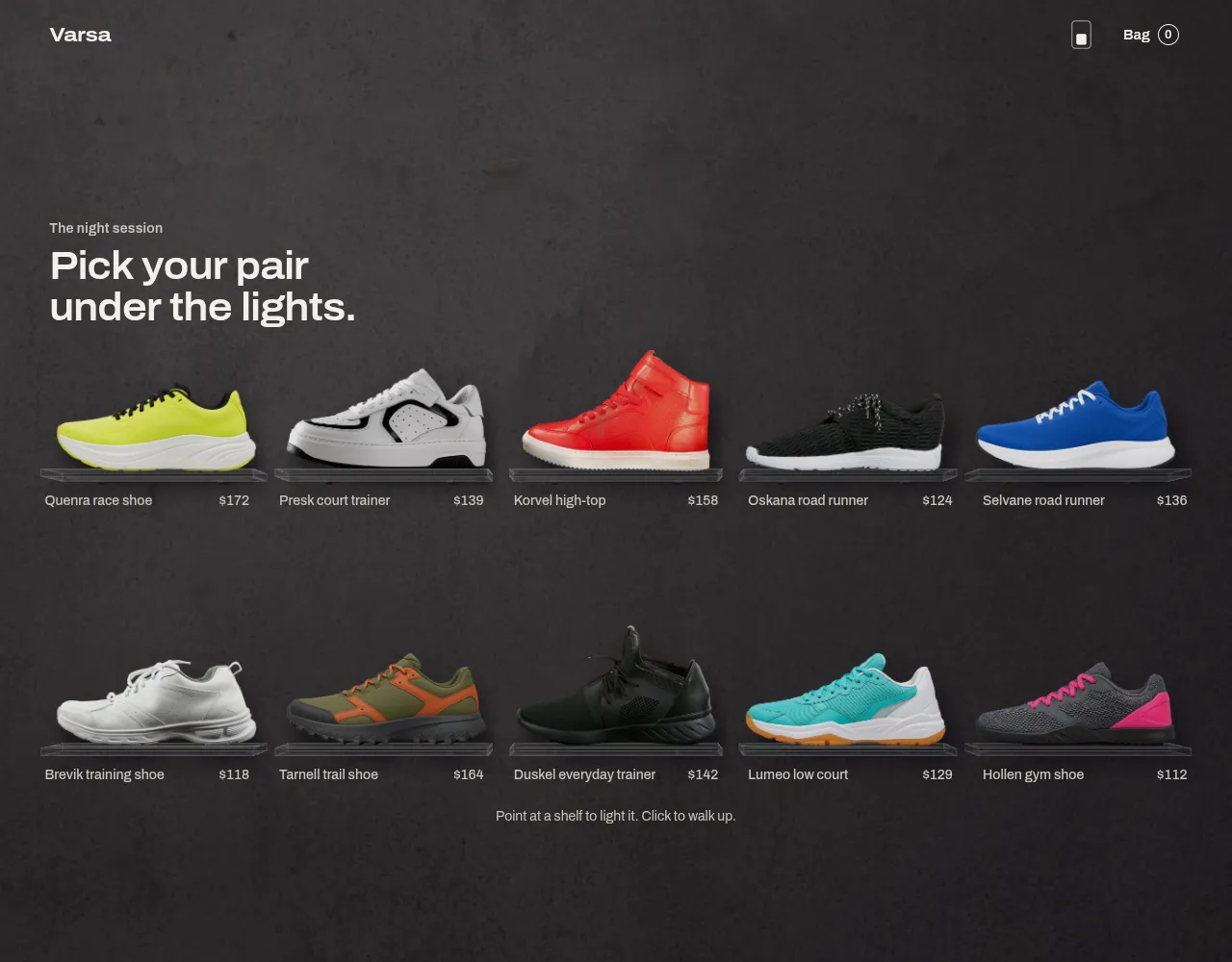
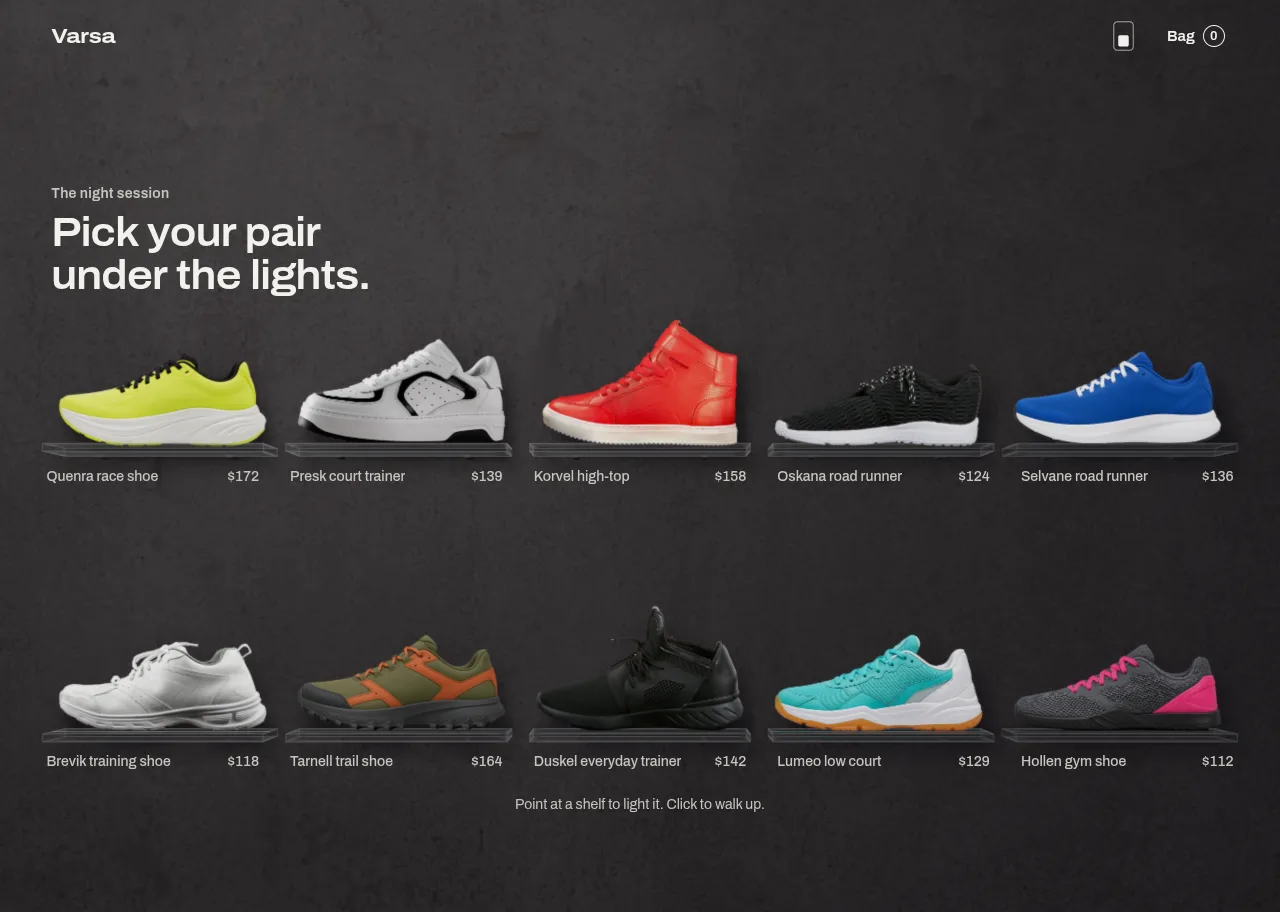
Floodlit is a 3D night showroom for a small range of sports shoes, written as a React component in raw WebGL2 with no 3D library. Pairs stand on clear acrylic shelves against a plaster wall. Point at a shelf and a strip of light inside the acrylic comes up in that shoe's own colour, and the light lands on the sole, on the edge of the slab and on the wall behind it. Click, and one camera walks up to the shoe.
This article is about the rendering: one camera for the whole room, the wall, the four kinds of light and the maths behind each, the acrylic, the soft shadows, how a flat photograph is lit as if it stood in the room, how a still is made clean, and how all of it runs in a Web Worker with the page's own thread as a fallback. The motion and the store around it are in a second article. The demo's ten shoes are five real photographs and five AI-generated images, listed with their sources in the product's PHOTOS.md.
Why raw WebGL2, and not three.js or a baked picture
A baked picture of a lit wall cannot answer a pointer: the strip comes up on hover, a torch follows the pointer across the plaster, and the camera walks. That needs a real renderer.
three.js would have given a scene graph and materials, but nothing this room needs is a standard material. The strip is a line light with a closed-form falloff. The acrylic is drawn without a depth buffer, in a fixed order around a photograph that stands inside it. The photographs are premultiplied in sRGB and must be unpremultiplied and decoded in the shader before they are lit, or every edge gets a fringe. Each of those fights a general-purpose engine. Written by hand, the whole component is 26.5 KB of gzipped JavaScript without React: 11.6 KB on the page and 14.8 KB in the worker.
One room, one camera
Everything is placed in world units that are CSS pixels at the rest camera: x to the right, y down, z towards the viewer. The wall is the plane z = 0. A shoe's picture is a card standing at z = 24. A slab is a box 46 deep and 8 thick, from z = 2 to its front at z = 48.
There is one camera, and every shelf is seen from it. The focal length follows the component's width, f = clamp(0.9 × width, 900, 1700) pixels. A point at depth z appears at
screen x = W/2 + (x − camera.x) × k + shiftX × W/2, with k = f / (camera.z − z)
and the same for y. shiftX and shiftY are a lens shift: they move the picture across the screen without turning the camera. The projection matrix carries them as an extra term in clip space:
At rest the camera stands at z = f × stepBack + 24, so for the shoes' plane k = 1 / stepBack. On a window tall enough, that is exactly 1: the shoes' plane is 1:1 with CSS pixels, which is what lets the page lay its posters out with CSS alone (the second article explains why that matters). The wall at z = 0 comes out a fraction smaller and the slab's front a fraction larger, as they would in a real room.
export function restPose(layout: WallLayout, width: number, height: number, scrollY = 0, top = 0): Pose { const f = focalLength(width); if (width < TALL_WIDTH) { return { x: width / 2, y: scrollY + height / 2, z: f + SHOE_Z, pitch: 0, yaw: 0, shiftX: 0, shiftY: 0 }; } // A short window steps back: the layout never changes by height. The host's header keeps its own strip on top. const room = Math.max(1, height - top); const stepBack = Math.max(1, layout.contentHeight / room); // The camera's eye sits level with the middle of the shelves, so the rows above it are seen from below // and the rows below it from above. A lens shift keeps the page itself where it belongs. const first = layout.slots[0]?.slab.y ?? 0; const last = layout.slots[layout.slots.length - 1]?.slab.y ?? 0; const eye = (first + last) / 2; const pageCentre = layout.contentHeight / 2; const screenEye = top + room / 2 + (eye - pageCentre) / stepBack; const shiftY = -((screenEye / height) * 2 - 1); return { x: width / 2, y: eye, z: f * stepBack + SHOE_Z, pitch: 0, yaw: 0, shiftX: 0, shiftY };}
The same trick keeps a shoe head-on in the focus view. To leave room for the panel, the shoe must sit left of centre. Moving the camera sideways would view the flat card about 9° off its axis, and a photograph cannot show a side it does not have. So the camera stays directly in front of the shoe, and the lens shift slides the picture over. The wall and the slab still move behind the shoe during a walk, because they are at other depths.
The wall: a scan, not a photograph
The plaster is a photogrammetry scan from Poly Haven, under CC0. It arrives as a colour map and a measured height map, and becomes three textures:
a colour ratio map, 1024², the colour divided by its own heavy blur, so it holds only the plaster's variation and the shader chooses the base colour per theme;
a normal map, 1024², from the height map;
a detail tile, 512², the height's finest frequencies with the seams cross-faded, for when the camera is close.
The normal comes from the height's slope. With Sobel derivatives gx, gy, the tangent-space normal is normalize(−s·gx, s·gy, 1), where s is a strength. There is no true unit for s here: a height map's values are relative. So s is set from the data:
In the shader the ratio map scales a base colour, and the normal map and the detail tile tilt the surface:
vec3 ratio = texture(uAlbedo, uv, uMapBias).rgb * 2.0;ratio = mix(vec3(dot(ratio, LUMA)), ratio, uChroma); // how much of the plaster's colour to keepratio = max(vec3(0.0), 1.0 + (ratio - 1.0) * uContrast);vec2 nm = texture(uNormal, uv, uMapBias).rg * 2.0 - 1.0; // stored with +y up the imagevec2 dt = texture(uDetail, P * uDetailScale).rg * 2.0 - 1.0; // uDetailScale = 1/170: one tile per 170 world unitsvec2 tilt = nm * uRelief + dt * uDetailRelief;vec3 N = normalize(vec3(tilt.x, -tilt.y, 1.0)); // world y points down
Light, in linear light
All lighting is done in linear light in RGBA16F render targets, and converted to sRGB only once, at the end. The wall receives four terms: an ambient, a key light, a torch, and the strips.
Ambient. A constant, falling by up to 20% towards the room's far ends: room = 1 − 0.2 × smoothstep(0.9, 2.2, |x − centre| / halfWidth).
Key light and torch. Point lights with real inverse-square falloff: E = power × max(N·L, 0) / d², where L points from the wall pixel to the light and d is the distance in world units. The key light is fixed above and in front of the wall. The torch follows the pointer at a small distance from the wall, so it rakes across the plaster and moves the shadows a little.
Strips. Each strip is a straight line of light of constant intensity along x, from x0 to x1, inside the slab's front edge at height y_s and depth z_s. For a wall pixel at (x, y, 0), put the line's ends at a = x0 − x and b = x1 − x, and its perpendicular distance at r² = (y − y_s)² + z_s². The irradiance on the wall, which faces +z, is the integral of cos θ / ρ² along the line:
That closed form is why the glow has no box to have an edge: its ends fall away smoothly by construction, and its cross-section is the real fall of a line light, not a Gaussian picked by eye.
// Light from a straight line of length b - a, on a plane parallel to it.float lineIrradiance(float a, float b, float d2, float z) { return (b / sqrt(b * b + d2) - a / sqrt(a * a + d2)) * z / d2;}for (int i = 0; i < uCount; i++) { vec4 st = uStrip[i]; // x0, x1, y, z float dy = P.y - st.z; float d2 = dy * dy + st.w * st.w; float e = lineIrradiance(st.x - P.x, st.y - P.x, d2, st.w); // Relief: how much the normal-mapped surface faces the nearest point of the line, against a flat wall. vec3 toLine = normalize(vec3(clamp(P.x, st.x, st.y) - P.x, -dy, st.w)); float relief = max(dot(N, toLine), 0.0) / max(toLine.z, 0.08); // The strip's own shoe stands between it and the wall above it. vec2 q = vec2(P.x, P.y + (st.z - P.y) * (uShoeZ / st.w)); float shade = 1.0 - 0.72 * shadowAt(i, q, 3.2); E += uLed[i].rgb * uLed[i].a * uStripPower * e * relief * shade;}
The relief term divides by toLine.z because the closed form already includes the flat wall's cosine. The ratio leaves the strip's overall falloff untouched and adds only what the plaster's tilt changes: grazing light catches the bumps, which is what makes the glow look like light on a material and not paint.
Measured on the P1 stills, the largest step between neighbouring pixels along and across any glow was 4 and 3 levels, against a limit of 20.
Soft shadows from a blurred alpha chain
A shoe is a card at z = 24, 24 units in front of the wall. To know whether a wall pixel P sees a light at Lp, follow the ray from P towards the light up to the shoe's plane:
q = P + (Lp − P).xy × (24 / Lp.z)
and read the shoe's alpha at q. A hard read would give a hard shadow. Instead each shoe ships a small atlas of its alpha, blurred at five strengths (256² down to 16²), stored as one layer of a TEXTURE_2D_ARRAY with its own mip chain. The shader reads it with an explicit level that grows with how far up the shoe q is, so the shadow is sharp at the sole and soft at the collar, as a real contact shadow is:
float h = clamp((uShoeBase[i].x - q.y) / uShoeBase[i].y, 0.0, 1.0); // 0 at the sole, 1 at the topkeyVis *= 1.0 - here * uKeyShadow * shadowAt(i, q, mix(0.5, 2.6, h));
The slab casts a faint soft bar from the key light and a closer ambient occlusion where it meets the wall. Both are a softBar, a smoothstep along the slab and a Gaussian across it, so neither has a box edge either.
Clear acrylic with no depth buffer
The context has no depth buffer. Everything is transparent or cut out, and a depth buffer would not order transparent faces anyway. So each shelf is drawn in a fixed order: the brackets under it, then the slab's far faces, then the part of its top face behind the shoe, then the shoe, then the part of the top in front of the shoe, then the near faces and the front. Which side faces and which of top or bottom are far depends on where the camera is, so the order is chosen per shelf, per frame.
      const size: [number, number, number] = [max[0] - min[0], max[1] - min[1], max[2] - min[2]];
      const face = (name: string, zFrom = min[2], zTo = max[2]) => {
        g.uniform3f(slabP.u.uOrigin, min[0], min[1], zFrom);
        g.uniform3f(slabP.u.uScale, size[0], size[1], zTo - zFrom);
        const [first, count] = box.ranges[name];
        g.drawArrays(g.TRIANGLES, first, count);
      };
      const camAbove = cam.y < slot.slab.y;
      const camBelowFloor = cam.y > max[1];
      // Far faces of the slab, before the shoe.
      if (!camBelowFloor) face("bottom");
      face("top", min[2], SHOE_Z);
      if (cam.x > min[0]) face("left");
      if (cam.x < max[0]) face("right");

      // The shoe.
      {
        const p = programs.shoe;
        g.useProgram(p.program);
        g.bindVertexArray(quadVao);
        g.uniformMatrix4fv(p.u.uViewProj, false, vp);
        g.uniform3f(p.u.uOrigin, slot.card.x, slot.card.y, SHOE_Z);
        g.uniform3f(p.u.uScale, slot.card.w, slot.card.h, 1);
        bind2D(0, shoeTextures[i]);
        g.uniform1i(p.u.uShoe, 0);
        const large = larges.get(i);
        const largeMix = large?.ready ? (st.largeMix ?? 0) : 0;
        if (largeMix > 0) bind2D(1, large!.texture!);
        g.uniform1i(p.u.uShoeLarge, 1);
        g.uniform1f(p.u.uLargeMix, largeMix);
        g.uniform1f(p.u.uMipBias, st.mipBias);
        g.uniform1f(p.u.uExposure, st.exposure);
        g.uniform3fv(p.u.uLedColor, led as unknown as number[]);
        g.uniform1f(p.u.uLedLevel, st.level);
        g.uniform1f(p.u.uSoleCatch, L.soleCatch);
        g.uniform1f(p.u.uBaseline, shoes[i].baseline);
        g.uniform2f(p.u.uPanelFade, state.panelFade[0], state.panelFade[1]);
        g.uniform1f(p.u.uPanelAmount, st.panelAmount);
        g.uniform1f(p.u.uFadeAll, st.fade);
        g.uniform1f(p.u.uFlip, flip);
        g.uniform2f(p.u.uViewport, targetW, targetH);
        g.drawArrays(g.TRIANGLES, 0, 6);
      }

      // Near faces of the slab, over the shoe.
      g.useProgram(slabP.program);
      g.bindVertexArray(boxVao);
      face("top", SHOE_Z, max[2]);
      if (camBelowFloor) face("bottom");
      if (cam.x < min[0]) face("left");
      if (cam.x > max[0]) face("right");
      face("front");
The acrylic's look comes from three terms. A rim: light caught along the edges of each face, exp(−edge / w), where edge is the pixel's distance to the nearest edge of its face in world units and w is at least 1.1 pixels, from fwidth(edge), so the rim never aliases. A Fresnel term, (1 − |N·V|)⁴, so faces seen at a grazing angle are more reflective. And the strip itself on the front face: a sharp core exp(−(d/0.95)²) and a wider halo exp(−d/3.2), with a faint glow leaving through the top and bottom faces, strongest near the front. On the top face the shader also draws the shoe's contact shadow, a Gaussian across z centred on the shoe's plane, and a faint reflection: it mirrors the view ray off the top face, intersects it with the shoe's plane, and reads the shoe's picture there at a soft mip level, fading with height above the sole.
A photograph lit as part of the room
Each picture is a cut-out, uploaded with its alpha premultiplied by createImageBitmap in sRGB. Blending premultiplied colours in a texture is what keeps mip levels free of dark or pale halos. But light must be applied to the real colour in linear light. So the shoe's shader undoes the premultiply, decodes sRGB to linear, lights the colour, and premultiplies again in linear light:
vec4 s = texture(uShoe, uv, uMipBias);if (uLargeMix > 0.0) s = mix(s, texture(uShoeLarge, uv, uMipBias), uLargeMix); // a larger picture fading inif (s.a < 0.002) discard;vec3 albedo = srgbToLinear(clamp(s.rgb / s.a, 0.0, 1.0));float h = max(uBaseline - vFace.y, 0.0); // height above the sole, as a share of the picturefloat low = exp(-h / 0.13); // the strip catches only the lower part of the shoevec3 lit = albedo * (uExposure + uLedColor * uLedLevel * uSoleCatch * low);outColor = vec4(lit * s.a, s.a);
The picture is never lit by the key light or the torch. It is a photograph, already lit when it was taken, and a flat card lit again by a point light only looks flat. What it does get is the strip's coloured light on its sole, falling off with height, and its exposure lowered when the room dims around a shoe in focus.
In focus, the panel needs a calm zone. Shoes on the panel's side fade out before the panel, by a screen-space ramp, panelKeep(x), a smoothstep between two screen positions just past the focused shoe's own slab.
Clean pixels: float targets, MSAA, and a still averaged in linear light
While the camera moves, each frame is drawn once into a multisampled RGBA16F renderbuffer and resolved: 4× MSAA up to 2.6 megapixels, 2× up to 5, and none above that, where the pixels are already small. The total is capped at 6 megapixels.
  function samplesFor(w: number, h: number): number {
    const limit = gl!.getParameter(gl!.MAX_SAMPLES) as number;
    const pixels = w * h;
    // Past 5 MP the pixels themselves do the work while moving, and a still is averaged anyway.
    const want = small ? 2 : pixels <= 2_600_000 ? 4 : pixels <= 5_000_000 ? 2 : 0;
    return Math.min(limit, want);
  }

  /**
   * One frame of motion, or one step of a still. A still is built one jittered frame at a time across animation
   * frames, so it never makes a long frame. Its first frame has no jitter and is the same picture as a moving
   * frame, so nothing shifts at the moment the camera stops. Pass stillIndex -1 while moving.
   */
  function frame(layout: WallLayout, cssW: number, cssH: number, dpr: number, state: RoomState, stillIndex: number) {
    const g = gl!;
    const w = Math.round(cssW * dpr);
    const h = Math.round(cssH * dpr);
    resize(w, h, samplesFor(w, h));
    drawCalls = 0;
    worldDim = state.worldDim;
    if (stillIndex < 0) {
      renderFrame(layout, cssW, cssH, state, 0, 0);
      present(sceneTex!);
      return drawCalls;
    }
    const [jx, jy] = stillIndex === 0 ? [0, 0] : HALTON_16[(stillIndex - 1) % 16];
    renderFrame(layout, cssW, cssH, state, jx, jy);
    g.bindFramebuffer(g.FRAMEBUFFER, accumFbo);
    g.viewport(0, 0, targetW, targetH);
    const p = programs.accumulate;
    g.useProgram(p.program);
    g.bindVertexArray(emptyVao);
    bind2D(0, sceneTex!);
    g.uniform1i(p.u.uFrame, 0);
    g.uniform1f(p.u.uWeight, 1 / (stillIndex + 1));
    if (stillIndex === 0) {
      g.disable(g.BLEND);
    } else {
      g.enable(g.BLEND);
      g.blendFunc(g.SRC_ALPHA, g.ONE_MINUS_SRC_ALPHA);
    }
    g.drawArrays(g.TRIANGLES, 0, 3);
    g.disable(g.BLEND);
    present(accumTex!);
    return drawCalls;
  }
When the camera stops, the room builds a still over the next 16 animation frames: each frame is drawn with a sub-pixel jitter from a Halton (2, 3) sequence, and blended into an accumulation target with weight 1/(i+1), which keeps a running mean. Then it draws nothing at all until something changes. Drawing one jittered frame per animation frame, rather than 16 in one go, means a still never makes a long frame.
The last step is present: highlights roll off above a knee rather than clip, c' = k + (1 − k)(1 − e^(−(c − k)/(1 − k))) above k = 0.72, so a bright strip keeps its hue instead of going white. Then sRGB encoding, and a static 64² blue-noise dither of one level peak to peak, which stops banding in the dim tails of the glows. It is never animated, so it cannot shimmer.
The still has one rule of its own, caught on reading the first loop rather than seen on screen: it starts on every stop, not only when a redraw is forced, and its first frame has no jitter, so the picture does not shift by a fraction of a pixel at the moment the camera stops. The Halton offsets begin with the second frame.
The stills and the frame-by-frame checks ran in installed Chrome on this laptop's real GPU, headless:
Off the page's thread
Creating a context, compiling shaders, decoding pictures and drawing frames all cost the thread that does them. So the room runs in a Web Worker on an OffscreenCanvas where the browser allows it, and the page only sends it commands. A canvas handed to a worker can never be taken back, so the page asks first: the worker's opening message says whether it can draw at all, and only then is the canvas transferred. A worker that never answers, because its file is missing or blocked, counts as no worker after 4 s, and an error before the hand-over falls back at once.
// The room's own thread: context, shaders, pictures and every frame, so the page's main thread never waits for them.// Typed without the "webworker" lib, so a project's own TypeScript setup never has to include it.import { createHost, type HostInit, type HostMethod } from "./host";type Message = { type: "init"; canvas: OffscreenCanvas; init: HostInit } | { type: "call"; method: HostMethod; args: unknown[] };type Scope = { postMessage(message: unknown): void; onmessage: ((e: { data: Message }) => void) | null };const scope = self as unknown as Scope;let host: ReturnType<typeof createHost> | null = null;scope.onmessage = ({ data }) => { if (data.type === "init") host = createHost(data.canvas, data.init, (event) => scope.postMessage(event), "worker"); else host?.call(data.method, data.args);};// Asked before the page hands its canvas over, because a canvas handed over cannot be taken back.let ok = typeof requestAnimationFrame === "function" && typeof OffscreenCanvas === "function";if (ok) { try { ok = !!new OffscreenCanvas(1, 1).getContext("webgl2"); } catch { ok = false; }}scope.postMessage({ type: "hello", ok });
On the page's own thread the same code runs: host.ts holds the engine and the room and takes commands by name in both places, and its module is loaded with a dynamic import() only when the fallback is needed. That fallback is not hypothetical: UpFork's preview is a single HTML file whose rules allow workers only from blob: addresses, so there the room always runs on the page's thread. A host with rules of its own can pass worker={false}.
Proving that needed a tab that was really hidden, and that was harder than it sounds:
A lost context, in either place
If the GPU resets, the context is lost. The host listens on the canvas, which works for an OffscreenCanvas in a worker as for a canvas on the page. On loss it drops the room and tells the page, which shows the plain posters and a plain slide-in, so buying never stops. On restore it builds a new engine on the same canvas, and puts back the layout, the shoe in focus and the bag.
The context comes back as the same object. The engine counts draw calls by wrapping drawArrays, and it binds the real function from WebGL2RenderingContext.prototype, never from the context, so a restored context is never wrapped twice.
  // From the prototype: after a restored context this is the same object, already wrapped once.
  const realDraw = WebGL2RenderingContext.prototype.drawArrays.bind(gl);
  gl.drawArrays = (mode: number, first: number, count: number) => {
    drawCalls++;
    totalDraws++;
    realDraw(mode, first, count);
  };
Larger pictures on demand
Every shoe loads at 960 px, shared with the page's own poster so the browser's cache serves it. A shoe in focus gets a 2000 px picture, and so do its two neighbours, because walking along is one key away. The larger picture is fetched and decoded as soon as a shelf is hovered or focused, which costs the GPU nothing. It goes to the GPU only when no walk is running, one step per animation frame: the picture in one frame, its smaller levels in the next. Then it crossfades over the smaller one in the shoe's shader. Far ones are let go: at most five larger pictures are held on a desktop and three on a phone.
  function preload(index: number) {
    if (!layout) return;
    const n = layout.slots.length;
    const near = (i: number, centre: number) => {
      const d = Math.abs(i - centre);
      return Math.min(d, n - d) <= 1;
    };
    const centre = focused >= 0 ? focused : index;
    const limit = options.small ? 3 : 5;
    let held = 0;
    for (let i = 0; i < n; i++) if (engine.largeReady(i)) held++;
    if (held >= limit) engine.keepLarge((i) => near(i, centre) || near(i, index));
    for (const k of [index, (index + 1) % n, (index - 1 + n) % n]) {
      void engine.requestLarge(k).then((arrived) => {
        if (arrived) wake();
      });
    }
  }
With four larger pictures held at 1440×900, the textures came to 79 MB, and 143 MB with the render targets. At a phone's size at 2×, with three held, 29 MB and 74 MB.
What was measured, and what was not
Everything below was measured on one laptop with an Intel Iris Plus, in installed Chrome, on a production build, while other work was running on the same machine.
What
Result
Component JavaScript, gzip, without React
26.5 KB (11.6 on the page, 14.8 in the worker)
Pictures for the first view at 1440×900
863 KB
GPU textures, desktop / phone size
79 MB / 29 MB (143 / 74 with render targets)
Draw calls at rest, and in a hidden tab
0
Largest step along or across a glow
4 and 3 levels
Pixels shimmering in a walk's settle
0 of 31,360
Frame times, long tasks, LCP and GPU time per frame were never measured on a quiet machine. The laptop was busy with other work for the whole build, so this article gives no frame rate. The room was not tested on a real phone, a real tablet, Safari or Firefox.
The GLSL sources are in the product's gl/ folder, built into gl/shaders.ts by a small script. The wall, its maps and the photo pipeline are described in the product's README. The pictures are not covered by the MIT licence: five are real photographs under their own licences and five are AI-generated, and we have not verified those tools' terms, so check them yourself or replace the pictures.
How Floodlit's camera walks up to a shoe on springs that never snap, how buying works inside the 3D room, and how a real HTML wall lands where WebGL draws, by CSS alone.
Ramin ValadanProved GitHub account and website, confirmed e-mail: checked by UpFork·28 min read··AI·1
23 lessons
Behind the build
Behind the build · Pacewall — Sneaker & Shoe Store Product Grid for React and Tailwind CSS
Why a shoe wall needs side-view cut-outs, where usable photographs come from, and a Python pipeline that keys, mattes, cleans the edge, levels the sole and measures where it meets the shelf.
Ramin ValadanProved GitHub account and website, confirmed e-mail: checked by UpFork·18 min read··AI
14 lessons
Behind the build
Behind the build · Lightfall — Crypto & Web3 Hero Section for React with WebGL Background
How Lightfall draws up to 160 light lanes in one shader pass, why its WebGL runs in a Web Worker (Lighthouse 70 to 98), and eight traps in GLSL, layout shift, timing and contrast.
Ramin ValadanProved GitHub account and website, confirmed e-mail: checked by UpFork·10 min read··AI·3

Comments
0 comments
No comments yet. Questions, what you built with it, what could be better: its developer reads them.
Sign in to comment.
Sign in to comment