New
Loading the page…
Loading the page…
Loading the page…
Before you buy
How this component gets from the preview into your project, and what buyers ask most.
How to use it
From the preview to your project
Try it in the preview
Switch between light and dark, and resize it to phone and tablet widths, before you decide.
Get it
Free products are yours with a free account. Paid ones settle in USDT on TRON, sent straight to the wallet on your order.
Install it
Components go into your project with one shadcn command, dependencies included. Everything else downloads with a checksum.
Make it yours
It's your code now: rename it, restyle it and wire in your real data.
Or hand it to your AI
Copy the prompt and let your coding assistant place it in your project, following your conventions.
Yes, a free one: it keeps your order, every payment you make for it and the files together. Free products need it too: without an account you can look and try the live preview, but not download, install or copy anything.
Send the price as a USDT transfer on TRON (TRC-20) to the wallet on your order, shown with its QR code, then paste the transaction ID on the order. It's checked on-chain, and the files unlock once it's confirmed. Paid less? You're asked for the rest.
Yes. The Standard License covers unlimited personal and commercial projects, client work included; just don't resell it on its own. Open-source licenses say so on the product.
Create a CLI token on your account page, put it in your project's .env.local, add UpFork to components.json once, and install with npx shadcn add: free and paid components alike.
Onto your order, in your account. Download links last ten minutes and can be made again.
Releases are scanned for malware and reviewed before anyone can download them, and every file shows its SHA-256 so you can check what you got.
Building with an AI assistant?
Copy a ready-made prompt with the code, its dependencies and a demo, and your assistant can put it in place for you.
Selling your own work?
Get approved once, then publish components, templates and mobile components, paid in USDT straight to your own wallet.
Components
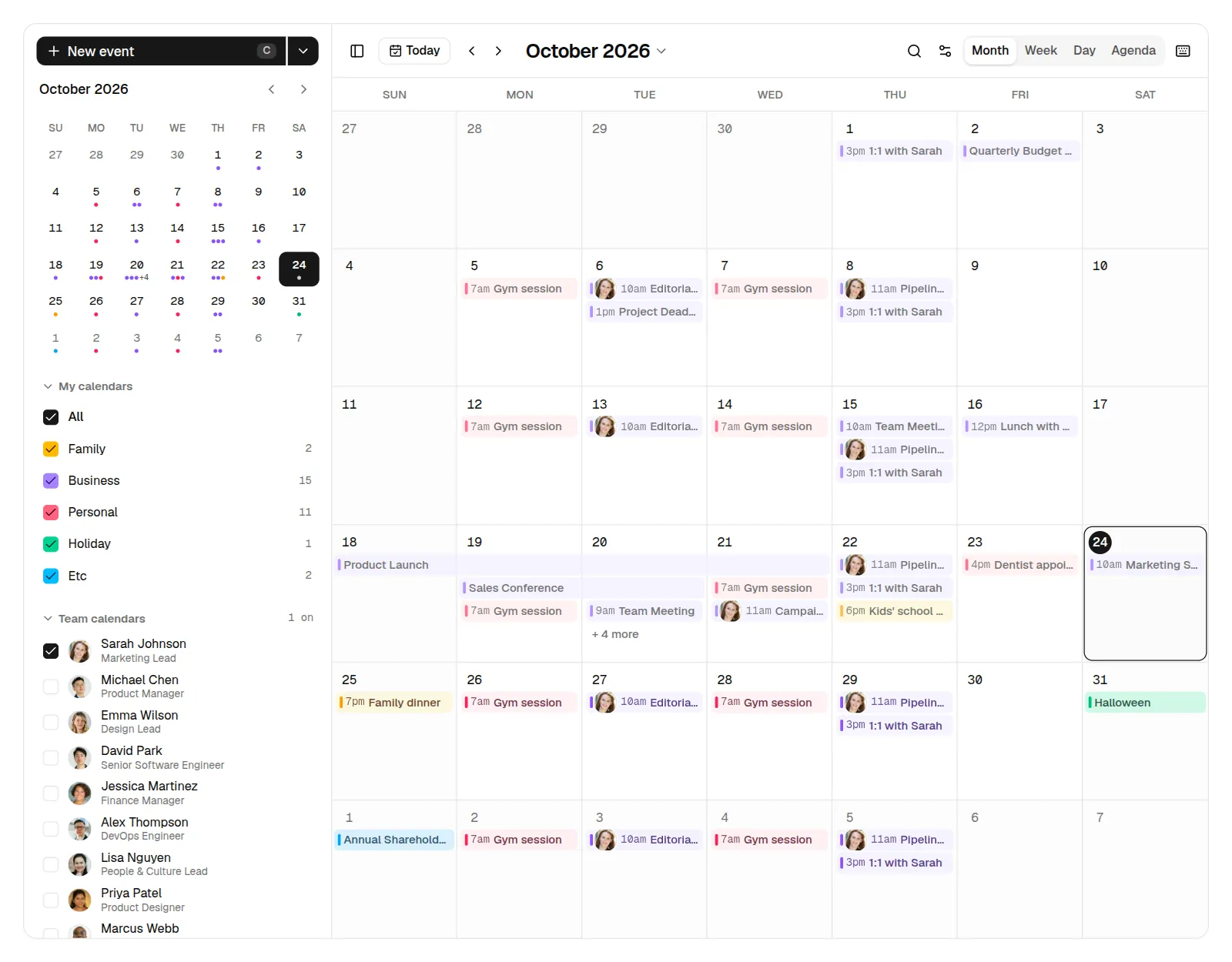
A full event calendar and scheduler for React and shadcn/ui: month, week, day and agenda views, drag-and-drop to create, move and resize, recurring events, attendees with photos and RSVPs, team calendars, search and shortcuts, Undo everywhere. Light and dark, mobile to desktop.
by UpFork, built by Ramin ValadanComponentUpdated 24 Oct 2026
52 files · 12 packages · 15 assets
The code comes with the Pro plan
These files install into your project with one command, or download as a ZIP.
See the plansA complete calendar app for React and shadcn/ui: month, week, day and agenda views; drag to create, move and resize; repeating events; attendees with photos and RSVPs; teammates' calendars; search, settings and keyboard shortcuts; Undo on every change. Light and dark, phone to desktop, keyboard and screen reader friendly.
import { Toaster } from "sonner"
import { EventCalendar } from "@/components/calendar/event-calendar"

export default function CalendarPage() {
  return (
    <div className="h-dvh p-4">
      <EventCalendar />
      <Toaster position="bottom-right" closeButton />
    </div>
  )
}
Give it a height (it fills its parent and scrolls inside its views). Without events it shows the demo calendar,
moved to the current week so it always looks alive.
<EventCalendar
  events={events}            // CalendarEvent[]
  categories={categories}    // your calendars: { id, name, color: "amber" | "violet" | "rose" | "emerald" | "sky" }
  people={people}            // everyone who can be invited, the signed-in user included
  me="u_42"                  // the signed-in user's id: organizer of new events
  onEventsChange={save}      // after every create, move, resize, edit, delete and undo
/>
| Prop | What it does |
|---|---|
events | Timed events keep ISO instants (start, end, exclusive) and the timeZone they were entered in; all-day events keep dates (start, end, both inclusive, YYYY-MM-DD). Optional: description (basic rich text), location, videoUrl, organizerId, attendees ({ personId, rsvp }), reminders (minutes before), recurrence, exdates, kind: "out-of-office". |
categories | Defaults to Family, Business, Personal, Holiday and Etc. Each takes one of the five colour recipes. |
people, me | Defaults to the demo team. Photos are plain <img>; initials show only if one fails to load. |
defaultView, defaultDate |
0 reviews · 0 bugs
Ship it0With fixes0Skip0· 0 reviews
0 bugs0 open0 fixed
Members who have it review it and report its bugs. Sign in
No reviews or bugs yet.
| Where it opens when the URL and the visitor's last choice don't say. Phones open on Agenda (or Day, if that was their last choice). |
defaultTeam | Teammates whose calendars start switched on. |
defaultSettings | Week start, 12/24 h, weekends, dimming, week numbers, working hours, time zone, density. |
syncUrl | Keeps ?view=week&date=2026-10-15&event=… in the address bar (default on). |
persist | Remembers the view, filters, sidebar and settings in localStorage (default on). |
onEventsChange | Called with the whole list after each change. |
Repeating events: recurrence: { freq: "daily" | "weekly" | "monthly" | "yearly", interval, byWeekday?, nth?, until?, count? }.
A series expands only over the range a view shows. Editing, moving or deleting one date asks This event / This and
following / All events; "this event" takes the date out of the series (exdates) and adds a single event in its place.
components/calendar/
  event-calendar.tsx   the shell: sidebar, toolbar, the view, dialogs; layout by its own width
  sidebar.tsx          New event (+ All-day, Out of office), the mini calendar, My calendars, Team calendars, Upcoming
  toolbar.tsx          Today, ‹ ›, the title as a month/year picker, view switcher, search, settings
  month-view.tsx       the month grid, continuous multi-day bars, + N more, drag to move and to create
  time-grid.tsx        week and day: all-day row, side-by-side overlaps, now line, drag to create/move/resize, slot cursor
  agenda-view.tsx      day groups, Day 2 of 4, earlier events, loads more on scroll
  event-item.tsx       chips, bars and blocks (and what clicking, double-clicking and keys do to them)
  event-popovers.tsx   hover card, quick view, quick create
  event-dialog.tsx     the full editor; fields.tsx (typed times, dates, people, repeat, reminders); description-editor.tsx (TipTap, loaded on demand)
  dialogs.tsx          confirm, repeating-event scope, shortcuts, phone sheets
  store.ts, commands.ts, actions.ts   one typed store; commands with toasts and Undo; pure edits
  logic.ts, recurrence.ts, format.ts, tz.ts   ranges, layouts, search; series; the one date/time formatter; time zones
  data.ts, people.ts   the demo calendar and team
  ui/                  the shadcn/ui primitives it uses, in their Base UI flavour
M W D A views · T today · J / K next / previous · C new event · / search · [ sidebar · ? all of
them. Arrow keys move through the month grid and the time slots, Enter opens a day or an event, Space picks up an
event to move with the arrows, Delete asks before deleting. Shortcuts pause while you type.
npm install
npm run dev        # http://localhost:6301
npm test           # unit tests (time zones, formatting, recurrence, layout, edits)
npm run build && npm run start:lan   # http://localhost:6300, also from phones on the same Wi-Fi
node scripts/e2e.mjs                 # clicks through every feature against :6300 (installed Chrome)
node scripts/a11y.mjs                # axe on ten screens, light and dark
npm run shots                        # screenshots at 1440 / 1280 / 1024 / 768 / 390, light and dark
npm run registry && npm run zip      # what UpFork lists (registry/) and daybook.zip
Photos: public/images/avatars/ (sources and licence in CREDITS.md there).


