A camera that walks up to a shoe: springs, buying inside a 3D room, and a wall placed by CSS alone
How Floodlit's camera walks up to a shoe on springs that never snap, how buying works inside the 3D room, and how a real HTML wall lands where WebGL draws, by CSS alone.
Ramin ValadanProved GitHub account and website, confirmed e-mail: checked by UpFork·28 min read··Updated ·1 view
A 3D night showroom for sneaker and shoe stores in React and raw WebGL2: pairs stand on lit acrylic shelves, the camera walks up to the shoe you click, and sizes, add to bag and the bag live in the room. No three.js.
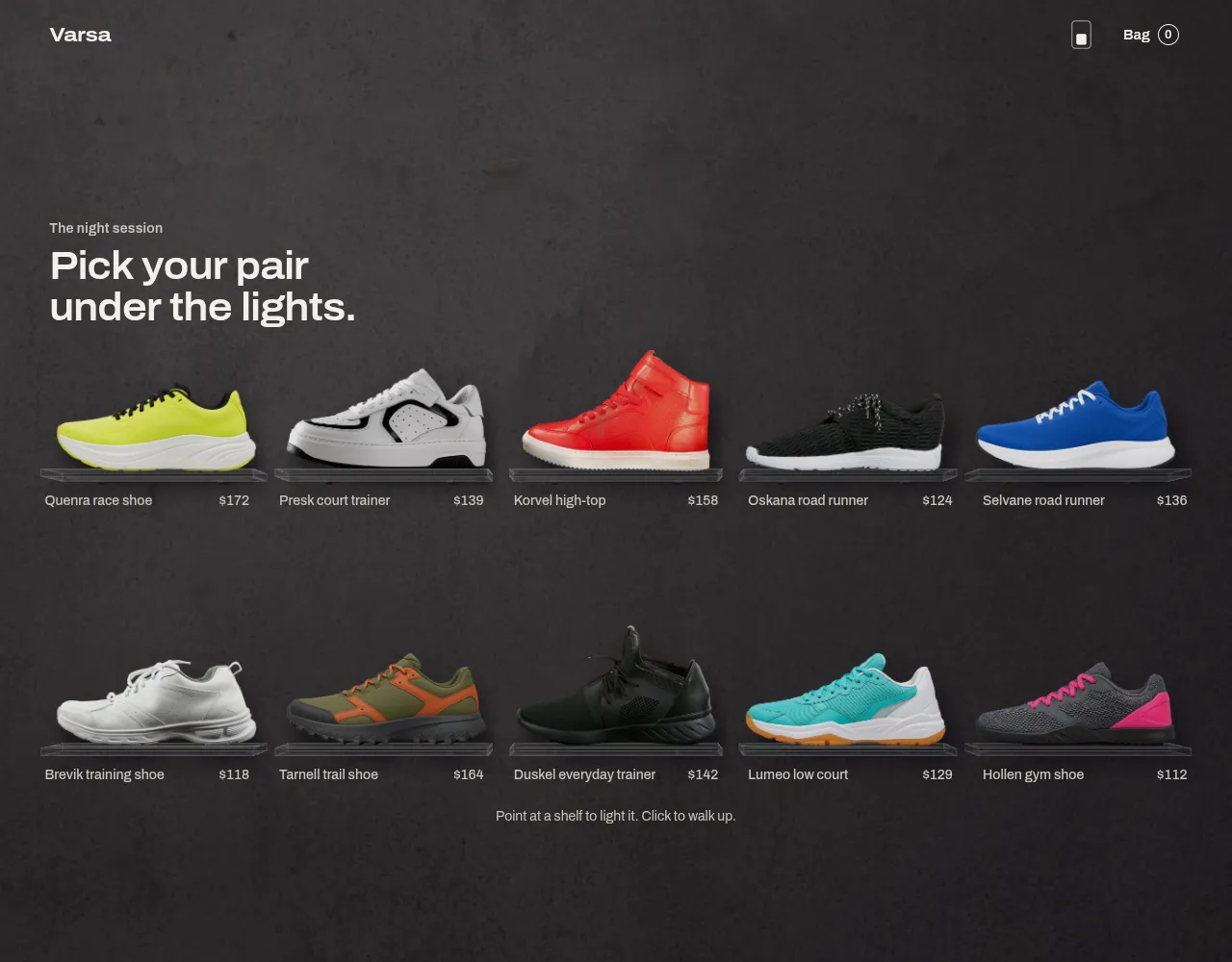
Floodlit is a 3D night showroom for a small range of sports shoes: pairs on clear acrylic shelves against a plaster wall, each shelf lit by a strip in its shoe's own colour. The first article covered how the room is drawn. This one covers how it moves and how it sells: one camera that walks up to a shoe, along the wall and back, springs that never snap, a panel for buying that belongs to the room, a wall that is real HTML placed by CSS alone, phones, right to left, and access.
Everything here is in world units that are CSS pixels at the rest camera, with x to the right, y down and z towards the viewer. The shoes stand on the plane z = 24. A point on that plane appears on screen at W/2 + (x − camera.x) × k + shiftX × W/2, where k = f / (camera.z − 24) and f is the focal length. shiftX and shiftY are a lens shift: they slide the picture without turning the camera. The demo's ten shoes are five real photographs and five AI-generated images, listed in the product's PHOTOS.md.
The walk up: anchored on the shoe
The obvious way to walk a camera up to something is to ease its position and its distance from start to end. That makes the shoe swing across the screen on a curve: the same sideways move of the camera shifts the picture far more when it is close than when it is far, so the shoe drifts one way early and the other way late.
So the path is anchored on the shoe instead. Take a point on the shoe, a little above its slab. Work out where it is on screen now (s0) and where it must be at the end (s1). Then, at each moment u from 0 to 1:
the shoe's screen position moves in a straight line: s(u) = s0 + (s1 − s0) × e(u), where e is the easing curve, plus a small rise of −14 px × sin(π·e) so it lifts a little on the way;
the distance eases in log space: ln D(u) = ln D0 + (ln D1 − ln D0) × e(u), because equal steps in ln D look like equal steps of zoom;
the camera is solved from those two: camera.x = anchor.x − (s.x − W/2 − shiftX·W/2) / k, with k = f / D(u).
Near the end the distance goes a hair past its target and comes back, by 1.2% of the log distance travelled, shaped by sin(π × (u − 0.7)/0.3). That settle is what makes the stop feel like a person stopping, not a crane. The walk up runs 1230 ms after a 60 ms delay, and the panel is told it may enter at u = 0.55, when the path to it is clear.
  /**
   * A path towards a shoe or away from it, anchored on the shoe: it travels in a straight line across the screen
   * from wherever it is now to where it ends, while the distance eases. So it never swerves, and a command in
   * mid-walk just starts a new line from the present moment.
   */
  function anchoredPath(anchorX: number, anchorY: number, to: Goal, ease: (u: number) => number, rise: number, settle: number) {
    const from = currentGoal();
    const [sx0, sy0] = screenOf(anchorX, anchorY, from);
    const [sx1, sy1] = screenOf(anchorX, anchorY, to);
    const f = focalLength(cssW);
    return (u: number): Goal => {
      // The settle: past the target by a little, and back. Only the distance does it.
      const over = settle * Math.sin(Math.PI * Math.min(1, Math.max(0, (u - 0.7) / 0.3)));
      const e = ease(u);
      const logD = mix(from.logD, to.logD, e) - over * (from.logD - to.logD);
      const k = f / Math.exp(logD);
      const shiftX = mix(from.shiftX, to.shiftX, e);
      const shiftY = mix(from.shiftY, to.shiftY, e);
      const sx = mix(sx0, sx1, e);
      const sy = mix(sy0, sy1, e) + rise * Math.sin(Math.PI * e);
      return {
        x: anchorX - (sx - cssW / 2 - (shiftX * cssW) / 2) / k,
        y: anchorY - (sy - cssH / 2 + (shiftY * cssH) / 2) / k,
        logD,
        shiftX,
        shiftY,
      };
    };
  }
Walking along to the next shoe is simpler, because the distance hardly changes: position and lens shift ease together over 700 ms, and the log distance gets a bump of 0.06 × sin(π·e), a small step back in the middle, the way you lean back to look along a wall. Back to the wall is the same anchored path in reverse, with a gentler curve (0.42, 0, 0.2, 1), a smaller rise and no settle.
Closing has the opposite timing to get right. The wall's own HTML, its heading, names and prices, comes back on the way home:
Springs that never snap
Every value that moves (the camera's five numbers, the room's dim, each strip's level, the bag) is a spring, { x, v }, stepped with its exact solution rather than a numerical one, so a slow frame cannot make it unstable. A critically damped spring with angular frequency ω reaches its target with no overshoot:
e = exp(−ω·dt), tmp = (v + ω·(x − target))·dt, x' = target + (x − target + tmp)·e, v' = (v − ω·tmp)·e
The strips use an under-damped spring, a lamp coming up rather than a value arriving: ω 17 and ζ 0.84. Computed from the spring itself, for a step from rest, that peaks 0.77% over and reaches 95% at 213 ms. The first choice, ω 26 and ζ 0.8, peaked at 1.5% and read as a flash on light.
/** Critically damped: reaches the target with no overshoot. */export function critical(s: Spring, target: number, omega: number, dt: number): void { const e = Math.exp(-omega * dt); const delta = s.x - target; const tmp = (s.v + omega * delta) * dt; s.x = target + (delta + tmp) * e; s.v = (s.v - omega * tmp) * e;}/** Under-damped: a small overshoot, set by zeta below 1. */export function underdamped(s: Spring, target: number, omega: number, zeta: number, dt: number): void { const wd = omega * Math.sqrt(1 - zeta * zeta); const e = Math.exp(-zeta * omega * dt); const c = Math.cos(wd * dt); const sn = Math.sin(wd * dt); const delta = s.x - target; const a = delta; const b = (s.v + zeta * omega * delta) / wd; s.x = target + e * (a * c + b * sn); s.v = e * ((-zeta * omega) * (a * c + b * sn) + wd * (-a * sn + b * c));}
The camera does not follow its path directly. The path sets a goal, and the camera's five numbers chase it with critical springs at ω 34, stiff enough to look like the path, soft enough to absorb what a new command does to it. A new command (a click on another shoe in mid-walk, Esc, an arrow key) starts a new path from the camera's present pose.
  function startPath(p: Path) {
    // The spring trails its goal a little. Keep that lead too, or the goal jumps back and the camera brakes hard.
    const lead = { x: goal.x - pose.x.x, y: goal.y - pose.y.x, logD: goal.logD - pose.logD.x, shiftX: goal.shiftX - pose.shiftX.x, shiftY: goal.shiftY - pose.shiftY.x };
    carry = { t0: p.t0, x: pose.x.v, y: pose.y.v, logD: pose.logD.v, shiftX: pose.shiftX.v, shiftY: pose.shiftY.v, lead };
    path = p;
    wake();
  }

  /** The present velocity fades into the new path. At the moment of the command the speed is unchanged. */
  function withCarry(g: Goal, t: number): Goal {
    const tau = Math.max(0, t - carry.t0) / 1000;
    if (tau > 1.4) return g;
    const e = Math.exp(-tau / CARRY_SECONDS);
    const f = tau * e;
    const l = carry.lead;
    return {
      x: g.x + carry.x * f + l.x * e,
      y: g.y + carry.y * f + l.y * e,
      logD: g.logD + carry.logD * f + l.logD * e,
      shiftX: g.shiftX + carry.shiftX * f + l.shiftX * e,
      shiftY: g.shiftY + carry.shiftY * f + l.shiftY * e,
    };
  }
Walks are timed against the clock, which brings one more case: a frame that comes very late.
Looking around without turning a photograph
The shoes are flat photographs. A camera that turned, or moved sideways without compensation, would show the card at an angle it was never photographed from. So when the pointer moves, the camera moves sideways by up to tan(1.5°) × distance, and the lens shift moves the picture back by exactly as much on the shoes' plane: shiftX += 2·dx·k / W. Points on z = 24 stay put. The wall at z = 0 and the slab's front at z = 48 move against it, which is the parallax that says "room". Measured between looking far right and far left, the shoe changed by 0.7 levels on average and the slab band by 9.1.
    const f = focalLength(cssW);
    const k = f / dist;
    const reach = Math.tan((LOOK_DEGREES * Math.PI) / 180) * dist * d;

    // Closer on the shoe: the same card, scaled about a chosen point. The camera comes forward; nothing is enlarged
    // beyond what the picture holds, because the caller sets the limit per shoe.
    if (closer.zoom.x > 1.0005 && focused >= 0 && layout) {
      const card = layout.slots[focused].card;
      const zoom = closer.zoom.x;
      const px = card.x + closer.u.x * card.w;
      const py = card.y + closer.v.x * card.h;
      const centreX = card.x + card.w / 2;
      const centreY = layout.slots[focused].slab.y - card.h * 0.42;
      const [sx, sy] = screenOf(centreX, centreY, g);
      const dist1 = dist / zoom;
      const k1 = f / dist1;
      p.z = SHOE_Z + dist1;
      p.x = px - (sx - cssW / 2 - (p.shiftX * cssW) / 2) / k1;
      p.y = py - (sy - cssH / 2 + (p.shiftY * cssH) / 2) / k1;
    }
    const dx = lookX.x * reach;
    const dy = lookY.x * reach * 0.6;
    p.x += dx;
    p.shiftX += (dx * k * 2) / cssW;
    p.y += dy;
    p.shiftY -= (dy * k * 2) / cssH;
Hover brings the shelf's strip up on its spring. The torch, a small point light that follows the pointer at a short distance from the wall, rakes across the plaster and moves the shadows a little. With reduced motion there is no walk and no torch; states crossfade, and light still answers hover.
The wall is HTML, placed by CSS alone
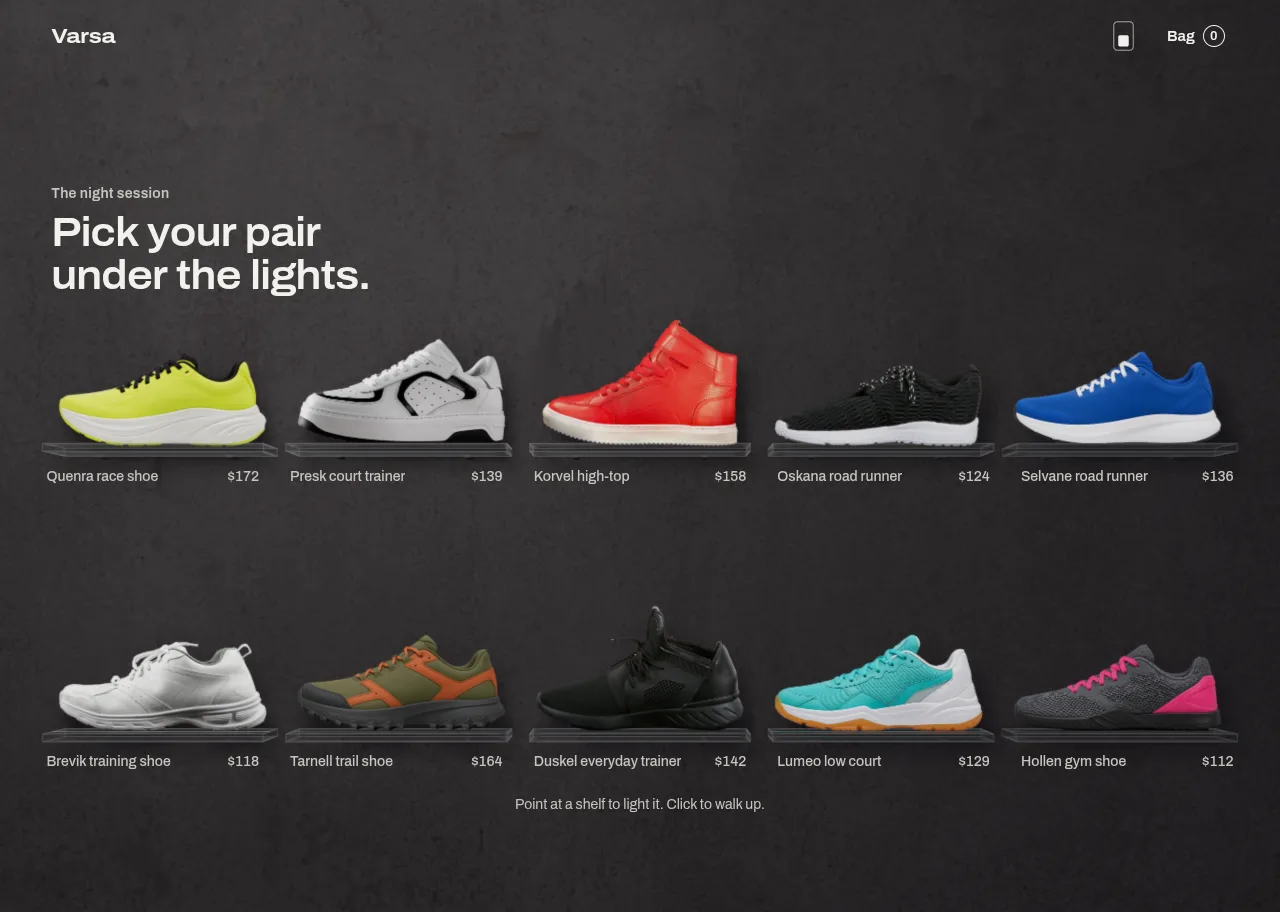
Under the canvas the wall is a <ul> of real <a href> links, each with the shoe's picture, name and price, in the server's markup. Crawlers, middle-click, screen readers and a browser with JavaScript off need no WebGL. The first paint is those pictures, and the canvas fades in over them. For that to work the pictures must already stand exactly where the room will draw the shoes, before any script runs.
The layout is the same sums as the room's layout.ts, written once in TypeScript and once in CSS on the component's own container. A container cannot query itself, so the container is .fl-root and everything hangs off its child .fl-body:
/** Where a shoe goes at each breakpoint, as CSS variables, so the server's markup places it with no script at all. */function slotVars(index: number, count: number, rtl: boolean): Record<string, number> { const out: Record<string, number> = {}; const at: [string, number][] = [["lg", 1100], ["md", 700], ["sm", 320]]; for (const [name, width] of at) { const cols = columnsFor(width, count); const rows = Math.ceil(count / cols); const row = Math.floor(index / cols); const inRow = row === rows - 1 ? count - cols * (rows - 1) : cols; const col = index - row * cols; out[`--c-${name}`] = rtl ? inRow - 1 - col : col; out[`--r-${name}`] = row; out[`--o-${name}`] = (cols - inRow) / 2; } return out;}
For right to left, the markup mirrors the column (inRow − 1 − col) and CSS still places by left alone. Writing left and inset-inline-start together on the same card would look fine in LTR, where they are one property and the later wins, and lose in RTL, where the second is right and an over-constrained box keeps right.
Without WebGL, or after a lost context, the same posters stay, and the shoe in focus shows as a flat picture on a drawn shelf. The shelf's top comes from the picture's own baseline, because each picture stands at a different height in its frame; a shelf at a fixed 73% of the stage cut straight through one sole.
The posters and the room's textures are the same pictures, so they should be the same files:
Buying inside the room
In focus, the shoe stands to one side and a panel stands beside it: series, name, price, a short description, size tiles with a unit switch, an add-to-bag pill, and the returns note. Arrow keys and two buttons walk along to the neighbours. The panel is not a modal laid over the room. It enters when the walk is 55% through, once the zone it will stand in is clear (the room calls onPanelClear), so it never slides in over shelves that are still fading. If that cue never comes, it comes in anyway after 1.8 s: a view with nothing to press is worse than a panel over a shoe still settling.
Size tiles
The tiles are a radio group. Choosing a size remembers it, so the next shoe opens with the same size chosen when it is in stock, and only three or fewer left shows "only N left". Pressing Add with no size chosen is not an error: a hint asks for a size, the tiles give a small pulse, the shoe's strip pulses with them, and focus moves to the size tiles.
The pill
The pill has a fixed size and six states: needs a size, ready, adding, added, error, and add another. Adding sweeps the shoe's colour across it as a transform, and the label swaps inside a fixed-height mask, so nothing reflows. Its text uses the colour's own ink. During the sweep that ink sits on the room's base on one side and the colour on the other, so a dark colour at night would have been pale text on a pale pill for 300 ms; while adding, the base is set to the opposite of the text's ink (--fl-pill-base), and the label reads on both ends of the sweep and on every blend between them.
onAddToBag may return a promise. The pill waits at least 500 ms so "adding" is never a flicker, a rejected promise shows its message and keeps the size, and the bag is the component's own unless the host controls it.
  const add = async () => {
    if (!focused) return;
    if (pill === "needs-size") {
      setTilePulse((n) => n + 1);
      setReserved({ kind: "hint", text: labels.chooseSizeFirst });
      roomRef.current?.pulse(focusIndex);
      tilesRef.current?.querySelector<HTMLButtonElement>('[tabindex="0"]')?.focus();
      return;
    }
    // Two clicks in one frame reach here before the state has changed: only the first counts.
    if (addingNow.current) return;
    addingNow.current = true;
    const size = focused.sizes.find((s) => s.eu === chosen) as ShoeSize;
    const token = ++addToken.current;
    setPill("adding");
    setReserved({ kind: "none" });
    const began = performance.now();
    let problem: string | null = null;
    try {
      await onAddToBag?.(focused, size);
    } catch (error) {
      problem = error instanceof Error && error.message ? error.message : labels.couldNotAdd;
    }
    const left = 500 - (performance.now() - began);
    if (left > 0) await new Promise((r) => setTimeout(r, left));
    addingNow.current = false;
    if (token !== addToken.current) return;
    if (problem) {
      setPill("error");
      setReserved({ kind: "error", text: problem });
      return;
    }
    const key = `${focused.id}:${size.eu}`;
    const existing = bag.find((l) => l.key === key);
    const label = `${labels.size} ${unit.toUpperCase()} ${sizeLabel(size, unit)}`;
    setBag(
      existing
        ? bag.map((l) => (l.key === key ? { ...l, qty: l.qty + 1 } : l))
        : [...bag, { key, shoeId: focused.id, name: focused.name, image: focused.photo.src, sizeLabel: label, eu: size.eu, variantId: size.variantId, price: focused.price, currency: focused.currency, ledColor: focusedColour, qty: 1 }],
    );
    setPill("added");
    setReserved({ kind: "added" });
    setLive(labels.addedLive(focused.name));
    roomRef.current?.pulse(focusIndex);
    addedTimer.current = setTimeout(() => setPill("another"), 2400);
  };
Why a pill's border is an SVG stroke at all, rather than a masked ring, is lesson L-941T on this site; the stretched viewBox above is the trap that comes after it.
The title, the bag, and the host's header
The shoe's name is set in large type above the panel's side of the room, and it must never touch the shoe or be cut off. Its size comes from a rule, not a breakpoint:
  // The title fits by rule: it never overlaps the shoe and is never cut off.
  useLayoutEffect(() => {
    const el = titleRef.current;
    if (!el || !box || !focused) return;
    const margin = Math.max(16, size.w * 0.04);
    const roomW = rtl ? size.w - box.panelLeft : box.panelLeft;
    const forWidth = stacked ? size.w - margin * 2 - 48 : Math.max(180, roomW - margin - 24);
    // From below the back button to just above the top of the shoe's picture. A text line's box is about 1.1 em.
    const titleTop = detailTop + Math.min(28, Math.max(12, window.innerHeight * 0.03)) + 50;
    const forHeight = stacked ? 36 : Math.max(36, (box.y0 + (box.y1 - box.y0) * 0.06 - titleTop - 6) / 1.1);
    el.style.fontSize = "100px";
    el.style.whiteSpace = "nowrap";
    const width = el.scrollWidth;
    el.style.fontSize = "";
    el.style.whiteSpace = "";
    const oneLine = Math.min(84, (100 * forWidth) / Math.max(1, width), forHeight);
    // A name too long for one line at a readable size wraps instead of being cut.
    setTitleWrap(oneLine < 18);
    setTitleSize(Math.max(18, oneLine));
  }, [focused, box, size.w, detailTop, stacked, rtl]);
The bag is a drawer of dark glass at the window's edge. The room behind it dims and softens (its mip bias rises, so the wall and the shoe blur slightly), which is what makes the glass read as glass.
Phones: ordinary scrolling moves the camera
On a phone the wall is two columns and taller than the window. Taking over the scroll would fight the browser, so the page scrolls as usual. The canvas lives in a sticky stage, position: sticky; top: 0; height: 100svh; margin-bottom: -100svh, which takes no room, and the HTML wall scrolls under it. The camera reads how far down the wall it is from the two boxes, stage.top − plane.top. That is exactly how far the page has carried the shoes past the stage, for a component at the top of a page, for one lower down, while the stage releases at the end, and under a header, with no clamps:
  // On a phone the wall is taller than the window. The page scrolls as usual, and the camera follows it: the
  // distance between the sticky stage and the shoes' plane is exactly how far down the wall we are.
  useEffect(() => {
    if (!tall) return;
    const onScroll = () => {
      const stage = stickRef.current?.getBoundingClientRect().top ?? 0;
      const plane = planeRef.current?.getBoundingClientRect().top ?? 0;
      roomRef.current?.setScroll(stage - plane);
    };
    onScroll();
    window.addEventListener("scroll", onScroll, { passive: true });
    return () => window.removeEventListener("scroll", onScroll);
  }, [tall, gl, size.h]);

  // While a shoe is open on a phone, the page behind stays still. Where the page has a classic scrollbar (a computer,
  // or the site's preview at phone width on one), locking it would take the scrollbar away and make the page wider:
  // the room would lay out again in mid-walk. So its gutter stays.
  useEffect(() => {
    if (!tall || focusIndex < 0) return;
    const html = document.documentElement;
    const before = { overflow: html.style.overflow, gutter: html.style.scrollbarGutter, overscroll: html.style.overscrollBehavior };
    const bar = window.innerWidth - html.clientWidth;
    html.style.overflow = "hidden";
    // A drag down steps back here; on a page that cannot scroll it would otherwise be a pull-to-refresh.
    html.style.overscrollBehavior = "none";
    if (bar > 0) html.style.scrollbarGutter = "stable";
    return () => {
      html.style.overflow = before.overflow;
      html.style.scrollbarGutter = before.gutter;
      html.style.overscrollBehavior = before.overscroll;
    };
  }, [tall, focusIndex]);
The focus view and the bag also live inside that sticky stage, which is already the window's height. A position: fixed overlay would be simpler to write, but .fl-root is a size container, and containment may make it the containing block for fixed children, depending on the browser. Inside the stage there is no fixed element at all, so the host's own containers cannot change it. On a phone, while a shoe is open, the page behind stops scrolling. That lock is where the product's worst bug after listing came from: on UpFork's own preview, at phone width on a computer, a click on a shoe walked the camera up and then left an empty dark sheet that nothing answered.
In focus on a phone, the layout stacks: the shoe in the upper part, the panel as a sheet below starting at max(H/2, H − 440), the shoe fitted between a ceiling under the header and a floor 62 px above the sheet. Swipe sideways to walk along, down to step back.
export function focusFrame(slot: Slot, width: number, height: number, rtl = false, top = 0): FocusFrame {
  const f = focalLength(width);
  const { card } = slot;
  if (isStacked(width, height)) {
    // The shoe in the upper part, the panel as a sheet below. Neighbours may show at the sides.
    // Clear of the host's header and the row with the back button, and above the walking buttons.
    const visible = card.h * 0.9;
    // The slab's thickness and its front edge count too: the buttons sit under the slab, not on it.
    const under = 26;
    const ceiling = Math.max(height * 0.1, top + 52);
    const floor = sheetTop(height) - 62;
    const scale = Math.min((width * 0.9) / card.w, Math.max(height * 0.2, floor - ceiling) / (visible + under));
    const spare = Math.max(0, floor - ceiling - (visible + under) * scale);
    const baseY = slot.slab.y;
    const screenY = ceiling + spare * 0.5 + visible * scale;
    const z = SHOE_Z + f / scale;
    const y = baseY - (visible * scale * 0.5) / scale;
    const screenCamY = screenY - (baseY - y) * scale;
In focus those gestures are the room's own: touch-action: none on the canvas, pan-y on the sheet so it still scrolls, and overscroll-behavior: none on the page while it is locked. Left to the browser, a drag down on a page that cannot scroll may be taken as a pull-to-refresh. That last part was found by reading, not seen: no real Android phone was tried here.
Access, and text over light
Everything is reachable by keyboard. Arrow keys walk along, Tab stays inside the focus view while it is open, and Esc takes off the closer look, then the bag, then the shoe. Closing returns focus to the shoe's own link on the wall:
A live region says which shoe is in view and when a pair has been added. Reduced motion turns walks into crossfades. And every line of text, over a room whose light moves, must read:
What was measured, and what was not
All of it on one laptop with an Intel Iris Plus, in installed Chrome, on a production build:
Check
Result
Sizes from 320 px to 3440×1440
No sideways scroll at ten sizes; 337 checks. In the last full run two of them failed under heavy load and passed when re-run
Buying, in focus and in the bag
31 checks pass
Text over the lit room, both themes
At least 4.5:1 in 67 states; controls at least 3:1; axe clean
Server posters against the canvas
Largest offset 1 px
Camera speed through six quick commands
Largest change between two frames about 4 px
Title against the shoes
0 overlapping samples, ten shoes at ten sizes
UpFork's preview frame on a computer, 390 and 768 px, real scrollbars
Panel in at about 0.45 to 1 s, width holds, buying and Esc work; also when the frame is resized in mid-walk
Seven phone and tablet sizes, mouse and touch, moving
Frame times were not measured on a quiet machine: the laptop was busy with other work throughout, so this article gives no frame rate. The room was not tested on a real phone, a real tablet, Safari or Firefox, or with a real screen reader. Phone results are Chrome's emulation, with touch events sent over DevTools. Of the ten pictures, five are real photographs under their own licences and five are AI-generated; we have not verified those tools' terms for this use, so check them yourself or replace them.
The component takes your range as shoes, your header's height as detailTop, and your cart as onAddToBag and onCheckout; labels, formatPrice and dir cover words, prices and right to left. The README lists every prop. The room needs a transparent side view of each shoe, all facing the same way, and the product's scripts/photos/ shows the pipeline that made the demo's set.
How Floodlit lights photographs as part of a 3D room in raw WebGL2: the line-light maths, clear acrylic with no depth buffer, soft shadows, a scanned wall, and the room in a Web Worker.
Ramin ValadanProved GitHub account and website, confirmed e-mail: checked by UpFork·24 min read··AI·2
15 lessons
Behind the build
Behind the build · Pacewall — Sneaker & Shoe Store Product Grid for React and Tailwind CSS
Why a shoe wall needs side-view cut-outs, where usable photographs come from, and a Python pipeline that keys, mattes, cleans the edge, levels the sole and measures where it meets the shelf.
Ramin ValadanProved GitHub account and website, confirmed e-mail: checked by UpFork·18 min read··AI
14 lessons
Behind the build
Behind the build · Pacewall — Sneaker & Shoe Store Product Grid for React and Tailwind CSS
How a shoe flies from a shelf into its detail view on the Web Animations API: the measuring, one flight for every move, and how a 178 ms click became 75 ms, with what still misses budget.
Ramin ValadanProved GitHub account and website, confirmed e-mail: checked by UpFork·28 min read··AI
Comments
0 comments
No comments yet. Questions, what you built with it, what could be better: its developer reads them.
Sign in to comment.
Sign in to comment